# Setting Up the My Team Page

The <a href="/en/gr/627003/">My Team page</a> or Manager Homepage provides managers real-time insights into their direct and indirect teams' training progress. With a quick glance, managers can evaluate both individual and overall team performance without relying on a central Training Admin team. Managers can also send nudges, or personalized messages, to remind or encourage team members to complete their training.


<div class="note-border alert-info">
  <div class="alert alert-info" role="alert">
    <div><i class="far fa-info-circle"></i></div>
    <div class="alert-text">
      <p><strong>Note</strong>: This feature is available for use in Veeva Training only. The <a href="/en/gr/627042/">My Study Team page</a> offers a similar option in Veeva Study Training.</p>
    </div>
  </div>
</div>


## Feature Dependencies

The My Team page requires that:
  * Manager groups are enabled in your Vault in **Admin > Security Settings > Manager Groups**.
  * Learners' _Person_ records are populated with their _Manager_.
  * The selected Managers' _Person_ records are _Eligible_.

Additionally, we recommend enabling this feature in tandem with:
* <a href="/en/gr/704918/">Training Matrix Visualization</a>, allowing Managers can view more detailed information about a Learner's progress within their training matrix.
* <a href="/en/gr/8685221/">Training Change Request</a>, allowing Managers to view and compare their direct reports' _Learner Role_ assignments and submit Training Change Requests directly from the My Team page. When both the My Team page and Training Change Request are already configured within your Vault, this capability is automatically available, however your organization may consider updating this feature's standard workflow.

## Enablement Overview {#enablement-overview}

To enable the My Team page:

  1. Navigate to **Admin > Configuration > Tabs** and <a href="/en/gr/23516/#how-to-edit-custom-tabs">edit</a> the My Team tab such that its **Status** is _Active_. If desired, update the label to fit your organization's requirements. If you relabel this tab, we also recommend updating the page label in **Admin > Configuration > Pages**.
  2. If your Vault is configured to use Tab Collections for Training, <a href="/en/gr/542174/#Edit_Tab_Collection">add</a> the My Team tab to the desired collection(s).
  3. Review your Vault's security configuration for Training functionality. To use the My Team page, managers must be assigned a <a href="/en/gr/23647/#how_to_edit_permission_sets">permission set</a> with the below [permissions][4].
  4. Optional: Enable the **Display in Business Admin** option for the _Manager Position_ object, and ensure relevant users have the appropriate <a href="/en/gr/57307/">permissions</a>. This object is used for the page's [organizational view][2], and its records map _Persons_ to their manager (_Reporting To_).

### About Organizational View {#about-organizational-view}

The My Team page's <a href="/en/gr/627003/#org-view">organizational view</a> allows managers to view Learner assignment data from the perspective of your organization's Learner and Manager hierarchy. When a manager toggles the page's **Show Entire Organization** button, they can view their direct and indirect teams' training progress.

Vault automatically manages the organizational view using _Manager Position_ records that it creates and maintains with a series of jobs:

  * When a _Person_ record with a _Manager_ is created or updated, the _Quality Manager Chain Checker Job_ locates these instances by comparing _Person_ records with existing _Manager Position_ records, then creating, updating, or deleting those records accordingly.
  * The _Quality Manager Chain Retagging Job_ subsequently ensures all impacted direct and indirect reports' records are properly tagged within the Vault's transactional data.

Both jobs are active by default; the checker job runs every two hours, and the retagging job runs every hour. You can adjust these intervals according to your organization's requirements, or inactivate the jobs at any time.


<div class="note-border alert-info">
  <div class="alert alert-info" role="alert">
    <div><i class="far fa-info-circle"></i></div>
    <div class="alert-text">
      <p><strong>Note</strong>: Vault automatically prevents Training Admins from creating a <a href="/en/gr/6270031/#about-circular-reporting-chains">circular reporting chain</a>, where one member of a hierarchy is configured as reporting to someone lower in the hierarchy. However, at the time of feature enablement, it is possible that your Vault currently includes these references. We recommend updating the <em>Job Owner</em> from “System” to a Training Admin group or other recipient(s) whom Vault should notify in the event of errors when running the jobs for the first time.</p>
    </div>
  </div>
</div>


## Limitations {#limitations}
Managers must be eligible for training, according to their _Person_ record's _Training Eligibility_ field. When a Manager is ineligible, the My Team page indicates they do not have any direct reports.

When a Learner's manager changes, Vault can take up to three hours to update the My Team page's organizational view. This is due to the scheduled intervals and overall run times of the [organizational view][2] jobs.

The My Team page only displays assignment counts for:

* Assignments Vault creates as part of the Learner's training matrix, according to the assignment's _Creation Source_ field. The My Team page does not count _Training Assignments_ created as a result of Direct Assignment or Self-Enrollment.
* Learners who are Vault users, according to their _Person_ record.
    * The My Team page does not count assignments for Learners with the _Person is not a Vault user_ field selected. This is because Vault only counts _Training Assignment_ records with a <a href="/en/gr/3200/#manager_groups">Manager Group</a> assigned to the Direct Manager role. Vault does not create or populate Manager Groups for Learners without a _User_ record.
    * Assignment counts exclude Learners who are <a href="/en/gr/50960/#facilitated-training">not Vault users</a>. Additionally, these Learners cannot receive <a href="/en/gr/627003/#nudges">nudges</a>.

### About Circular Reporting Chains {#about-circular-reporting-chains}

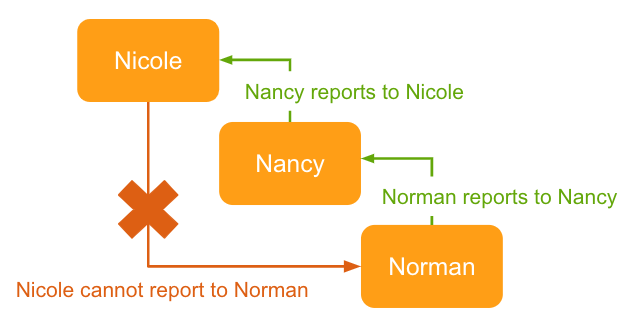
The My Team page does not properly display training records when your organization's _Person_ records include a circular reporting chain, where one member of a hierarchy's Manager is populated as someone lower in the overall hierarchy. While Vault automatically prevents Training Admins from creating or updating records with circular references, this feature's [jobs][2] may detect existing references the first time they run.

<a href="https://platform.veevavault.help/assets/images/circular-reporting-chain-example.png" data-lightbox="My Team Page" data-title="" data-alt="example of a circular reporting chain">
  <img class="docimage" src="https://platform.veevavault.help/assets/images/circular-reporting-chain-example.png" alt="example of a circular reporting chain" style="max-width: 100%;width: 600px;"  />
</a>

## Related Permissions {#related-permissions}

To use the My Team page, Managers must be assigned a <a href="/en/gr/23647/#how_to_edit_permission_sets">permission set</a> with the below permissions.

Additionally:
  * When your Vault's security configuration includes custom or matching <a href="/en/gr/61279/">sharing rules</a>, Managers must have _Read_ access to their own _Person_ record, as well as the _Person_ records of any of their direct reports.
  * To view related _Training Assignment_ data in a report, the manager must also be assigned to the _Direct Manager_ role in an assignment's Sharing Settings.


<div class="note-border alert-info">
  <div class="alert alert-info" role="alert">
    <div><i class="far fa-info-circle"></i></div>
    <div class="alert-text">
      <p><strong>Note</strong>: Assigning these permissions to a non-Manager allows that user to access the My Team tab, but does not display any data to them. For example, an “All Learners” permission set assigned to Managers and non-Managers means Vault only displays Learner data to the Managers, or users who are indicated as a <em>Direct Manager</em> on their direct report’s <em>Person</em> record.</p>
    </div>
  </div>
</div>


| Permission Label | Permission |
|---|---|
| Objects: Assignment Details | Read |
| Objects: Media: Object Permissions: Image | Read |
| Objects: Nudge Detail | Read |
| Objects: Nudge Details User Input | Read |
| Objects: Person: Object Field Permissions | _Read_ for the following object fields: <br/>ID<br/>Image<br/>Manager<br/>Name<br/>Training Eligibility<br/>Status<br/>User (`vault_user__sys`) |
| Tabs: My Team | View<br>Note: If this tab is configured in a <a href="/en/gr/542174/">Tab Collection</a>, Managers also require _View_ access to that collection. |
| Pages: My Team Page | View |


[2]: #about-organizational-view
[3]: #about-circular-reporting-chains
[4]: #related-permissions
