# Learner Exemption Requests

Learner Exemption Requests allow your organization to capture extenuating training circumstances, where a Learner seeks to be <a href="/en/gr/54488/#submitting-an-exemption-request">exempted</a> from a Vault-issued assignment. To do this, Learners can provide evidence and other details of a training directly from the assignment, then a Training Admin or other role accepts or rejects the exemption request. This allows organizations to maintain a more accurate picture of a Learner’s qualifications, without overburdening Learners with additional assignments they may not need to complete.


<div class="note-border alert-info">
  <div class="alert alert-info" role="alert">
    <div><i class="far fa-info-circle"></i></div>
    <div class="alert-text">
      <p><strong>Note</strong>: This feature is available for use in Veeva Training and Veeva Study Training and must be configured by a Vault Admin.</p>
    </div>
  </div>
</div>


## Feature Dependencies

Learner Exemption Requests do not depend on any other Training features beyond the baseline application <a href="/en/gr/50960/">configuration</a>.

## Use Cases

* A Manufacturing Technician relocating from one facility to another may be assigned an _External Training Assignment_ for a safety training they’ve already completed. The technician submits an exemption request to capture the training date and upload a certificate of completion.
* A Maintenance Technician is required to attend a classroom training and undergo subsequent evaluation on welding. The technician’s CV includes extensive welding experience, so they submit this as a reason for exemption from the _Classroom Training Assignment_.
* In Study Training, a Principal Investigator is part of two concurrent studies (A and B) for the same drug, and they receive and complete a _Vault Document_ _Training Assignment_ for Study A’s drug compound overview. Then, the investigator receives a second assignment for Study B with identical content: This is because the drug compound overviews for each study are stored as separate documents in Clinical Operations, and therefore requires two _Training Requirements_. To exempt themselves from Study B’s assignment, the investigator submits a request with these details.


## How Exemption Requests Work

The process for requesting and approving Learner exemption from a _Training Assignment_ is determined by your Vault’s _VT: Learner Exemption Request_ [workflow configuration][1], as well as the field values set on an assignment’s _Training Requirement_.

Learners can request exemption from a _Training Assignment_ of any type: Vault Document, Classroom, Evaluation, and External.

* When a _Training Requirement_ record’s _Allow Learner Exemption_ field is “Yes”, Learners can select **Request Exemption** directly from the related assignment’s card on the Learner Homepage, or from the assignment record.
* Vault prompts the Learner to populate a reason for the request and capture its _Evidence Completion Date_.
    * Vault creates a _Learner Request_ record of the _Exemption_ object type to track the request.
    * For _External Training Assignments_:
      * Data collected from the Learner depends on the related requirement's _Proof Required_ field.
      * Vault adds Learner-uploaded evidence as an Attachment to the _Learner Request_ record. Training Admins can view these on the record itself, or from a Vault Admin-configured report for the _Learner Request_ object with Attachments.
* A Training Admin or other [configured][1] role receives a workflow task to review the request.
    * The Learner can cancel the request at any time while the review task is open.
    * When _Learner Request_ records are accessible from Business Admin or a custom tab, reviewers can alternatively complete the workflow task from the request record for that assignment.
* The reviewer accepts or rejects the request, then Vault updates records and sends notifications accordingly.
    * When accepted, Vault marks the assignment as _Complete_ and cancels the training task.
    * When rejected, the assignment remains in the _Assigned_ state. Learners can re-request an exemption at any time prior to completing the assignment.
    * Learners receive a Vault email and notification of the verdict.


<div class="note-border alert-info">
  <div class="alert alert-info" role="alert">
    <div><i class="far fa-info-circle"></i></div>
    <div class="alert-text">
      <p><strong>Note</strong>: Vault automatically cancels open exemption requests when they no longer apply. For example, when the related <em>Training Requirement</em> record’s <em>Allow Learner Exemption</em> field is updated to “No”, the assignment remains open and the Learner is required to complete it as normal.</p>
    </div>
  </div>
</div>


## Configuration Overview

To configure Learner Exemption Requests:

1. Ensure the _Allow Learner Exemption_ field is associated with all applicable _Training Requirement_ and _Training Assignment_ object types, then add it to the corresponding object page layouts.
2. Within the _Learner Request_ object:
    * Confirm the _Allow attachments_ option is enabled.
    * Enable the _Display in Business Admin_ option. Otherwise, you must configure a custom object tab so that Training Admins can view _Learner Request_ object data.
    * Ensure the _Training Assignment_ field is not configured with a default value.
    * Optional: Configure the _Evidence Completion Date_ and/or _Reason_ fields with the _User must always enter a value (required)_ option.
3. Review the _VT: Learner Exemption Request_ workflow’s [default configuration][1] and adjust according to your organization’s requirements.
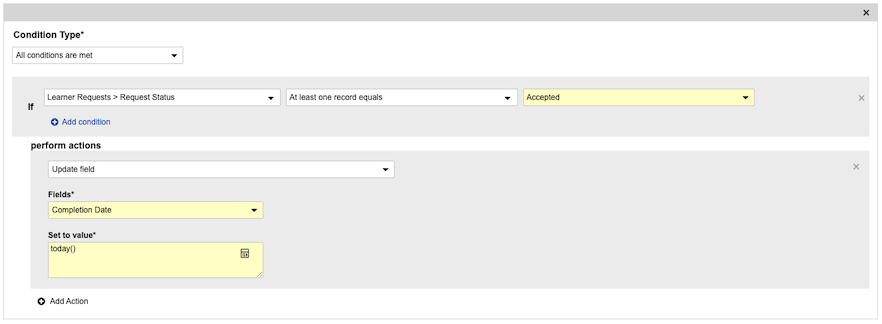
4. If your organization plans to use this feature for Instructor Led/Classroom trainings, add an additional, separate entry action to the _Training Assignment_ object lifecycle’s _Completed_ state (`completed_state__v`) such that when at least one _Learner Request_ record’s _Request Status_ field is _Accepted_, Vault sets the assignment’s _Completion Date_ field to `today()`.
    * <a href="https://platform.veevavault.help/assets/images/learner-request-ta-lc-config-24R3.png" data-lightbox="learner exemption requests" data-title="" data-alt="new TA lifecycle entry action">
  <img class="docimage" src="https://platform.veevavault.help/assets/images/learner-request-ta-lc-config-24R3.png" alt="new TA lifecycle entry action" style="max-width: 100%;width: 600px;"  />
</a>
5. Review your Vault’s security configuration to ensure users have the appropriate object permissions.
6. Optional: Create a report for Training Admins to quickly access all _Learner Requests_ with their Attachments. To do this, include the _Learner Request_ as the primary reporting object, with Attachments as a related object. You may also opt to include _Training Assignment_ as a related object.

### About the _Is Verification Required?_ Field

As of the 25R1 release, Training Vaults include a standard _Is Verification Required?_ field (`is_verification_required__v`). Most Vaults also include a custom (`__c`) version of this field.

Though the standard field only is required to use the <a href="/en/gr/7357221/">Cross-Sponsor GCP Certification Transfer</a> feature in Study Training, we strongly recommend updating any existing configuration to use the standard field, then inactivating the custom field.

### About the Learner Exemption Request Workflow {#about-the-learner-exemption-request-workflow}

The standard _VT: Learner Exemption Request_ workflow requires configuration according to your organization’s process for approving exemptions, as well as your Vault’s role and security configurations.

Consider the following aspects of the default configuration delivered to your Vault:

* The Start step is configured to use the Vault Owners group as participants. You will need to update this to fit your Vault’s security configuration. Otherwise, all exemption request review tasks will be sent to all members of the Vault Owners group.
* The _Review Learner Request_ task step does not show the reviewer a Learner’s _Reason_ for the exemption and their _Evidence Completion Date_. If reviewers should see this information on their workflow task, add these fields as optional field prompts. Otherwise, this information is available in the _Learner Request_ record.
* The _Review Learner Request_ task step does not collect a reviewer’s e-signature. To do so, select **Add eSignature** for the desired verdict(s) within this step.

## Limitations

* Learners cannot take a quiz, view e-learning content, or otherwise complete an assignment with a pending exemption request.
* _Training Assignment_ records only display the _Exemption Request_ section when the corresponding requirement’s _Allow Learner Exemption_ field is _Yes_.
* Exemption requests are not optimized for mobile. Learners attempting to submit a request on mobile are redirected to the desktop site.
* All users, including Vault Owners, cannot manually create _Learner Request_ records. Similarly, users cannot update a request record’s _Training Assignment_ field. These limitations apply even if a user is granted object or field permissions.


<div class="note-border alert-info">
  <div class="alert alert-info" role="alert">
    <div><i class="far fa-info-circle"></i></div>
    <div class="alert-text">
      <p><strong>Note</strong>: Due to a known issue, some Learners can upload their proof of completion but are not able to view it. However, Vault still collects the proof and reviewers are able to view it from the <em>Learner Request</em> record. This occurs for Learners assigned a Learner User application license according to their <em>User</em> record.</p>
    </div>
  </div>
</div>


## Related Permissions {#related-permissions}

To approve exemptions, Training Admins or other selected reviewers must be assigned a <a href="/en/gr/23647/">permission set</a> with _Read_ and _Edit_ permission for the _Learner Request_ object.

Additionally, if you configured a custom tab for the _Learner Request_ object, they must be granted permissions for this tab, as well as any associated Tab Collections.

[1]: #about-the-learner-exemption-request-workflow
[2]: #related-permissions
