Note: Veeva Training is a separate product that is part of the Quality and QualityOne application family. You must use QualityDocs or QualityOne in order to use Training. Contact your Veeva representative for more information.
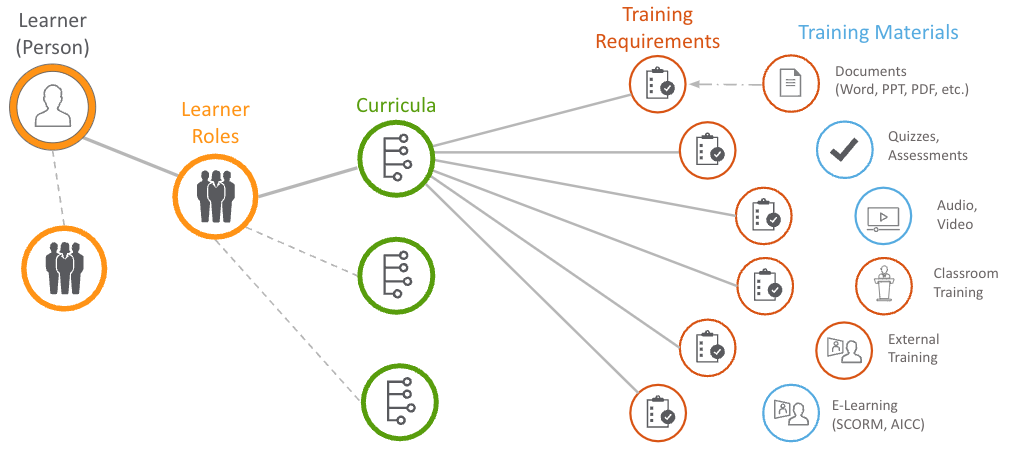
In this example:
* The learner is assigned a learner role that is associated with three (3) total curricula. One (1) curriculum is eligible for training, as represented by the solid line.
* The eligible curriculum contains six (6) eligible training requirements, which can contain any of the listed training materials.
To issue assignments, Vault checks the lifecycle state of each object record. If all are in eligible states, learners are issued a training assignment for each requirement. In this example, Vault assigns the learner six (6) total training assignments.
## Veeva Training Features
The Training application is built using Vault, so it shares all of the features and functionality of the platform product. In addition to those features, Training has:
* [**Training Automation**](/en/lr/50967/) utilizes scheduled jobs to create automation within the application. Vault creates _Training Assignment_ object records automatically based on the lifecycle state of the core Training objects. When an Admin updates a user's _Learner Role_ or makes changes to _Curriculum_ or _Training Requirement_ object records, Vault automatically assigns the relevant _Training Assignments_ to the user. For more information on how Vault creates _Training Assignments_, see [Configuring Veeva Training](/en/lr/50960/).
* Vault primarily uses a _Person_ record's [_Training Eligibility_](/en/lr/50967/#person-training-eligibility) field value to determine whether to create _Training Assignments_. With additional configuration, Vault can automatically create and update _Person_ records based on the existing _User_ record's _Pending_, _Active_, or _Inactive_ status. See [Auto-Managing Person Records](/en/lr/774807/) for details.
* When the _Create Related Training Requirement_ entry action is configured on a document lifecycle state, Vault can automatically create a related _Training Requirement_. See [Auto-Creating Training Requirements](/en/lr/774809/) for details.
* [**Training Matrix Visualization**](/en/lr/704918/) is a useful tool for Training Admins and Managers to understand a given _Person_, _Curriculum_, _Learner Role_, _Training Requirement_, or _Training Requirement Impact Assessment_ training matrix record's relationship to the other matrix records in your Veeva Training or Veeva Study Training Vault. This illustrated depiction of your organization's training matrix in a single view allows for easier review of related [training matrix](/en/lr/50953/#vault-training-objects) elements, without navigating to the records individually or running a report.
* **Learner Homepage** (**My Learning** tab) is an intuitive, easy-to-use dashboard that provides the Learner with an overview of their open assignments. Assignment cards display key information such as the related _Curriculum_, estimated completion time, the training document's _Effective Date_, due date, categories, and more. For more information, see [About the Learner Homepage](/en/lr/66151/).
* The [**Training Dashboard**](/en/lr/50979/) shows the progress of training programs, at-risk qualifications and training assignments, and allows training managers to take actions on items.
* **Manager Access**: The [My Team page](/en/lr/627003/) or Manager Homepage provides managers real-time insights into their direct and indirect teams' training progress. With a quick glance, managers can evaluate both individual and overall team performance without relying on a central Training Admin team. To do this, Vault assigns the _Direct Manager_ application role for a given Learner to their Manager Group on each of the Learner's training records: _Training Assignments_, _Assignment Details_, _TA Checklists_, _TA Responses_, _Class Schedules_, _Class Rosters_, _Sessions_, and _Session Rosters_. The Learner's [Manager Group](/en/lr/3200/) may also receive workflow tasks, such as verifying proof of completion for [External Training Requirements](/en/lr/60098/).
* **Quizzes** are optional components for _Training Requirements_ to aid or assess the user's understanding of the training material. See [Completing Training Assignments](/en/lr/54488/) and [Configuring Training Quizzes](/en/lr/54490/) for more information.
* **Training Requirement** object types allow for variations in training method:
* [**Vault Document Training Requirements**](/en/lr/60096/) capture the traditional method of sending Learners QualityDocs Library [**Training Materials**](/en/lr/50960/#training-materials) to read and confirm understanding with their electronic signature. Training Admins can also include [**Supplemental Materials**](/en/lr/627041/) to provide further context to Learners. Requirements of this type also include the [_Assign Additional Training Assignment?_](/en/lr/60096/#assigning-additional-training) field to issue concurrent assignments for both the Steady State and Ready for Training State document versions.
* [**External**](/en/lr/60098/) and [**On-the-Job**](/en/lr/72730/) requirements allow for training and evaluations that occur outside of Vault.
* [**Instructor-Led Training**](/en/lr/50533903/) optimizes the _Classroom Training Requirement_ object type for managing in-person classroom training. We recommend using this newer, simplified experience if your organization's classes are typically conducted in a single session. Otherwise, the core [classroom training](/en/lr/57241/) feature is best for training programs which include many multi-session classes.
* When a Learner requires training outside of their currently-assigned training matrix:
* The _Curriculum_ object's [**Assign to Learner**](/en/lr/52724/#assign-to-learner) action quickly and directly assigns a curriculum to a Learner, automatically integrating it into their training matrix and respecting recurrence automation and Prerequisite or Substitute Training Rules. This is useful for Learners who would otherwise require their own _Learner Role_ for a specific job function.
* [Direct Assignment](/en/lr/52724/#direct-assignment) issues assignments to Learners on an as-needed basis, and is not integrated into their training matrix. This truly ad-hoc method is recommended primarily for *Training Requirements* for which a Learner does not need to complete a future assignment based on recurrence or a document update.
* **Retraining** can be issued from a _Person_ or _Curriculum_ record. When a Training Admin uses the **Require Retraining** action, they can select one or more requirements which are already present within a selected Learner's training matrix. This method should be used in lieu of Direct Assignment for issuing retraining in most cases. See [Issuing Retraining](/en/lr/735720/) for more information.
* **Facilitated Training** enables users with proper access to give completion credit for _Training Assignments_ on behalf of Learners. This allows completion of Vault document _Training Assignments_ for Learners that may not have access to Vault. For example, in some organizations, users could be contractors, external employees, temporary employees, or otherwise outside the primary organization. See [Working with Facilitated Training](/en/lr/71116/) for more information.
* **E-Learning Content Support** provides a dynamic and engaging method of digital training that can include video, interactive elements, navigable information, and quizzes. Vault supports several e-learning content standards. See [Setting Up E-Learning Content Support](/en/lr/61957/) for more information.
* **LearnGxP ContentDirect** delivers LearnGxP E-Learning courses directly to subscriber Training Vaults. See [LearnGxP ContentDirect](/en/lr/626994/) for more information.
* **Substitute Training** assigns an alternative, or substitute, _Training Assignment_ to a Learner in place of a required, or primary, _Training Assignment_ using Training Admin-defined substitution rules. See [Substitute Training Requirements](/en/lr/62206/) for more information.
* **Prerequisite Training** allows a Training Admin to require that certain training, which is a prerequisite, is completed first before the next set of training, which has a prerequisite, can be completed by a Learner. See [Prerequisite Training Requirements](/en/lr/68195/) for more information.
* **Self-Enrollment** allows Learners to self-enroll in _Training Requirements_ that have been [made available for self-enrollment](/en/lr/829558/) by Training Admins. Learners can browse or search for courses that interest them and enroll on the Learner Homepage.
* **Dynamic Enrollment** reduces the time spent assigning _Learner Roles_ to _Persons_ by [creating _Dynamic Enrollment Rules_](/en/lr/56334513/), matching _Persons_ to _Learner Roles_ via field data comparison between _Learner Role_ and _Person_ records.
* **Curriculum Matching** reduces the number of granular Learner Roles by [creating Curriculum Matching Rules](/en/lr/56334514/), matching Learners to their training via field data comparison between _Curriculum_ and _Person_ records.
* [**Curriculum Outcomes**](/en/lr/627014/) supports training programs where Learners must complete training on Vault functionality before an Admin grants access to that functionality.
* [**Curriculum Completion Tracking**](/en/lr/24483/) uses the _Curriculum Completion Status_ object to detail the training completion status of individual Learners at the Curriculum level.
* [**Learner Exemption Requests**](/en/lr/735722/) allow your organization to capture extenuating training circumstances, where a Learner seeks to be exempted from a Vault-issued assignment.
## About Read & Understood
QualityDocs Vaults use the [Read & Understood](/en/lr/9489/#tracking-read-and-understood-tasks) (R&U) feature set, including the _Read and Understood_ workflow and the one-click _Training Report_.
To avoid user or Admin confusion, current QualityDocs customers enabling the Training application should consider:
* Updating document lifecycle configuration to prevent the legacy _Read and Understood_ document workflow from being used. The Training application uses a workflow in the _Training Assignment_ object lifecycle to issue _Vault Document Training Assignments_ to Learners.
* [Hiding](/en/lr/9489/#tracking-read-and-understood-tasks) the _Training Report_ from the document **Actions** menu. Otherwise, this report may appear blank or outdated, depending on when your organization stopped using the legacy R&U workflow.