# Mandatory Participants (Quality)
If you secure documents in the _Documents to be made Effective_ or _Documents to be made Obsolete_ sections of a _Document Change Control_ record with specific application roles, Vault can use the membership of these roles to automatically determine the mandatory participants for approval or review workflows for that _Document Change Control_ record.
Users in the _Document Change Control Approver_ role may be automatically assigned as mandatory approvers in an approval workflow, while users in the _Document Change Control Reviewer_ role may be automatically assigned as mandatory reviewers in a review workflow.
Note: Contact Veeva Support to enable mandatory participants in your Vault.
## Configuring Mandatory Participants
You must assign one or more users to either the _Document Change Control Approver_ or _Document Change Control Reviewer_ [roles for documents](/en/lr/895/) that undergo Document Change Control before you can configure mandatory participants.
To configure a Document Change Control workflow to use these roles as mandatory participants:
1. Navigate to **Admin** > **Configuration** > **Object Workflows** and click into an object workflow associated with the _Document Change Control_ lifecycle.
2. Click into the _Start_ step.
3. In the _Start Options_ section, click **Add Control** and select **Participants**. Label this control as appropriate. For example "Mandatory Approvers" or "Mandatory Reviewers".
4. Select **Use custom action to define participants**, and select either **Mandatory Approver for Document Change Control** or **Mandatory Reviewer for Document Change Control**, as appropriate, from the drop-down.
5. Click **Save**.
6. In the workflow, click into a workflow task that requires mandatory participants.
7. In _Workflow Task Options_ > _General Settings_, select the participant control you created in step 3 in the _Assign Task To_ drop-down.
8. In the task _Verdicts_ section, ensure the **Short-circuit tasks with the configured tags** checkbox is selected for any rejection verdicts.
9. Add either the **Mandatory Approver for Document Change Control** or **Mandatory Reviewer for Document Change Control** action, as appropriate, in the _Custom Actions_ section.
Once configured, when your workflow is started for a _Document Change Control_ record, Vault will automatically populate the members of the participant control with the users in the _Document Change Control Approver_ or _Document Change Control Reviewer_ role. Vault displays the mandatory participants in the workflow start dialog. You can hover over a mandatory participant group to see a list of users in that group. The members are populated across the documents attached to the _Document Change Control_ record.
## Redundant Task Cancelation
If a group is listed in the _Document Change Control Approver_ or _Document Change Control Reviewer_ role for a document, at least one user from that group must complete their task. Vault assigns every mandatory participant a task. As users complete their tasks, redundant tasks for other users are automatically canceled.
### Example: Mandatory Approvers
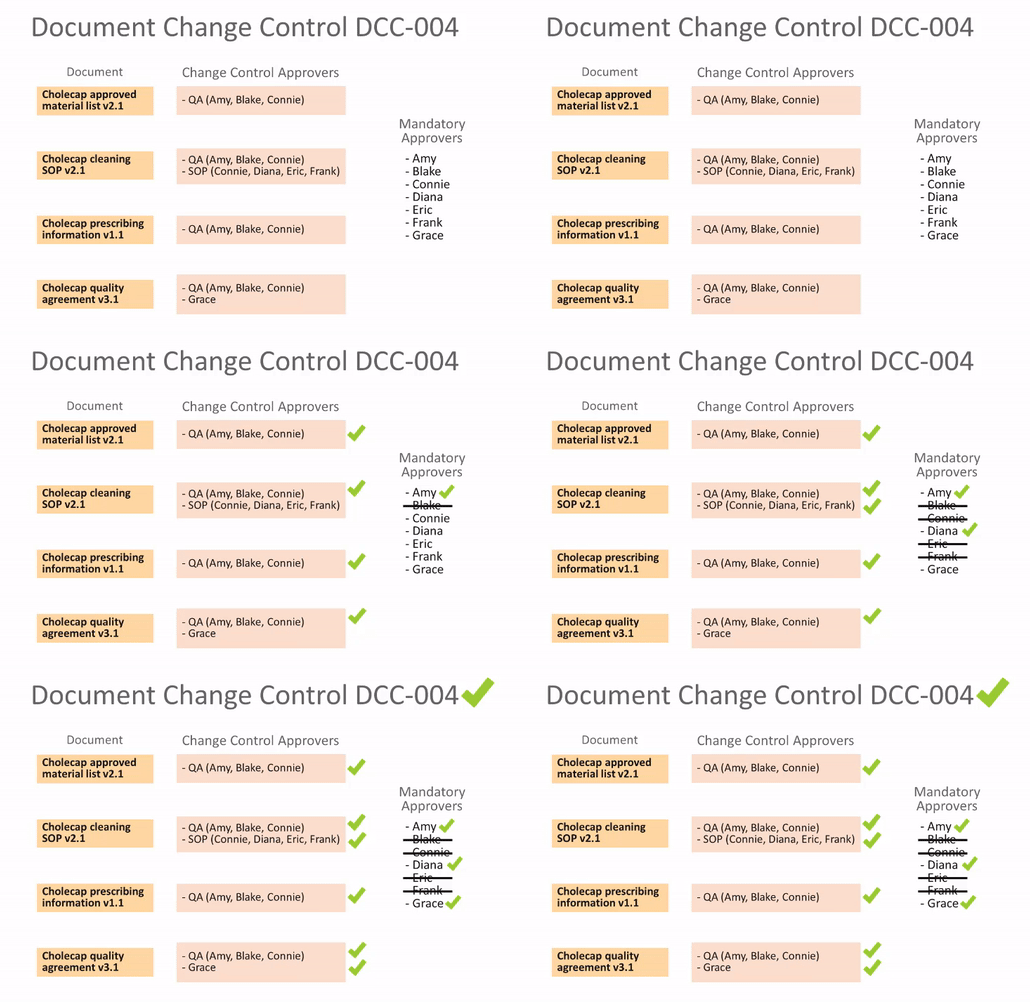
For example, in a DCC record with 4 documents, the _Document Change Control Approver_ role is populated as follows:
* The QA approval group, comprised of users Amy, Blake, and Connie, is assigned to the role for all documents.
* The SOP approval group, comprised of users Connie, Diana, Eric, and Frank, is assigned to the role for one of the documents.
* Finally, user Grace is assigned to the role for one of the documents.
If Amy approves the _Document Change Control_, Vault cancels the task for Blake (as it is now redundant), but remains open for Connie as she is also in the SOP approval group. If Diana approves, then Vault cancels the redundant tasks for the remainder of the SOP approval group. This leaves Grace as the only remaining mandatory approver, and, if she approves, the approval task is completed.