Note: TRIA for Document Change Control is available for Veeva Training only. Additionally, configuration steps for this feature are dependent upon your Vault’s current TRIA and DCC configurations, as well as your organization’s requirements for both processes. Certain aspects of these features as described in Vault Help may not align with your Vault’s current configuration or organizational requirements. We recommend contacting your Veeva representative for enablement support.
Note: These settings support Date-type fields only. DateTime-type fields are not supported.
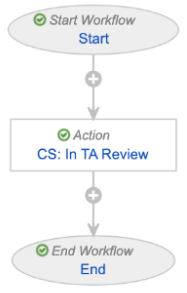
3. Within the existing _In Review_ state (`initiate_tria_state__v`):
* Remove the existing entry action which initiates the TRIA workflow.
* Create a new conditional entry action such that, when the TRIA record's _TRIA Initiation Source_ field equals "Document", Vault initiates the new state-change workflow you created in Step 2 ("VT: CS: In Training Admin Review"). This is how Vault initiates TRIA for non-DCC documents, whereas TRIA for DCC documents is initiated from the _Document Change Control_ lifecycle.
* Recommended: Create a new notification to inform the Training Admin that TRIA was initiated because of a DCC, then add a new conditional entry action which sends this notification when the TRIA record's _TRIA Initiation Source_ field equals "Document Change Control".
4. Within the new "In Training Admin Review" state, add an entry action to start your Vault's current TRIA workflow (for example, "Start Workflow: VT: TRIA: Assess Impact").
#### Supporting Training Requirement Retirement
TRIA for DCC supports retiring *Training Requirements* via the TRIA process. The following configuration is required in order to avoid retiring a requirement earlier than expected, or otherwise on the same day a DCC-related TRIA record is marked for retirement.
1. Within the *Training Requirement Impact Assessment* object lifecycle:
* Re-label the *Pending Training Requirement Retirement* state (`retire_tr_state__v`) to "Retire Training Requirement".
* Create a new state in which requirements should await retirement. We recommend labeling and naming this state "Pending Retirement" `pending_retirement_state__c`.
2. Within your primary TRIA workflow (for example, the "Assess Impact" workflow), locate the state-change step in which the requirement is updated to the `retire_tr_state__v` re-labeled in Step 1. Depending on your Vault's configuration, this step may be called "SC: Pending Training Requirement Retirem[ent]". Within the step's **State Change Options**, select the newly-relabeled *Retire Training Requirement* state as the **Next State**.
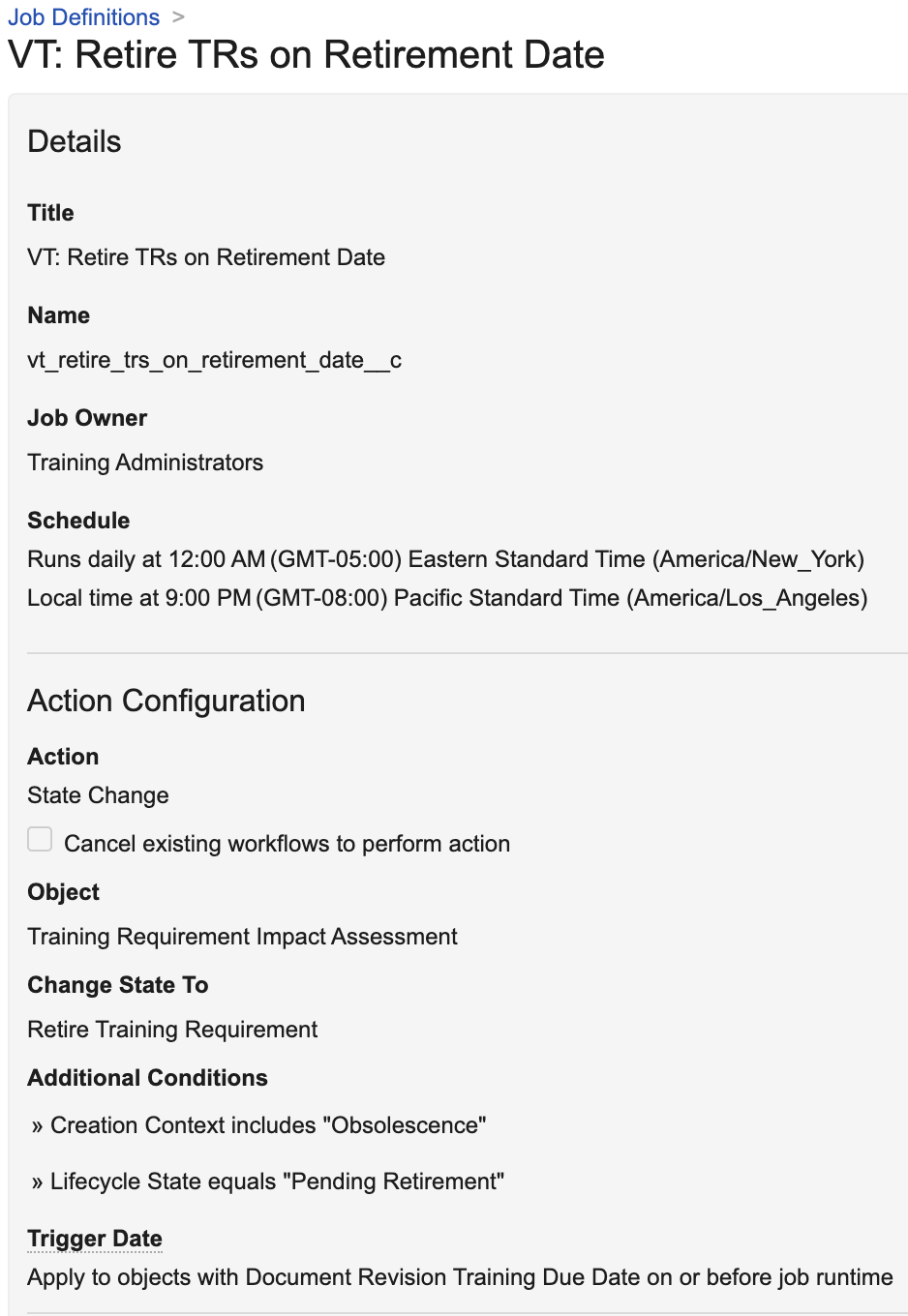
3. Create a new job to retire any TRIA records in the new *Pending Retirement* state to the *Retire Training Requirement* state on their indicated *Retirement Date*. See the screenshot below for the minimally-required job configuration. We recommend setting the **Job Owner** to the appropriate group or individual.
 ## DCC Object & Lifecycle Configuration {#dcc-object-lifecycle-configuration}
To configure the _Document Change Control_ object and its lifecycle for this feature:
1. Add a new "Training Requirement Impact Assessments" section to the _Document Change Control_ object page layout using the [section type](/en/lr/26387/#how-to-add-sections) of the same name. This feature does not support linking DCC and TRIA records via a related object section.
2. Create a new "Training Requirement Impact Assessment State" lifecycle state type, then associate it with an existing lifecycle state per your organization's requirements. We recommend using the _Change Authorization Approved_ (`change_authorization_approved_state__c`) state.
3. Within the _Approved_ (`approved__v`) state:
* Add an entry action such that Vault changes the object lifecycle state of related _Training Requirement Impact Assessment_ records to "In Training Admin Review". This is the new state you [previously created][6] within the TRIA lifecycle.
* Optional (depending on [TRIA Creation Settings][1]): Add an entry action to update the related record (TRIA object) field _Document Revision Training Due Date_ with a specific _Document Change Control_ date field value, for example _Proposed Implementation Date_. This entry action is required when enabling the __Use DCC Field as Due Date__ [TRIA Creation Setting][3], as it allows Vault to use a specific _Document Change Control_ date field as the _Due Date_ for the resulting assignments. The field you select when configuring the entry action should match the setting's __DCC field__ selection.
4. Optional: Add a new "Create Training Requirement Impact Assessment" user action on the state you selected in Step 2. This action functions similarly to the TRIA object's _Evaluate Training Req. Impact Assessment_ action, allowing users to manually re-trigger TRIA in the event Vault encounters unexpected failures while creating TRIA records for DCC documents: Vault creates records asynchronously, and failures can occur when a DCC record includes a large number of documents. To configure the action:
* Within the _Document Change Control_ object, create a new custom action using the _Create Training Req Impact Assessments_ action. We do not recommend selecting the "Available in All Lifecycle States" option.
* Within the state you selected in Step 2 (for example, _Change Authorization Approved_), add a corresponding user action.
* Recommended: Configure additional [action level security](/en/lr/43127/#action_level_security) so that only certain super-users are permitted to execute the new action.
## Limitations
TRIA and DCC [date field settings][3] support Date-type fields only. DateTime-type fields are not supported.
[1]: #application-settings
[2]: #role-settings
[3]: #date-field-settings
[4]: #always-implement-latest-trainable-state
[5]: #document-lifecycle-configuration
[6]: #tria-object-lifecycle-configuration
[7]: #dcc-object-lifecycle-configuration
## DCC Object & Lifecycle Configuration {#dcc-object-lifecycle-configuration}
To configure the _Document Change Control_ object and its lifecycle for this feature:
1. Add a new "Training Requirement Impact Assessments" section to the _Document Change Control_ object page layout using the [section type](/en/lr/26387/#how-to-add-sections) of the same name. This feature does not support linking DCC and TRIA records via a related object section.
2. Create a new "Training Requirement Impact Assessment State" lifecycle state type, then associate it with an existing lifecycle state per your organization's requirements. We recommend using the _Change Authorization Approved_ (`change_authorization_approved_state__c`) state.
3. Within the _Approved_ (`approved__v`) state:
* Add an entry action such that Vault changes the object lifecycle state of related _Training Requirement Impact Assessment_ records to "In Training Admin Review". This is the new state you [previously created][6] within the TRIA lifecycle.
* Optional (depending on [TRIA Creation Settings][1]): Add an entry action to update the related record (TRIA object) field _Document Revision Training Due Date_ with a specific _Document Change Control_ date field value, for example _Proposed Implementation Date_. This entry action is required when enabling the __Use DCC Field as Due Date__ [TRIA Creation Setting][3], as it allows Vault to use a specific _Document Change Control_ date field as the _Due Date_ for the resulting assignments. The field you select when configuring the entry action should match the setting's __DCC field__ selection.
4. Optional: Add a new "Create Training Requirement Impact Assessment" user action on the state you selected in Step 2. This action functions similarly to the TRIA object's _Evaluate Training Req. Impact Assessment_ action, allowing users to manually re-trigger TRIA in the event Vault encounters unexpected failures while creating TRIA records for DCC documents: Vault creates records asynchronously, and failures can occur when a DCC record includes a large number of documents. To configure the action:
* Within the _Document Change Control_ object, create a new custom action using the _Create Training Req Impact Assessments_ action. We do not recommend selecting the "Available in All Lifecycle States" option.
* Within the state you selected in Step 2 (for example, _Change Authorization Approved_), add a corresponding user action.
* Recommended: Configure additional [action level security](/en/lr/43127/#action_level_security) so that only certain super-users are permitted to execute the new action.
## Limitations
TRIA and DCC [date field settings][3] support Date-type fields only. DateTime-type fields are not supported.
[1]: #application-settings
[2]: #role-settings
[3]: #date-field-settings
[4]: #always-implement-latest-trainable-state
[5]: #document-lifecycle-configuration
[6]: #tria-object-lifecycle-configuration
[7]: #dcc-object-lifecycle-configuration