# Curriculum Sequencing & Prerequisites

Oftentimes, a Learner's skills build on one another and should be completed in a particular order, also known as mastery- or competency-based training. For example, Learners may need to complete Safety 101 before moving onto a more demanding process training.

Curriculum Sequencing and Curriculum Prerequisites are independent features available with an easy-to-use Curriculum Sequencing Rule Builder page, where Training Admins can suggest or require, respectively, the order in which Learners complete _Curricula_ for a _Learner Role_.

Along with [Substitute](/en/lr/62206/) and [Prerequisite Training Requirements](/en/lr/68195/) already defined in your organization's Training Matrix, these capabilities can eliminate:
  * The need for Learners to follow new-hire or other training checklists which define training order.
  * Manual Training Admin steps, such as adjusting _Training Assignment_ due dates to accommodate a defined training order.
  * Training Matrix designs in which duplicate or similar _Curricula_ are in place across multiple _Learner Roles_. With Curriculum Prerequisites, _Curricula_ can be ordered differently in two _Learner Roles_ but share the same _Training Requirements_.
  * Overwhelming new hires with new training tasks. This feature supports delivering training to new Learners in phases or waves, where Vault unlocks a curriculum after a specific time period.


## About Curriculum Sequencing & Prerequisites

When Learners view the _Learner Role_ detail page from the Learner Homepage, Vault displays all _Curricula_ within the _Learner Role_ in alphabetical order by default. With Curriculum Sequencing, Training Admins can define the display order to suggest how a Learner might or should complete the assigned _Curricula_.

The Curriculum Prerequisites feature builds upon this concept by allowing Training Admins to enforce the defined order for some or all _Curricula_ in a _Learner Role_: When _Curriculum Training Rules_ are in place, a Learner cannot begin training on a given Curriculum's issued assignments until they have completed all assignments from a prerequisite _Curriculum_.

### Terminology

Understanding the difference between prerequisite and dependent _Curricula_ is key to understanding these features.


<div class="note-border alert-info">
  <div class="alert alert-info" role="alert">
    <div><i class="far fa-info-circle"></i></div>
    <div class="alert-text">
      <p><strong>Note</strong>: The terms and concepts in this section apply to both Curriculum Sequencing and Prerequisites, with the exception of Prerequisite Training Rules and their enforcement. Vault does not enforce Curriculum order without defined prerequisite rules.</p>
    </div>
  </div>
</div>


  * **Prerequisite**: A Learner must complete all assignments from a prerequisite _Curriculum_ prior to beginning any assignments from a dependent curriculum. A prerequisite _Curriculum_ is one referenced by a _Curriculum Training Rule_ on another _Curriculum_.
  * **Dependent**: A Learner cannot begin training on a dependent _Curriculum_'s issued assignments until they have completed all assignments from the prerequisite _Curriculum_. A dependent _Curriculum_ is one with a defined _Curriculum Training Rule_.
  * **Prerequisite Training Rule**: A _Training Rule_ that governs all _Training Assignments_ within a _Curriculum_ which must be completed prior to completing assignments for another _Curriculum_. You can define one (1) _Curriculum Training Rule_ per _Curriculum_ on a _Training Requirement_.
  * **Offset Due Dates**: A configuration on a dependent _Curriculum_ indicating that the resulting dependent assignments' _Due Date_ values should not be set unless and until the prerequisite _Curriculum_ is complete. While a dependent assignment awaits prerequisite completion, its _No Due Date_ field is "Offset". Once unlocked, Vault clears the field and sets the _Due Date_ accordingly.
  * [**Completion Based**][1] rules define a specific _Curriculum_ that must be completed by the Learner before Vault can unlock the _Curriculum_ for which the rule is defined.
  * [**Time Based**][2] rules define a specific time period (days or weeks) a curriculum should remain locked. Use this option when defining prerequisites specific to new Learners, also called wave-based training.

See also [Migrating Curriculum Prerequisite Records][23] for information on how these objects relate to each other.

### How Curriculum Prerequisites Work

The following sections outline important points of the Curriculum Prerequisite feature as it relates to other key parts of the Training application. Curriculum Prerequisite configurations can quickly become complex, and this section explains the guardrails to protect against potential overcomplication.

See also [Limitations & Data Validation][24] for more information.

#### Learner Roles

  * A _Curriculum_ and its prerequisite _Curriculum_ must both be part of the same _Learner Role_.
  * Each dependent _Curriculum_ in a _Learner Role_ can only have one prerequisite _Curriculum_.
  * If a _Curriculum_ belongs to multiple _Learner Roles_, then the _Curriculum_ can have multiple prerequisite training rules, one for each _Learner Role_ that the _Curriculum_ is a part of.

#### Training Requirements

  * A dependent or prerequisite _Curriculum_ can include any _Training Requirement_ type, including prerequisites and substitutes.
  * A _Training Requirement_ cannot be used in more than one _Curriculum_ that is used in a prerequisite rule. This means that a given _Learner Role_ cannot contain more than one prerequisite or dependent _Curricula_ with the same _Training Requirement_.

#### Substitutes

  * Prerequisite and dependent _Curricula_ can include substitute _Training Requirements_.
  * If a substitute _Training Requirement_ has multiple primary _Training Requirements_, none of the primary records may be used in a prerequisite or dependent _Curriculum_.

#### Completion Based Prerequisites {#completion-based}

Completion based rules define a specific *Curriculum* that must be completed by the Learner before Vault can unlock the *Curriculum* for which the rule is defined.

Use this option when:

* Only some *Curricula* within a *Learner Role* should be subject to prerequisite rules. See additional details about this use case.
* *Curricula* should not share the same [duration start][18].


#### Time Based Prerequisites for Wave-Based Training {#time-based}

Time based rules define a specific time period (days or weeks) a curriculum should remain locked. Use this option when defining prerequisites specific to new Learners, also called wave-based training.

Vault calculates timing based on the *Person* record's *Learner Initial Activation Date* (`learner_initial_activation_date__v`). This field defaults to the *User* record's *Activation Date* (`activation_date__sys`) for newly-created *Person* records, however a Vault Admin can update this configuration.


<div class="note-border alert-info">
  <div class="alert alert-info" role="alert">
    <div><i class="far fa-info-circle"></i></div>
    <div class="alert-text">
      <p><strong>Note</strong>: A Learner’s <em>Person</em> record must have an appropriate <em>Learner Initial Activation Date</em> field value when the <em>Update Training Assignments</em> job runs in order to honor any time-based rules. When this field is blank (or the date does not meet the rule definition), Vault assigns the <em>Curriculum</em> as unlocked.</p>
    </div>
  </div>
</div>


#### Offsetting Due Dates

  * By default, an assignment's _Due Date_ is set as soon as it is created. This means that a locked, dependent _Curriculum_ can contain _Training Assignments_ that are due before prerequisites have been met.
  * To avoid the above scenario, each dependent can instead have its due dates offset, so that the Learners' time limit to complete assignments does not begin unless and until they've completed the prerequisites.

#### Prerequisite Completion

  * A Learner must fulfill a prerequisite only once, and Vault does not re-lock dependent _Curricula_. For example, if Vault issues a new assignment for a previously-completed prerequisite _Curriculum_, Learner progress within the dependent _Curriculum_ is uninterrupted, and it remains unlocked.
  * A Learner can unlock a dependent _Curricula_ based upon one path, or the unique combination of _Curriculum_, _Learner Role_, and _Training Requirement_ records through which an assignment is made. If a Learner receives one assignment from multiple prerequisite _Curricula_, the Learner is only required to complete one of them.

#### Training Assignments

  * Vault considers a _Training Assignment_ as complete whenever it is in the _Completed_ lifecycle state.
  * In most cases, completion of the last _Training Assignment_ in a prerequisite _Curriculum_ immediately unlocks all assignments in the dependent _Curriculum_.
      * If a dependent _Curriculum_ includes assignments bound by prerequisite or substitute rules, Learners must still complete these assignments in the order or method defined via prerequisite _Training Requirement Rules_ or _Substitute Training Rules_.
      * Prerequisite logic ignores any _Training Assignment_ which does not have an accompanying _Assignment Details_ record, for example assignments made via [Direct Assignment](/en/lr/52724/) or [Self-Enrollment](/en/lr/829558/).

#### Training Rule Enforcement

[Changes][20] made to prerequisite training rule configurations are enforced in real time and can impact open _Training Assignments_, regardless of the _Training Requirement_ lifecycle state. For example, if a Training Admin deletes a prerequisite rule, the next time the Learner opens either the dependent or prerequisite _Training Assignment_, or views the Learner Homepage, the _Training Assignment_ reflects the current configuration status.

#### Traceability {#traceability}

  * The relationship between a prerequisite _Curriculum_'s assignments and their dependents is captured in [_Curriculum Completion Status_](/en/lr/50960/#curriculum-completion-tracking) and _Related Curriculum_ object records. These records are related via the _Dependent Curriculum Completion Status_ field on the _Related Curriculum_ object.
  * Vault automatically creates and maintains these records for each prerequisite _Training Assignment_ as the Learner completes them. As such, _Related Curriculum_ records cannot be manually created or edited. However, a Training Admin can update the _Initial Completion Date_ field on the _Curriculum Completion Status_ object, and the _Update Training Assignments_ job updates the _Related Curriculum_ accordingly.
  * The _Latest Automation Update_ field on the _Curriculum Completion Status_, _Related Curriculum_, and _Training Assignment_ objects details the impact of prerequisite rules changes for a given individual assignment.
  * The _Update Training Assignments_ job log captures prerequisite rules evaluated by the job.


<div class="note-border alert-info">
  <div class="alert alert-info" role="alert">
    <div><i class="far fa-info-circle"></i></div>
    <div class="alert-text">
      <p><strong>Note</strong>: The <em>Curriculum Training Rule</em> object field <em>Related Curriculum</em> refers to a prerequisite <em>Curriculum</em> record. This field does not refer to the <em>Related Curriculum</em> object.</p>
    </div>
  </div>
</div>


## Use Case: Curriculum Sequence & Prerequisites for Quality Control: Lab {#combination-use-case}

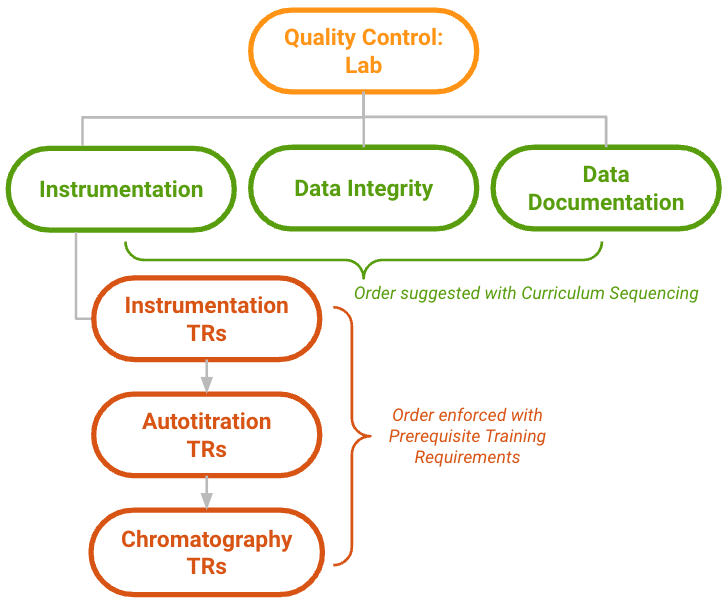
VernBio's current Quality Control: Lab _Learner Role_ includes a mixture of _Curricula_ with and without Prerequisite Training Requirements: the Instrumentation Curriculum requires Learners to read SOPs on this topic before moving on to instrument-specific SOPs and Instructor-Led Training sessions, and others (Data Integrity, Data Documentation) can be completed in any order.

The diagram below illustrates these relationships in VernBio's Training Matrix:

<a href="https://platform.veevavault.help/assets/images/curriculum-prerequisites-use-case-1.png" data-lightbox="curriculum prerequisites" data-title="" data-alt="curriculum prerequisites before">
  <img class="docimage" src="https://platform.veevavault.help/assets/images/curriculum-prerequisites-use-case-1.png" alt="curriculum prerequisites before" style="max-width: 50%;width: 600px;"  />
</a>

The Training Admin finds this solution useful for Learner comprehension, however it is occasionally prone to error as the Training Admin must remember to manually adjust assignment _Due Dates_ each time a new Learner is added to the role. Additionally, the configured _Training Requirement_ rules are technically too specific for VernBio's needs: within the list of Instrumentation and Autotitration requirements, Learners are permitted to complete assignments (read SOPs) in any order. However, because Learners must train on the Instrumentation and Autotitration topics before Chromatography, all _Training Requirements_ in the Instrumentation _Curriculum_ are configured with prerequisites to maintain and enforce the overall order.

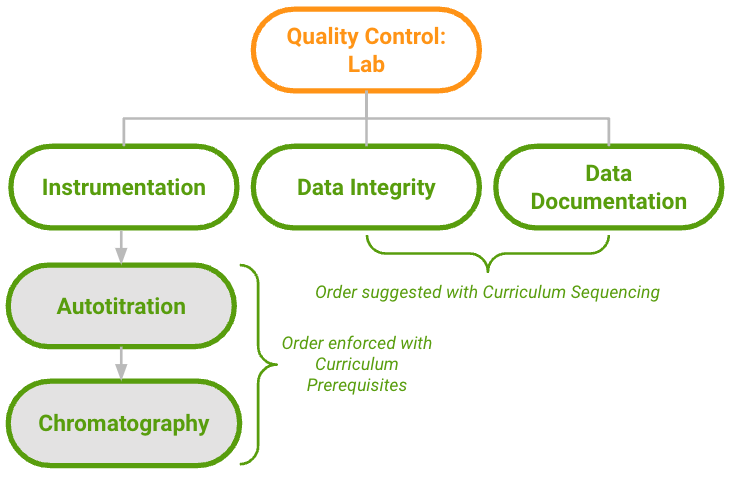
Given this and recent organizational changes at VernBio, the Training Admin opts to implement Curriculum Sequencing and Curriculum Prerequisites to:

  * Eliminate manual _Due Date_ adjustment. Curriculum Prerequisites allow Vault to set dependent Curriculum assignments' due dates only when the dependent _Curriculum_ is made available (unlocked) upon completion of all prerequisites.
  * Reduce the number of Training Requirement Prerequisite rules they must manage and create.
  * Re-use the Instrumentation _Curriculum_ content elsewhere in the matrix, as the Quality Control group's leadership has requested an adjacent _Learner Role_ using the same requirements and ordering.

Following feature configuration and the creation of two new _Curricula_ with Curriculum Prerequisite rules, the _Learner Role_ is structured per the below diagram:
<a href="https://platform.veevavault.help/assets/images/curriculum-prerequisites-use-case-2.png" data-lightbox="curriculum prerequisites" data-title="" data-alt="curriculum prerequisites after">
  <img class="docimage" src="https://platform.veevavault.help/assets/images/curriculum-prerequisites-use-case-2.png" alt="curriculum prerequisites after" style="max-width: 50%;width: 600px;"  />
</a>


## Enabling Curriculum Sequencing & Prerequisites {#emabling}


<div class="note-border alert-info">
  <div class="alert alert-info" role="alert">
    <div><i class="far fa-info-circle"></i></div>
    <div class="alert-text">
      <p><strong>Note</strong>: Curriculum Prerequisites build upon the configuration and functionality of Curriculum Sequencing. If sequencing is already in use in your Vault, items marked with an asterisk (*) may already be configured.</p>
    </div>
  </div>
</div>


1. Assign the **Manage Curriculum Rules** [action](/en/lr/43127/#assign-actions) to the _Learner Role_ object.*
2. Add a **Manage Curriculum Rules** [user action](/en/lr/59885/#define-actions) to the appropriate _Learner Role Lifecycle_ state or states.*
3. Ensure your Vault's [security configuration](/en/lr/22824/#objectpermission) allows the below for Training Admins working with Curriculum Prerequisites:
    * _Curriculum Training Rule_ object: _Read_, _Create_, _Edit_, _Delete_
    * _Curriculum Training Rule Set_ object: _Read_, _Create_, _Edit_, _Delete_
    * _Learner Role-Curriculum Order_ object: _Read_, _Edit_*
4. Create object page layouts for the _Related Curriculum_ and _Curriculum Training Rule Set_ objects. Ensure the _Curriculum Training Rule Set_ layout includes a related object section for _Curriculum Training Rules_.
5. Optional: To support [time-based prerequisites][2], update the default value configuration within the _Person_ object's _Learner Initial Activation Date_ field. By default, this value is `vault_user__sysr.activation_date__sys` (the _User_ object's _Activation Date_), however you can update this configuration if your organization uses a different _User_ object field to signify a Learner's start date.

### Enabling with Training Requirement Prerequisites

If your Vault was created on or before 23R3 and your organization is using or will use Curriculum Prerequisites alongside Prerequisite Training Requirements, we recommend some updates to distinguish the objects for these two features in your Vault's Admin UI.

See [Prerequisite Training Requirements](/en/lr/68195/#enabling-with-curriculum-prerequisites) for more information.

### Enabling with Curriculum Outcomes

Curriculum Outcomes are a set of Training Admin-managed records which define how Vault should execute automatic updates for a given _Outcome Type_ when Learners complete assignments for all _Training Requirements_ within a given _Curriculum_.

As outcomes build upon prerequisite functionality, we recommend enabling prerequisites first. See [Curriculum Outcomes](/en/lr/627014/) for more information.


## Defining & Updating Curriculum Sequence & Prerequisite Rules

When you launch the Curriculum Sequencing Rule Builder page from a _Learner Role_ record, Vault displays all _Curricula_ within the _Learner Role_ in alphabetical order by default. This is also the order in which Learners see the _Curricula_ listed on their Learner Homepage.

To override the default and define a suggested curriculum completion order for a _Learner Role_, see [Defining Curriculum Sequence][16].

To enforce a defined sequence for _Curricula_ in a _Learner Role_, see [Defining Curriculum Prerequisites][17].

### Defining Curriculum Sequence {#defining-curriculum-sequence}

To override the default order and define the suggested curriculum completion order for a _Learner Role_:

1. Navigate to a _Learner Role_ record via **Business Admin** or a custom _Learner Role_ object tab.
2. Click the <i class="far fa-abacus"></i> **Manage Curriculum Rules** button, or perform the related action. Vault loads the **Curriculum Sequencing Rule Builder** page, and the curriculum at the top of the page is the first in the sequence.
3. Drag **Curricula** to order them, or hover over an individual record and click <i class="far fa-chevron-double-up"></i> **Move to top** or <i class="far fa-chevron-double-down"></i> **Move to bottom** to quickly move a curriculum to either end of the sequence.

Vault saves all changes automatically upon reordering, and displays the defined _Curriculum_ sequence when Learners navigate to their _Learner Role_ detail pages from the Learner Homepage.

### Defining Curriculum Prerequisites {#defining-curriculum-prerequisites}

To enforce a defined sequence for *Curricula* in a *Learner Role*, Vault provides two options upon launching the builder via the <i class="far fa-abacus"></i> **Manage Curriculum Rules** button or related action.

Option one creates prerequisite rules in bulk, quickly enforcing the sequence as it appears on the builder page. This can save time by creating a simple, 1:1 prerequisite relationship between curricula, where one curriculum is dependent upon the record appearing immediately above it. 

To create simple prerequisite rules:

1. Navigate to a *Learner Role* record via **Business Admin** or a custom *Learner Role* object tab.
2. Click <i class="far fa-abacus"></i> **Manage Curriculum Rules**, or perform the **Manage Curriculum Rules** action. Vault loads the **Curriculum Sequencing Rule Builder** page, and the curriculum at the top of the page is the first in the sequence.
3. Drag **Curricula** to order them, or hover over an individual record and click <i class="far fa-chevron-double-up"></i> **Move to top** or <i class="far fa-chevron-double-down"></i> **Move to bottom** to quickly move a curriculum to either end of the sequence.
4. Once the order of *Curricula* on the page is satisfactory, click the **Enforce Sequence** button. In the dialog, select a **[Duration Start][18]**, then click **Save**.

Option two supports more complex [completion-based][1] or [time-based][2] (wave-based training) scenarios.

To create completion- or time-based prerequisite rules:

1. Complete steps 1-3 for defining simple prerequisite rules above.
2. For each *Curriculum* requiring a prerequisite, hover over the item and click <i class="fal fa-pencil-alt"></i> **Create Rule** in the **Prerequisites** column.
3. In the **Prerequisites** tab, select whether the rule should be <i class="fal fa-lock"></i> **Completion Based** or <i class="fal fa-hourglass"></i> **Time Based**. Next steps depend on the selected type:
    * For completion-based, select one or more prerequisite curricula from the dropdown. These records must appear in the sequence above the curriculum for which you are defining the rule. As such, the **Completion Based** button is not available for curricula appearing first in the list.
    * For time-based, enter the required time period (for example, 60 days) after which Vault should unlock the curriculum.
4. For Completion Based rules only: In the dialog's **Due Dates** tab, choose a **[Duration Start][18]**.
5. Click **Save**.


## About Duration Start & Offset Due Dates {#about-duration-start-and-offset-due-dates}

By default, Vault sets a _Training Assignment_'s due date based on the related _Training Requirement_ record's duration values at the time of assignment. An advantage of Curriculum Prerequisites is the ability to override this behavior and delay or offset a dependent (locked) _Curriculum_'s assignment due dates so that it does not become overdue while the Learner completes prerequisite training.

When a Training Admin sets a **Duration Start** for both simple and individual prerequisite rules, selecting **Durations start when curriculum is available (offset due dates)** ensures Vault sets _Training Assignment_ due dates only once the Learner completes the last open _Training Assignment_ within a prerequisite _Curriculum_.

When a previously-locked _Curriculum_ is unlocked and a related document undergoes revision, the resulting assignment _Due Dates_ are based on the _Training Requirement_ record's duration values. Offset due dates do not impact this requirement, as the curriculum is already unlocked.

## About Prerequisite Training Rule Evaluation

Curriculum Prerequisites do not result in the creation of _Training Assignments_ by themselves, they only determine whether Learners must complete all assignments in one curriculum before beginning another. _Training Assignment_ creation is handled by the _Update Training Assignments_ job or by [Direct Assignment](/en/lr/52724/).

Anytime the _Update Training Assignments_ job processes a _Curriculum_ with a prerequisite and creates, updates, or cancels a _Training Assignment_, it evaluates the curriculum's prerequisite rules and creates the relationship between prerequisite and dependent _Curricula_ as a _Related Curriculum_ record. Details of the evaluation are available in the [job log](/en/lr/50967/#vault-training-job-logs). Furthermore, anytime a Learner completes a _Training Assignment_ (or an assigned _Training Assignment_ is canceled) the job evaluates whether the change results in unlocking a dependent _Curriculum_.

If a Training Admin creates, edits, or deletes a prerequisite rule, Vault reevaluates the assignment's _Curriculum Training Rules_ every time a Learner accesses the _Training Assignment_ to determine if any changes have been made or if the prerequisite has been satisfied. Changes to the _Training Assignment_ are captured in the _Latest Automation Update_ text field, as well as the [_Related Curriculum_ object][11].

Vault captures the _Training Assignment_'s locked status in the _Curriculum Prerequisite Status_ field and in the _Related Curriculum_ object's _Related Curriculum Fulfillment Status_ field.

### Changes to Prerequisite Training Rules {#changes-to-prerequisite-training-rules}

If the _Curriculum Training Rules_ for the _Curriculum_ are updated or deleted, or if new rules are created, Vault evaluates and applies the rules the next time a Learner accesses the applicable _Training Assignment_, either by viewing the Learner Homepage or clicking into a _Training Assignment_ task. This can result in locking the assignment if new unfilled prerequisites have been added, unlocking if its prerequisites have been removed, or maintaining its current locked or unlocked status.

While the _Update Training Assignments_ job evaluates and applies prerequisite training rules when creating assignments, it does not handle any changes to prerequisite training rules on previously existing _Training Assignments_.

### Retiring or Removing a Curriculum Used in a Prerequisite Training Rule

When a prerequisite or dependent _Curriculum_ is retired or removed from a _Learner Role_ and the _Curriculum_ is not referenced in any other _Curriculum Training Rule_ records, Vault automatically deletes the associated _Curriculum Training Rule_ and _Curriculum Training Rule Set_ records.

### Editing Prerequisite Rules in Training-Eligible Records

Vault allows Curriculum Prerequisites to be updated at any time during a _Learner Role_ or _Curriculum_'s lifecycle.

Once you make a change to prerequisites, the next time a Learner loads the Learner Homepage or clicks on updated records, they will see any updated prerequisite rules reflected on the affected records.

## Migrating Curriculum Prerequisite Records {#migrating-curriculum-prerequisite-records}

You can create Curriculum Prerequisite records in bulk using [Vault Loader](/en/lr/26597/) or create them using the <a class="external-link " href="https://developer.veevavault.com/" target="_blank" rel="noopener">Vault API<i class="fa fa-external-link" aria-hidden="true"></i></a>, with the following guidelines:

  * Create records of the _Prerequisite_ object type for the _Curriculum Training Rule Set_ object, referencing the dependent `curriculum__v` record and its associated `learner_role__v`.
  * Create records of the _Prerequisite_ object type for the _Curriculum Training Rule_ object, referencing the new `curriculum_training_rule_set__v` and existing `related_curriculum__v` records. In this context, `related_curriculum__v` is the _Curriculum Training Rule_ object field, which references the `curriculum__v` record Learners must complete as a prerequisite. (This is different from the [_Related Curriculum_ object][11], records of which Vault automatically creates and maintains as Learners fulfill prerequisites.)
  * When creating a child _Curriculum Training Rule_ for a parent _Curriculum Training Rule Set_, Vault automatically populates the `curr_prereq_expression_display__v` and` curr_prereq_expression_internal__v` fields on the _Curriculum Training Rule Set_ record. These fields hold the _Name_ and _ID_ values, respectively, for the referenced _Related Curriculum_.

See [Limitations & Data Validation][24] for additional information on how Vault assesses records created in bulk.


## Limitations & Data Validation {#limitations-data-validation}

Rules created via Vault Loader and Vault API, as well as within Vault, are subject to the below data validation, logic, and object record join limitations.

### Rule Data Validation Restrictions

  * A _Curriculum Training Rule Set_ object record must have one child _Curriculum Training Rule_ object record and cannot have more than one (1) child _Curriculum Training Rule_ object record.
  * If a _Curriculum Training Rule Set_'s object type is `prerequisite__v`, then its child _Curriculum Training Rule_'s object type must be `prerequisite__v`.

#### Curriculum Training Rule Set Object Data Validation

  * A _Curriculum Training Rule Set_ record can only reference a _Curriculum_ record in a lifecycle state that is not _Retired_ or _Inactive_.
  * A _Curriculum-Learner Role_ object record must join the associated _Learner Role_ and _Curriculum_ object records.
  * The _Curriculum-Learner Role_ join object record cannot be in the _Retired_ or _Inactive_ lifecycle states.

#### Curriculum Training Rule Object Data Validation

  * A _Curriculum Training Rule_ record can only reference a related _Curriculum_ record in a lifecycle state that is not _Retired_ or _Inactive_.
  * A _Curriculum Training Rule_ record's referenced _Dependent Curriculum_ and _Related Curriculum_ must share the same _Learner Role_.

### Logic Limitations

  * A _Curriculum_ and its prerequisite _Curriculum_ must both be part of the same _Learner Role_.
  * Vault does not consider a dependent _Curriculum_ complete when its assignments were made via [Direct Assignment](/en/lr/52724/#direct-assignment) or [Self-Enrollment](/en/lr/829558/). Only _Training Assignments_ that have a _Learner Role_ and _Curriculum_ can unlock a dependent _Curriculum_.

Additionally, Vault does not allow the following rule definition scenarios:

  * Circular prerequisite logic: A _Curriculum_ with a prerequisite cannot be a prerequisite for a _Curriculum_ it is dependent on. For example, if _Curriculum A_ was a prerequisite for _Curriculum B_, and _Curriculum B_ was a prerequisite for _Curriculum C_, then _Curriculum C_ cannot be defined as the prerequisite for either _A_ or _B_.
  * Self-requirement: A _Curriculum_ cannot be its own prerequisite.


### Join Limitations

  * Each dependent _Curriculum_ in a _Learner Role_ can have only one prerequisite _Curriculum_.
  * A single _Learner Role_ can contain up to 100 _Curriculum Training Rule Sets._ This means there can be up to 100 dependent _Curricula_ within a given _Learner Role_.
  * A single _Curriculum_ can be a prerequisite for up to 100 dependent _Curricula_.


## Troubleshooting

### Curriculum Locking & Unlocking

To understand the reason(s) why a dependent Curriculum is locked for a specific Learner, review your Vault's _Related Curriculum_ records. Then, narrow results by records where:

  * _Related Learner_ is the relevant Learner
  * _Dependent_ _Curriculum Completion Status_ is the relevant dependent _Curriculum_
  * _Related Curriculum Completion Status_ is "Unfulfilled"

To understand the reason(s) why a dependent _Curriculum_ is locked generally, review _Curriculum Training Rule Set_ records where the _Curriculum Prerequisite Expression (display)_ field includes the relevant _Learner Role_ and dependent _Curriculum_.

### Missing Related Curriculum Records

When an expected _Related Curriculum_ record does not exist and the required _Curriculum Prerequisite Rule_ and _Curriculum Prerequisite Rule Set_ records are properly configured, this means the _Update Training Assignments_ job did not process a trainable _Training Requirement_ in the prerequisite or dependent _Curriculum_.

To confirm this, review the _Update Training Assignments_ job log for the date and time the relevant _Learner Role_, _Curriculum_, and _Training Requirement_ combination became eligible for training. If this information is not readily available and your Vault's configuration allows it, update the relevant _Training Requirement_ such that it re-enters the _Ready for Use_ state, allow the job to run, then observe the processing information in the log.

### Offset Training Assignment has a Due Date

When a Training Admin creates prerequisite rules with the _Durations start when Learner Role is assigned (default)_ option, Vault does not set the _Curriculum Training Rule Set_ record's _Offset Due Date_ field, and the due dates for any assignments based on this configuration are set and enforced accordingly.

If the _Offset Due Date_ field is later updated to "Offset" (from null) and there are existing assignments using the previous configuration, Vault does not update the _Training Assignment_ record's _Due Date_ for the new configuration.


<div class="note-border alert-info">
  <div class="alert alert-info" role="alert">
    <div><i class="far fa-info-circle"></i></div>
    <div class="alert-text">
      <p><strong>Note</strong>: When the opposite occurs (a prerequisite rule is configured as <em>Offset Due Date</em> = “Offset”) and then later cleared (updated to null), Vault updates any existing impacted assignments accordingly.</p>
    </div>
  </div>
</div>


[1]: #completion-based
[2]: #time-based
[11]: #traceability
[12]: #combination-use-case
[13]: #enabling
[16]: #defining-curriculum-sequence
[17]: #defining-curriculum-prerequisites
[18]: #about-duration-start-and-offset-due-dates
[20]: #changes-to-prerequisite-training-rules
[23]: #migrating-curriculum-prerequisite-records
[24]: #limitations-data-validation
