# Configuring External Training Requirements
The _External Training Requirement_ type allows Learners to complete training on content or topics that occurred outside of Vault. For example, an organization may require that Learners complete a third-party online course or receive an external certification.
A Training Admin can create external _Training Requirements_ and include them in their training matrix. Learners will receive a _Training Assignment_ with completion instructions. Managers or other users in an appropriate role can verify the _Training Assignment_ before it is set to the _Completed_ status.
The instructions here describe how to create an _External Training Requirement_. See [Configuring Veeva Training](/en/lr/50960/) for information about creating other types of _Training Requirements_.
## Configuration Overview {#configuration-overview}
To use the External Training feature, you must complete the following steps:
* Enable the [_External Training_ object types][2] and, optionally, configure the object page layout for [Training Materials](/en/lr/50960/#training-materials).
* Create [external _Training Requirements_][3].
* [Create custom fields][4] to drive object workflow logic.
* [Configure External Training workflows][5] for the _Training Assignment_ object.
## Enabling External Training {#enabling-external-training}
To use the external training type, you must activate the _External Training Requirement_ [object type](/en/lr/32857/) for the _Training Requirement_ object, and activate the _External Training Assignment_ object type for the _Training Assignment_ object.
Optionally, you can also [configure](/en/lr/50960/#training-materials) _External Training Requirements_ to include Training Materials, or documents from your Vault Library which provide Learners with a more complete view of external learning objectives.
## How to Create an External Training Requirement {#how-to-create-an-external-training-requirement}
To create an external _Training Requirement_:
1. Create a new training requirement from **Business Admin**, a custom object tab, or from the details page of the related curriculum.
2. Select the **External Training Requirement** type from the drop-down. Once you create a training requirement, you cannot change its type.
3. Enter required details. The **Instructions** field should contain all relevant details such as time, place, prerequisites, and, if necessary, a description of the proof of completion.
4. Optional: If the external training will be performed on an external website, add the URL to the **Training Link** field.
5. Optional: Select [recurrence options](/en/lr/4788081/).
6. Optional: Select a document to provide the **Learner Homepage Card Image**. See [additional details](/en/lr/55698501/#card-images) on how Vault displays images on the Learner Homepage.
7. Optional: Select the **Is A Substitute Training Requirement** checkbox to use this _Training Requirement_ as a substitute. See [Working with Substitute Training Requirements](/en/lr/62206/) for details on this and other substitute-specific fields.
8. Optional: Select **Yes** for the **Proof Required?** option if the Learner needs to upload proof of completion for the external training. The _Proof of Completion_ section always appears on the Learner's training task page and indicates whether proof of completion is required or optional.
9. Optional: Select the **Allow Self-Enrollment?** checkbox to allow Learners to enroll in the _Training Requirement_ via the _Explore_ tab on the [Learner Homepage](/en/lr/66151/#explore). When selected, you must additionally select one of the **Self-Enrollment Duration Options**. See additional details about [Self-Enrollment](/en/lr/829558/#how-self-enrollment-works).
10. Optional: In the **Completion Credit Given if Completed Via** field, select creation sources which can satisfy this requirement. See details about completion credit for [Self-Enrollment](/en/lr/829558/#how-self-enrollment-works).
11. Optional: Select whether to **Allow** [**Learner Exemption**](/en/lr/735722/).
12. Click **Save**.
13. Optional: In the **Training Materials** section, click **Add** and select one or more documents. These will be the Vault Library [documents](/en/lr/50960/#training-materials) that Learners interact with when Vault issues them a training assignment.
You must also [configure the][5] external training workflows appropriately, so that Learners can successfully complete any issued external _Training Assignments_.
## Custom Fields for External Training Workflow Logic {#custom-fields-for-external-training-workflow-logic}
You can [create custom fields](/en/lr/50960/#copying-custom-fields) on the external _Training Requirement_ to drive workflow logic on the external _Training Assignment_. For example, you could create a field indicating whether the assignment requires QA verification. To do this, create the same matching field on _Training Assignment_ as on the _Training Requirement_. Upon creating the _Training Assignment_, Vault automatically copies matching field values from _Training Requirement_ record to _Training Assignment_ record. You can then use the field value on the _Complete External Training Assignment_ workflow to drive business logic.
## External Training Assignments Requiring Verification {#external-training-assignments-requiring-verification}
For external _Training Requirements_ that require verification after the Learner completes the task, you must configure [custom sharing rules](/en/lr/25494/) or [matching sharing rules](/en/lr/36122/) on the _Training Assignment_ object. This grants the verifying user access to the external _Training Assignment_ record. In addition, you must create [custom application roles](/en/lr/31851/) so that you can use the application role in the external training workflows.
If you have enabled [Manager Groups](/en/lr/3200/), and the _Learner's Manager_ can be the verifier, there is no need to configure [custom sharing rules](/en/lr/25494/) or [matching sharing rules](/en/lr/36122/) on the _Training Assignment_ object. Vault automatically adds the _Learner's Manager_ group to Sharing Settings.
## Configuring External Training Workflows {#configuring-external-training-workflows}
As external Training Assignments may or may not require verification by another user, their [object workflow configuration](/en/lr/33550/) may vary depending on your organization's needs. For external _Training Assignments_ to function as intended, you must configure workflows that accomplish the necessary steps. Click the links below for more information about these example workflows:
* [Complete External Training Assignment][13]: Assigns a task to the Learner and determines whether verification is necessary.
* [Verify External Training Assignment][14]: Assigns a task to a Verifier to review the Training Assignment, and to accept or reject its proof of completion.
* [Resubmit External Training Assignment][15]: Assigns a task to the Learner to resubmit the external _Training Assignment_ for reverification.
Use either the _Complete External Training Assignment_ workflow by itself, or use all of the workflows together, depending on whether your external _Training Assignments_ require verification. The workflows use an [auto-start workflow entry action](/en/lr/52892/) when the external _Training Assignment_ enters the following states:
* Assigned: Starts the _Complete External Training Assignment_ workflow
* In Verification: Starts the _Verify External Training Assignment_ workflow
* In Learner Review: Starts the _Resubmit External Training Assignment_ workflow
### Example Complete External Training Assignment Workflow {#example-complete-external-training-assignment-workflow}
The purpose of this workflow is to assign a Learner a task to complete an external training. This example workflow first assigns the Learner application role as a participant and assigns the training task to a Learner. The workflow then determines if verification is necessary. Based on the result, the workflow then changes the Training Assignment's state to either _In Verification_ or _Completed_.
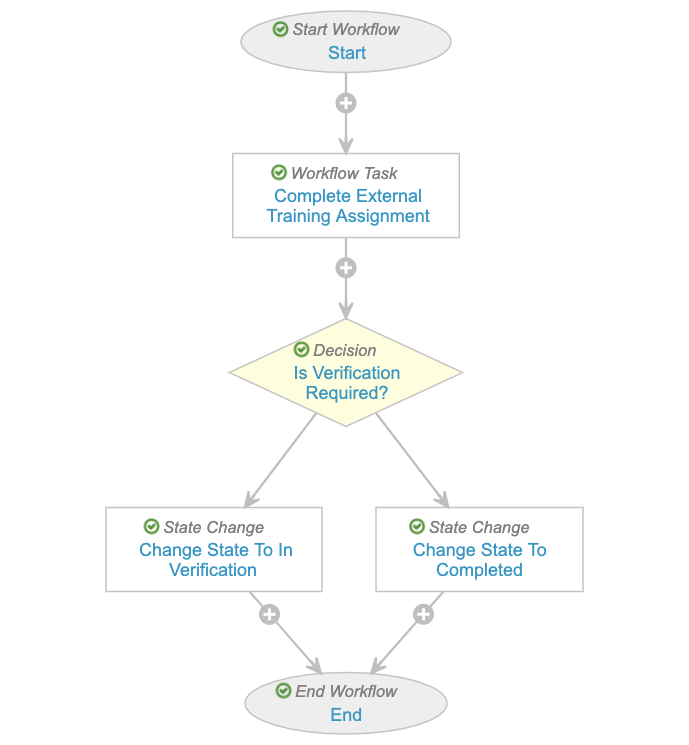 This workflow should follow these configuration guidelines:
* Configure participant control in the _Start_ step that defines the _Learner_ [application role](/en/lr/31851/#application-role) as a participant.
* Create a workflow task step that assigns a "Complete External Training" task to the _Learner_ participant control.
* Create a State Change workflow step to change the Training Assignments state to _Completed_; or
* Optional: Create a decision step that determines whether the _Training Assignment_ requires verification. This logic may be driven by the value of a [custom field copied from the Training Requirement][4]. Add rules to _Change State_ to _In Verification_ if it does, else _Change State_ to _Completed_.
### Example Verify External Training Assignment Workflow {#example-verify-external-training-assignment-workflow}
The purpose of this workflow is for a verifying user (often the Learner's [manager](/en/lr/50960/#manager-access)) to review the external Training Assignment, typically for proof of completion, then accept or reject the assignment.
This workflow should follow these configuration guidelines:
* Configure participant control in the _Start_ step that defines the _Learner_ [application role](/en/lr/31851/#application-role) as a participant.
* Create a workflow task step that assigns a "Complete External Training" task to the _Learner_ participant control.
* Create a State Change workflow step to change the Training Assignments state to _Completed_; or
* Optional: Create a decision step that determines whether the _Training Assignment_ requires verification. This logic may be driven by the value of a [custom field copied from the Training Requirement][4]. Add rules to _Change State_ to _In Verification_ if it does, else _Change State_ to _Completed_.
### Example Verify External Training Assignment Workflow {#example-verify-external-training-assignment-workflow}
The purpose of this workflow is for a verifying user (often the Learner's [manager](/en/lr/50960/#manager-access)) to review the external Training Assignment, typically for proof of completion, then accept or reject the assignment.
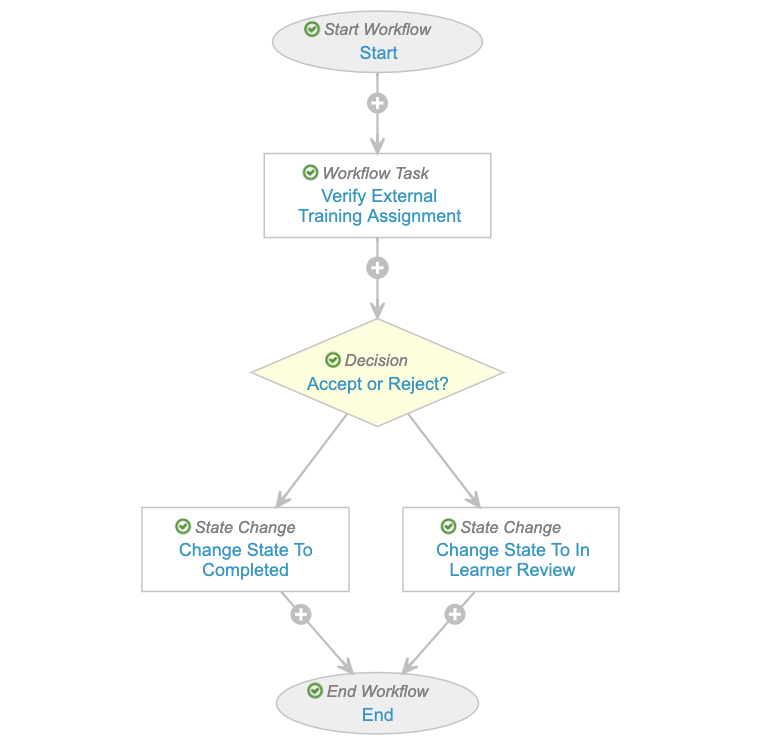 This workflow should follow these configuration guidelines:
* Configure a participant control in the _Start_ step that defines the _Direct Manager_ application role as the verifier participant. Select the **Use roles as participants** option, then select **Direct Manager** in the _Roles allowed to participate_ field.
* For non-Manager verifiers, you can use [Dynamic Access Control](/en/lr/33946/) to determine the user assigned to the verifier role.
* Create a _Workflow Task_ step that assigns the task to the verifier and prompts for a verdict. Create verdicts within the task that allow the verifier to determine whether to accept or reject the _Training Assignment_. Configure verdict comments, which are displayed to the Learner. Create a _Decision_ step that changes the state of the record, depending on the verdict, to _Completed_ or _In Learner Review_.
Note that a verifier will always see the object record details page, while the Learner will always see the Learner task page.
### Example Resubmit External Training Assignment Workflow {#example-resubmit-external-training-assignment-workflow}
The purpose of this workflow is for a Learner to resubmit a previously rejected external Training Assignment.
This workflow should follow these configuration guidelines:
* Configure a participant control in the _Start_ step that defines the _Direct Manager_ application role as the verifier participant. Select the **Use roles as participants** option, then select **Direct Manager** in the _Roles allowed to participate_ field.
* For non-Manager verifiers, you can use [Dynamic Access Control](/en/lr/33946/) to determine the user assigned to the verifier role.
* Create a _Workflow Task_ step that assigns the task to the verifier and prompts for a verdict. Create verdicts within the task that allow the verifier to determine whether to accept or reject the _Training Assignment_. Configure verdict comments, which are displayed to the Learner. Create a _Decision_ step that changes the state of the record, depending on the verdict, to _Completed_ or _In Learner Review_.
Note that a verifier will always see the object record details page, while the Learner will always see the Learner task page.
### Example Resubmit External Training Assignment Workflow {#example-resubmit-external-training-assignment-workflow}
The purpose of this workflow is for a Learner to resubmit a previously rejected external Training Assignment.
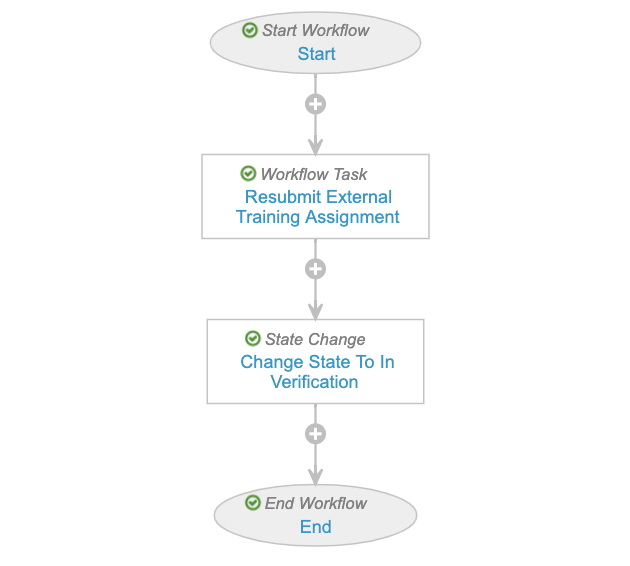 This workflow should follow these configuration guidelines:
* Configure a participant control in the _Start_ step that defines the Learner [application role](/en/lr/31851/#application-role) as a participant.
* Create a _Workflow Task_ step that assigns the task to the Learner.
* Create a _State Change_ step that changes the state of the record to _In Verification_.
The state change to _In Verification_ restarts the [Verify External Training Assignment workflow][14].
## Related Permissions
Learners users require the following permissions to complete _External Training Assignment_ tasks:
* _Read_ for the _Training Assignment_ object and its _External Training Assignment_ object type
* _Read_ for the _Assigned_ state in the _Training Assignment Lifecycle_
* _Read_ for the Learner's own _Person_ object record, as well as _Read_ for the _User_ field within their _Person_ record
[2]: #enabling-external-training
[3]: #how-to-create-an-external-training-requirement
[4]: #custom-fields-for-external-training-workflow-logic
[5]: #configuring-external-training-workflows
[13]: #example-complete-external-training-assignment-workflow
[14]: #example-verify-external-training-assignment-workflow
[15]: #example-resubmit-external-training-assignment-workflow
This workflow should follow these configuration guidelines:
* Configure a participant control in the _Start_ step that defines the Learner [application role](/en/lr/31851/#application-role) as a participant.
* Create a _Workflow Task_ step that assigns the task to the Learner.
* Create a _State Change_ step that changes the state of the record to _In Verification_.
The state change to _In Verification_ restarts the [Verify External Training Assignment workflow][14].
## Related Permissions
Learners users require the following permissions to complete _External Training Assignment_ tasks:
* _Read_ for the _Training Assignment_ object and its _External Training Assignment_ object type
* _Read_ for the _Assigned_ state in the _Training Assignment Lifecycle_
* _Read_ for the Learner's own _Person_ object record, as well as _Read_ for the _User_ field within their _Person_ record
[2]: #enabling-external-training
[3]: #how-to-create-an-external-training-requirement
[4]: #custom-fields-for-external-training-workflow-logic
[5]: #configuring-external-training-workflows
[13]: #example-complete-external-training-assignment-workflow
[14]: #example-verify-external-training-assignment-workflow
[15]: #example-resubmit-external-training-assignment-workflow