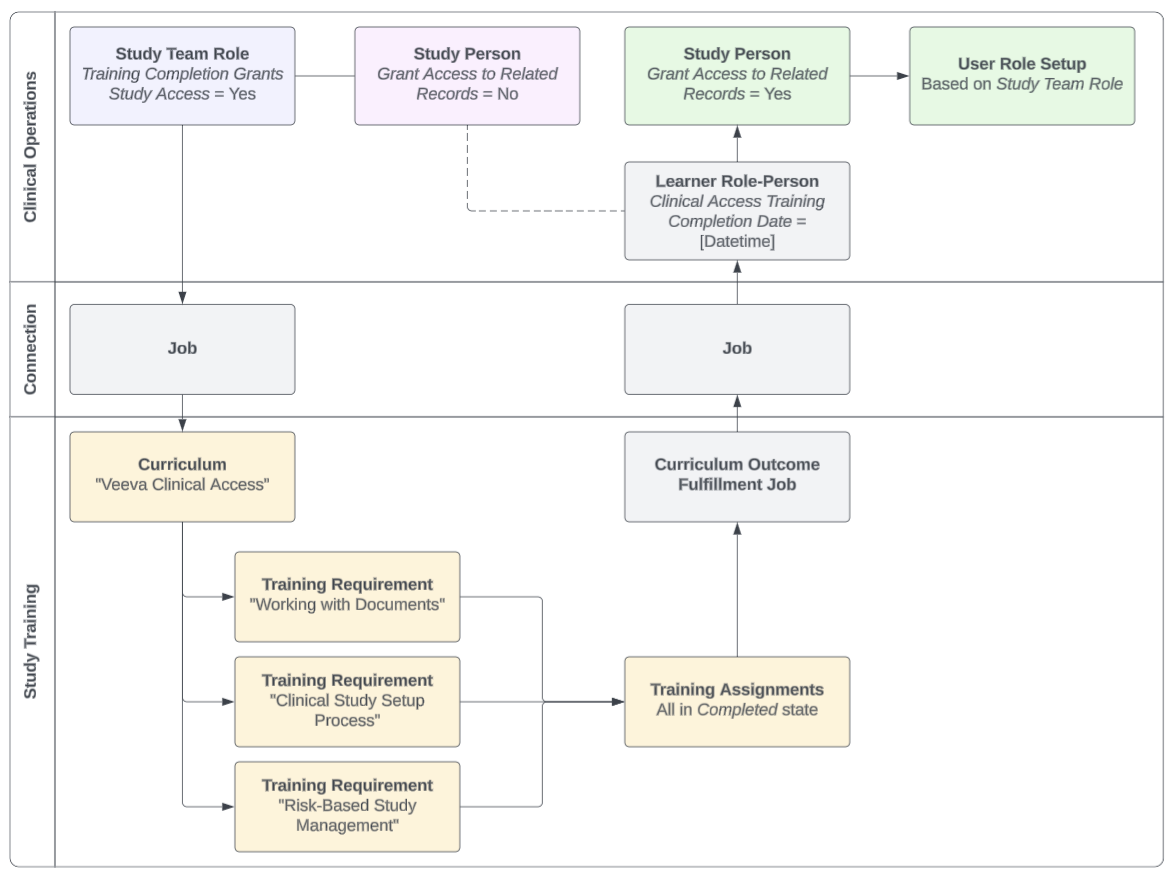
Note: This functionality is managed via the Study Training-Clinical Operations Connection and must be configured by a Vault Admin.
### About Curriculum Outcomes & Outcome Types
This feature shares various components with Veeva Training's [Curriculum Outcomes](/en/lr/627014/) feature, including:
* The *Outcome Type* picklist, where Vault references the picklist's *Study Training Clinical Access* value to grant access. All other values in this picklist are specific to Curriculum Outcomes and cannot be made active in Study Training. Similarly, *Study Training Clinical Access* cannot be made active in Veeva Training Vaults.
* The *Curriculum Training Rule Set*, *Curriculum Training Rule*, and *Curriculum Completion Status* [objects](/en/lr/627014/#outcome-objects). Vault uses these objects to aggregate completion data and automatically manages these object records; in Study Training, this primarily occurs when a Training Admin [publishes](/en/lr/50533901/#creating-publishing) a matrix with the required components. Admins can use these records to locate *Curricula* with defined rules for reporting or troubleshooting purposes.
* The *Curriculum Outcome Fulfillment* hourly job processes the outcomes captured within the above system-managed records.
## Defining Completion Criteria {#defining-criteria}
To define the completion criteria for granting Clinical Operations access via Study Training:
1. In Clinical Operations, create or update *Study Team Role* records with the *Training Completion Grants Study Access* field set to "Yes".
2. In Study Training:
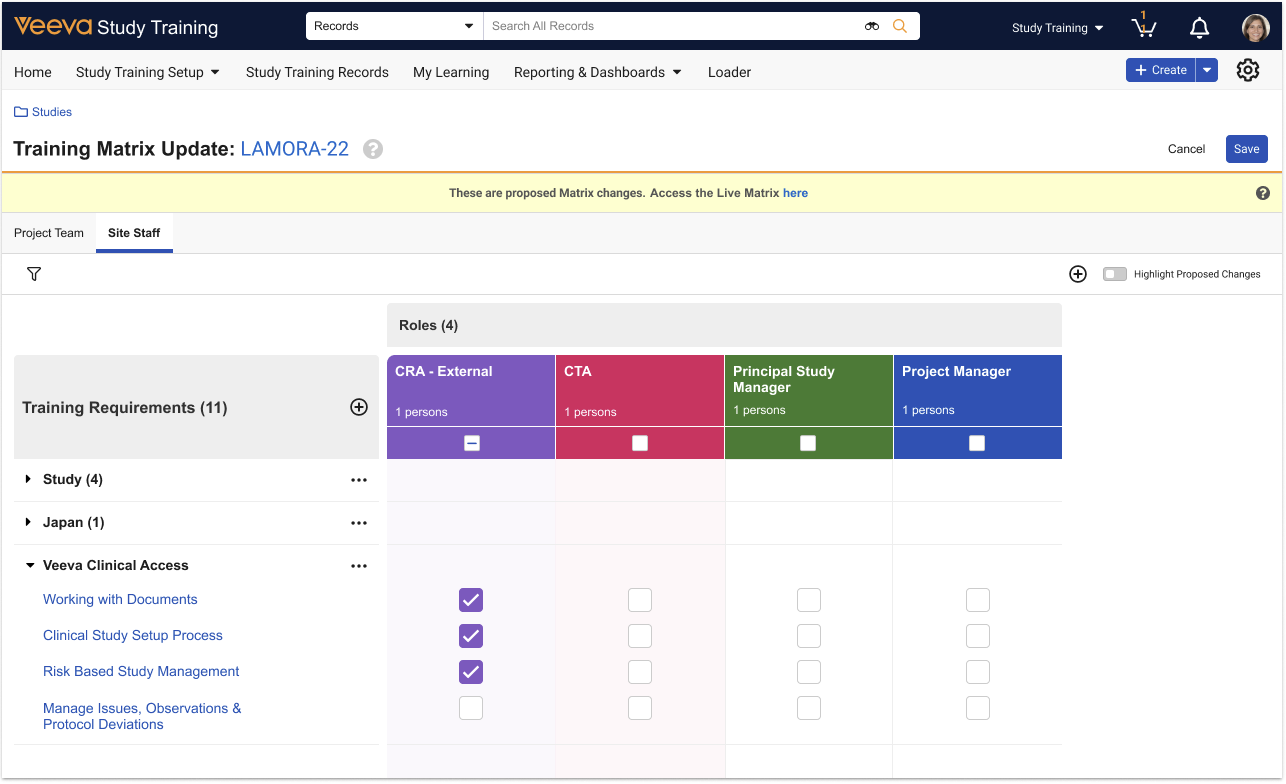
* Access the [Study Training Matrix Builder](/en/lr/50533901/)
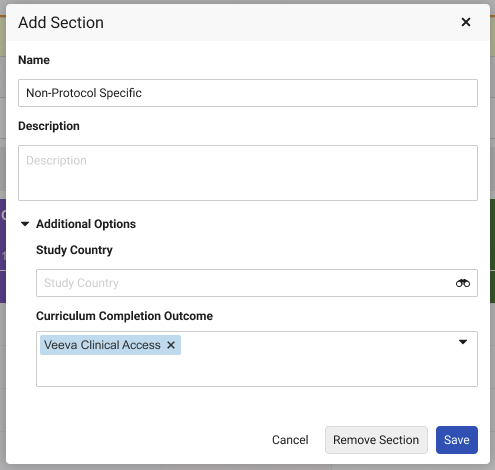
* Update or create a section with the appropriate *Curriculum* selected as the **Curriculum Completion Outcome**.
* Ensure the selected section includes all relevant *Training Requirements*, and that the role(s) you worked with in Step 1 are assigned to at least one requirement.
 ## Configuration Overview
This functionality is managed via the Study Training-Clinical Operations Connection, and as a result a Vault Admin with access to both Study Training and Clinical Operations must complete the below configuration.
### Clinical Operations Configuration
1. Within the *Study Team Role* object, activate the *Training Completion Grants Study Access* field, then:
* Update the field configuration with the *Display in default lists and hovercards* option.
* Add the field to the object page layout.
2. Within the *Study Person* object, activate the *Clinical Access Training Completion Date* field, then add it to the object page layout. We recommend adding it to the layout's Details section.
3. Navigate to **Admin > Connections** and locate **Study Training to Clinical Operations Connection**. Within the **Study Persons Integration**, activate the **Learner Role Person Inbound Integration Point**.
4. Review your Vault's permission sets and ensure users are assigned the appropriate permissions.
### Study Training Configuration
1. Within the *Curriculum Training Rule* and *Curriculum Training Rule Set* objects, activate the *Outcome* object type.
2. Review your Vault's permission sets and ensure users are assigned the appropriate permissions.
3. Activate the *Curriculum Outcome Fulfillment* job.
## Limitations
This feature does not provision users, nor is it intended for generic Clinical application training or any other non-study-focused training. This feature is specifically designed to automate internal Clinical Operations training with the *Study Person* activation process.
## Related Permissions
### Clinical Operations Permissions
Clinical Operations users working with Study Training must be permitted to *Edit* the *Study Team Role* object's *Training Completion Grants Study Access* field.
### Study Training Permissions
Study Training Admins must be assigned a permission set with the below permissions.
| Permission Label | Permission |
|---|---|
| Objects: Training Matrix Section: [All object types] | Read, Edit |
| Objects: Training Matrix Section: Object Field Permissions: Training Matrix Section Type | Read, Edit |
[1]: #defining-criteria
## Configuration Overview
This functionality is managed via the Study Training-Clinical Operations Connection, and as a result a Vault Admin with access to both Study Training and Clinical Operations must complete the below configuration.
### Clinical Operations Configuration
1. Within the *Study Team Role* object, activate the *Training Completion Grants Study Access* field, then:
* Update the field configuration with the *Display in default lists and hovercards* option.
* Add the field to the object page layout.
2. Within the *Study Person* object, activate the *Clinical Access Training Completion Date* field, then add it to the object page layout. We recommend adding it to the layout's Details section.
3. Navigate to **Admin > Connections** and locate **Study Training to Clinical Operations Connection**. Within the **Study Persons Integration**, activate the **Learner Role Person Inbound Integration Point**.
4. Review your Vault's permission sets and ensure users are assigned the appropriate permissions.
### Study Training Configuration
1. Within the *Curriculum Training Rule* and *Curriculum Training Rule Set* objects, activate the *Outcome* object type.
2. Review your Vault's permission sets and ensure users are assigned the appropriate permissions.
3. Activate the *Curriculum Outcome Fulfillment* job.
## Limitations
This feature does not provision users, nor is it intended for generic Clinical application training or any other non-study-focused training. This feature is specifically designed to automate internal Clinical Operations training with the *Study Person* activation process.
## Related Permissions
### Clinical Operations Permissions
Clinical Operations users working with Study Training must be permitted to *Edit* the *Study Team Role* object's *Training Completion Grants Study Access* field.
### Study Training Permissions
Study Training Admins must be assigned a permission set with the below permissions.
| Permission Label | Permission |
|---|---|
| Objects: Training Matrix Section: [All object types] | Read, Edit |
| Objects: Training Matrix Section: Object Field Permissions: Training Matrix Section Type | Read, Edit |
[1]: #defining-criteria