# TRIA for Document Change Control

Veeva Training's Training Requirement Impact Assessment (TRIA) feature is a complex Training Admin activity which maintains an organization's _Training Requirements_ and _Training Assignments_ in parallel with Training Material updates. When a document is undergoing revision via the QualityDocs Document Change Control (DCC) process, TRIA for Document Change Control allows Vault to:
* Initiate TRIA earlier in the document revision process, providing Training Admins and DCC participants visibility into both processes. This allows for more time to consider training needs during the DCC process.
* Align TRIA with decisions made during the DCC process, for example the DCC's _Proposed Effective Date_ can be used to calculate the _Due Date_ of any resulting assignments.


<div class="note-border alert-info">
  <div class="alert alert-info" role="alert">
    <div><i class="far fa-info-circle"></i></div>
    <div class="alert-text">
      <p><strong>Note</strong>: This feature is available for Veeva Training only and must be <a href="/en/gr/5722921/">configured</a> by a Vault Admin.</p>
    </div>
  </div>
</div>


## How TRIA for Document Change Control Works

TRIA for Document Change Control provides a secondary entry point into the TRIA process: When a Training Material on a *Training Requirement* is associated with a *Document Change Control* record, Vault creates a *Training Requirement Impact Assessment* record when the DCC reaches a lifecycle state configured to initiate the TRIA process. 

For example, Vault can initiate TRIA when a *Document Change Control* enters its *Change Authorization Approved* state, which indicates that the DCC's included documents can be routed for approval. To do this, Vault:
* Displays the TRIA record in the DCC's "Training Requirement Impact Assessments" section. This relationship is supported by the *DCC-TRIA* relationship record Vault additionally creates when initiating TRIA.
* Populates roles and date fields on the TRIA record according to several Application Settings. This feature allows Vault Admins to assign:
    * A document Owner to the TRIA record's Document Owner role.
    * A DCC's Record Owner to the TRIA record's Document Change Control Owner role.
* Sets the TRIA record's *TRIA Initiation Source* field to "Document Change Control".

Once Vault initiates TRIA from within the DCC process, Training Admins perform their impact assessment and Vault processes TRIA verdicts <a href="/en/gr/57229/">as normal</a>. Then, the DCC can be marked as *Closed* once its corresponding TRIA record is *Completed*.


<div class="note-border alert-info">
  <div class="alert alert-info" role="alert">
    <div><i class="far fa-info-circle"></i></div>
    <div class="alert-text">
      <p><strong>Note</strong>: A primary benefit of TRIA for Document Change Control is the ability to trigger TRIA earlier in the document lifecycle. This capability also extends to documents within the same lifecycle which are not associated with a DCC. As such, your Vault may initiate TRIA for non-DCC documents in an earlier lifecycle state, such as <em>Reviewed</em>.</p>
    </div>
  </div>
</div>


### About Multi-Document Training Requirements

When one document in a multi-document *Training Requirement* triggers TRIA as part of a DCC (for example, an SOP), and then a second document in that requirement undergoes revision (a Work Instruction), Vault only triggers TRIA when the Work Instruction is either:

* Part of a different DCC, separate from the SOP, or
* Undergoing revision outside of any DCC, meaning the Work Instruction is a non-DCC document.

Otherwise in this scenario, if the SOP and WI are both part of the same DCC, Vault includes both documents in the same TRIA record.


## Use Case: Draft to Effective Lifecycle with Document Change Control {#use-case-dte}

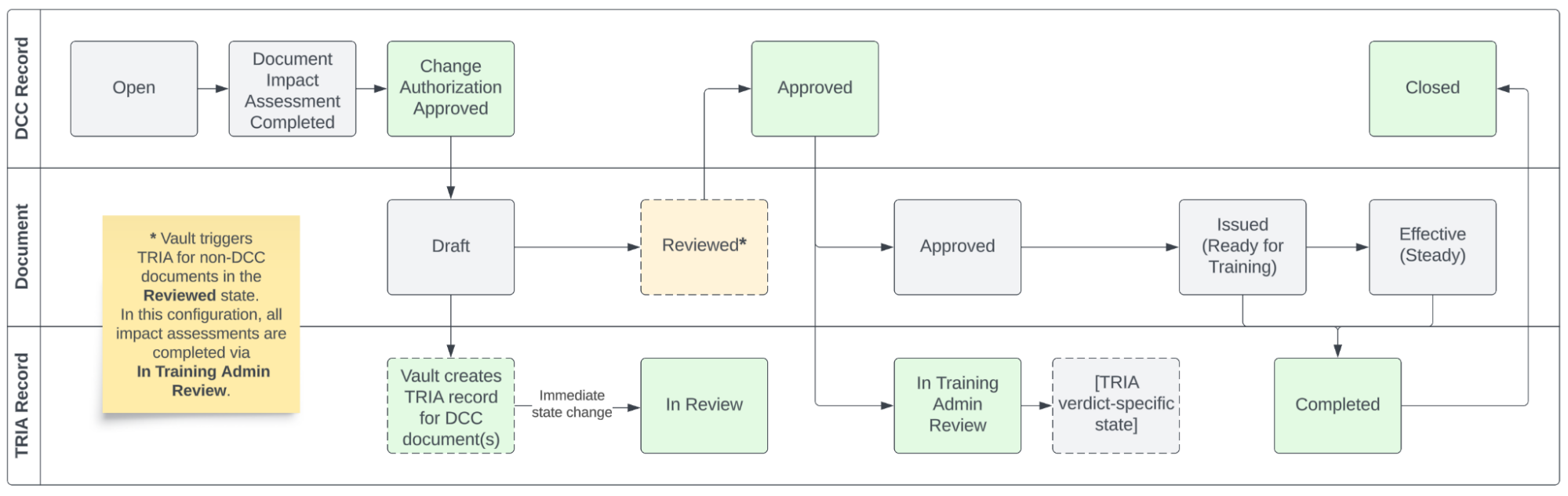
The process for completing TRIA via a Document Change Control is dependent upon your Vault's current TRIA and DCC configurations, as well as your organization's requirements for both processes. The example below illustrates how the two features can work together when configured for a *Draft to Effective* lifecycle with the indicated states.

The states in green are relevant to this TRIA for Document Change Control configuration such that:

* When the DCC reaches its **Change Authorization Approved** state, Vault creates the TRIA record associated with the DCC documents in their *Draft* states. Vault creates this record then immediately transitions it to the **In Review** state.
* Once the DCC is **Approved**, a lifecycle action transitions the TRIA record from the **In Review** state to the **In Training Admin Review** state (not shown). 
    * The *In Review* and *In Training Admin Review* states are required to concurrently support DCC and non-DCC documents in the same lifecycle.
    * For non-DCC lifecycle documents in this configuration, Vault triggers TRIA in the **Reviewed** state, then immediately moves the record to *In Review* and *In Training Admin Review*. This configuration supports completing all impact assessments from the *In Training Admin Review* state, regardless of a document's association with a DCC.
    * See <a href="/en/gr/57229/#tria-process-overview">Working with Training Requirement Impact Assessments</a> for more information on how Vault processes TRIA records after these states.
* When the DCC documents reach their trainable states (*Issued*, *Effective*), Vault marks the TRIA record **Completed** and handles any related assignments. This process is the same as the core TRIA feature.
* Once a TRIA record is **Completed**, the DCC can be marked **Closed**. In this Vault, a document control user manually performs this step via user action from the DCC's *Approved* state, and this feature automatically prevents them from doing so until the TRIA record is *Completed*.


<div class="note-border alert-info">
  <div class="alert alert-info" role="alert">
    <div><i class="far fa-info-circle"></i></div>
    <div class="alert-text">
      <p><strong>Note</strong>: This diagram omits some transitional lifecycle states such as <em>In Approval</em>, <em>In Review</em>, and <em>In Change Authorization Approval</em>.</p>
    </div>
  </div>
</div>


<a href="https://platform.veevavault.help/assets/images/tria-for-dcc-draft-to-effective-use-case.png" data-lightbox="TRIA for DCC" data-title="" data-alt="a process flow diagram of the Draft to Effective lifecycle use case">
  <img class="docimage" src="https://platform.veevavault.help/assets/images/tria-for-dcc-draft-to-effective-use-case.png" alt="a process flow diagram of the Draft to Effective lifecycle use case" style=""  />
</a>

## Working with TRIA-Associated Document Change Controls

When working with TRIA-associated DCC records, participants can access a related TRIA record via the DCC's "Training Requirement Impact Assessments" section.

Then, to prepare for or to <a href="/en/gr/57229/#completing-trias">complete</a> the assessment within the TRIA record:

* The "Documents to be Implemented" section provides links to the DCC documents' latest versions. This new section improves upon the functionality of the "Post-Change Training Documents" section it replaces as part of this feature's implementation.
* The record's <a href="/en/gr/57229/#about-tria-impact-alerts">impact alerts</a> inform users of how Vault will act upon TRIA verdict decisions once document(s) are "trainable" (enter their Ready for Training or Steady state) and the *Update Training Assignments* job runs.

### About Non-DCC Documents

One of TRIA for Document Change Control's primary benefits is the ability to trigger TRIA earlier in the document lifecycle. This capability also extends to documents within the same lifecycle which are not associated with a DCC. 

It is likely that your Vault's original TRIA implementation initiated TRIA from, for example, a document's *Approved* state, in accordance with the core TRIA feature's <a href="/en/gr/572291/#document-lifecycle-entry-actions">recommended configuration</a> for the *Draft to Effective* lifecycle. Once TRIA for Document Change Control is enabled, a Training Admin can select any state from which to trigger TRIA for both DCC and non-DCC documents. This means that Training Admins can begin the impact assessment sooner than previously allowed, such as when a document reaches its *Reviewed* state.

Similar to DCC documents, once Vault initiates TRIA for a non-DCC document, Training Admins perform their impact assessment and Vault processes TRIA verdicts <a href="/en/gr/57229/">as normal</a>.

### About the Create Training Requirement Impact Assessment User Action

When optionally <a href="/en/gr/5722921/#dcc-object-lifecycle-configuration">configured</a> for your Vault's TRIA-triggering DCC state (for example, *Change Authorization Approved*), Training Admins can use the *Create Training Requirement Impact Assessment* user action to manually re-trigger TRIA in the event Vault encounters unexpected failures while creating TRIA records. This is most likely to occur when a DCC includes a large number of documents.