When a Training Requirement’s related Training Materials are updated in the Vault Library, Training Admins can use the Training Requirement Impact Assessment (TRIA) process to review the materials along with their related Quizzes and Supplemental Materials to determine whether any changes are needed for current and future training on that requirement.
Note: This feature is available for Veeva Training only and must be configured by a Vault Admin. You can additionally configure your Vault to initiate TRIA via the Document Change Control process. See Configuring TRIA for Document Change Control for details.
How TRIA Works
Training Requirement Impact Assessment is a complex Training Admin activity which maintains your organization’s Training Requirements and Training Assignments in parallel with Training Material updates, in accordance with the content of those updates and the document’s configured lifecycle.
TRIA is intended to:
- Notify Training Admins that a document update may impact training.
- Collect the Training Admin’s verdict on how training should proceed once the Training Materials reach their Ready for Training and Steady lifecycle states.
- Apply this verdict to the related Training Requirement.
Along with a Training Material’s applicable document lifecycle entry actions, a completed TRIA verdict informs the Update Training Assignments job of when it can assign and/or cancel any related Training Assignments.
See the Training Admin-specific Working with Training Requirement Impact Assessments article for detailed process flows covering the various verdicts a Training Admin may choose during their review.
Configuration Overview
Note: You cannot configure TRIA or document lifecycles or workflows such that a document is prevented from moving to the Ready for Training or Steady state if the TRIA task is not complete. This feature purposefully prioritizes document state changes over training tasks.
- Configure the Create Training Requirement Impact Assessment Record and Retire or Assess Impact on Training Requirements entry actions for the appropriate document lifecycles and states. In these entry actions’ configuration options, optionally select:
- An Application Role to Assign Tasks To. This role should be configured on both the document lifecycle and the Training Requirement Impact Assessment object lifecycle, so that Vault can copy them to the TRIA record. While this step is optional, we recommend using the Training Administrator role. Otherwise, if you do not select a role, you must ensure that the Training Requirement Impact Assessment object includes a custom sharing rule so that the TRIA workflow can start.
- The Use Document Date Field as a Due Date checkbox. This option bases the due date of any resulting Training Assignments on a document field, such as Proposed Effective Date (plus any Additional Days). This overrides the default behavior of calculating an assignment’s Due Date based on the related requirement’s Duration and Duration Unit values. If you select a document date field that is not available on a revised document, Vault does not populate the resulting TRIA record’s Document Revision Training Due Date field, and instead reverts to the default behavior for the resulting assignments.
- Configure an object workflow for Training Admins to perform their impact assessment, then configure an entry action on the TRIA object lifecycle’s In Review state (
initiate_tria_state__v) to initiate the workflow. Depending on when your Vault was created, this configuration may already be complete. See additional details about the TRIA lifecycle and its workflows. - Add the Evaluate Training Req. Impact Assessment custom action to the TRIA object configuration, then add it as a user action to the Pending System Updates To Training Req. state in the TRIA object lifecycle. In the event Vault does not successfully transition records in this state to the Completed state, users can select this action to prompt Vault to reassess the documents’ lifecycle states. When documents are in a trainable state, the action immediately transitions the TRIA record to the Complete state. This process replicates the check Vault performs when the assessing user clicks Complete on the TRIA workflow, prior to selecting any verdicts.
- Configure the Training Requirement Impact Assessment object page layout to include the below impact alerts. Each alert corresponds to an object field, and informs users of the training and document impact of TRIA decisions.
- Cancel Open Training Assignments?: Impact Alert: Cancel Open Training Assignments
- Re-Issue Training?: Impact Alert: Re-Issue Training
- Require Updated Quiz?: Impact Alert: Require Updated Quiz. See additional details about this alert’s counterpart for pre-quizzes.
- TRIA for DCC Vaults only: Document Revision Training Due Date: Impact Alert: Doc Revision Due Date. See additional details on this alert’s limitations.
- Recommended: Update the Training Requirement Impact Assessment lifecycle’s Completed state such that each impact alert you configured in Step 4 is hidden via Atomic Security: Controls settings. These alerts are no longer relevant once Vault processes TRIA verdicts.
- Review the TRIA for All Training Requirements feature parameters and consider whether this impacts your organization’s Vault.
- Optional: Configure Auto-Close TRIA if your organization’s training processes can benefit from automatically processing and closing TRIA records based on specific scenarios. This feature can be useful in Vaults where TRIA for All Training Requirements was not previously enabled.
- Optional: To allow Training Admins to manually restart the TRIA process from certain states, create a workflow and user action to transition TRIA records back to the In Review state. See additional details below.
- Optional: Configure the Training Assignment lifecycle’s Resolved state and related Resolution Reason picklist to provide a more accurate representation of an assignment’s status in situations when, for example, an incorrect TRIA verdict causes Vault to create Training Assignments Learners are not actually required to complete.
- Optional: Configure TRIA for Document Change Control.
- Optional: Configure Training Change Request to additionally process matrix updates alongside TRIA decisions.
About the Resolved Lifecycle State
The Training Assignment object lifecycle includes an optional Resolved state, allowing Training Admins to manually transition assignments to this state when other terminal lifecycle states such as Cancelled or Completed do not apply. This provides a more accurate representation of an assignment’s status in situations when, for example, an incorrect TRIA verdict causes Vault to create Training Assignments Learners are not actually required to complete.
The Resolved state can optionally be used with the Training Assignment object’s Resolution Reason picklist field: When a Training Admin marks an assignment as Resolved, Vault prompts them to capture a reason such as TRIA Issue.
This feature primarily supports Study Training use cases, and all configuration steps and limitations are described in Setting Up Veeva Study Training. A Veeva Training Vault Admin can follow these same steps for configuration. For Resolution Reason picklist options, we recommend adding TRIA-specific values such as TRIA Issue or TRIA Error.
About TRIA for All Training Requirements
As of the 26R1 general release, all Training Requirements must undergo the TRIA process.
Prior to 26R1, it was possible for Vault to initiate the TRIA process only in certain cases, as determined by the Enable TRIA for All Training Requirements Application Setting. This setting is now removed.
This means that, in Vaults where the setting was previously disabled, Vault will begin generating a Training Requirement Impact Assessment record and workflow task for all requirements, including:
- Vault Document Training Requirements with a single document and no quiz.
- Any requirement with a substitute or prerequisite rule.
This default behavior now applies to all Training Vaults.
Additional information for Vault Admins is available in Veeva Connect: TRIA (Training Requirement Impact Assessment) for All in 26R1 and Auto-Close TRIA Configuration Guide.
Note: A Vault Admin can configure the TRIA workflow such that Vault automatically processes and closes TRIA records in cases where they are not required. See additional details about Auto-Close TRIA.
Impact in Non-TRIA Vaults
Some Vaults may not be configured for the TRIA feature as of the 26R1 general release. In this context, this means that the Create Training Requirement Impact Assessment Record action is not configured within the lifecycle of any document used as a Training Material.
When this is the case, Vault:
- Creates a TRIA record when a Training Material reaches the point in its lifecycle where Vault issues assignments, via the Issue Training Assignments entry action configured on that state.
- Sets the TRIA record’s lifecycle state to In Review (
initiate_tria_state__v).
Additionally, depending on when your Vault was created and its configuration, attempting to “skip” the TRIA process can cause Vault to error. For example, if the Draft to Effective lifecycle allows a document to bypass the Issued state and go directly from Draft to Effective, users are prevented from executing any related workflows or user actions.
These behaviors are meant to encourage TRIA adoption, as future features and enhancements to the application will require it. Any organizations wishing to bypass TRIA entirely should consider fully implementing TRIA along with Auto-Close TRIA.
Note: This behavior cannot be disabled. Contact your Veeva representative or visit Veeva Connect for more information about upgrading your Vault to use TRIA and Auto-Close TRIA.
Document Lifecycle Entry Actions
Vault initiates the TRIA process using the below document lifecycle entry actions. These actions can be configured for any Vault Library document your organization uses as Training Materials, however configuration depends on the document’s assigned lifecycle.
Important: Document lifecycle entry actions must be configured to occur in the proper order across lifecycle states according to the below guidelines. Additionally, entry actions within states must be configured in the proper order, depending on the action and any conditions.
- The Create Training Requirement Impact Assessment Record action is configured prior to the state in which training is assigned. For lifecycles in which TRIA and training assignments can occur in the same lifecycle state, the TRIA action must be configured to occur prior to the Issue Training Assignments action. For example:
- In the Draft to Effective lifecycle, Learners receive assignments when the document enters the Issued state. This means that the TRIA action must be configured for an earlier state, such as Approved.
- In the Draft to Approved and Initial to Final lifecycles, Learners receive assignments when a document enters the Approved or Final state, respectively. This means that the TRIA action must be configured to occur prior to the Issue Training Assignments action within these states. See additional details about action ordering within states.
- These recommendations are intended to prevent a TRIA record from becoming stale with previous document versions. For example, when a v1.3 Draft to Effective document is up-versioned to Approved v2.0, the resulting TRIA record’s post-change document versions are set and unlikely to change. Should the document require further updates, the TRIA process simply repeats. In contrast, if TRIA is triggered at an earlier state and version (for example, Reviewed v1.1), the TRIA record becomes stale: The configuration only triggers TRIA at the Reviewed state, and thus Vault does not update the TRIA record once the document is Approved at v2.0. If your organization prefers to trigger TRIA sooner in a document’s lifecycle, you may consider configuring TRIA for Document Change Control.
- When a document lifecycle includes a state where a document is no longer in use for training (for example, Obsolete in the Draft to Effective lifecycle), the Retire or Assess Impact on Training Requirements action ensures Training Admins can update or retire a related requirement.
Action Ordering & Condition Considerations
Document lifecycle entry actions can support a variety of organizational requirements for the TRIA process, however when implementing these aspects Vault Admins should consider:
- The condition(s) under which Vault initiates the action, for example only when a document’s Confidentiality Level field is not equal to “Confidential”.
- The order in which individual training-specific actions are configured within a given lifecycle state. Generally, Vault executes most entry actions strictly in the order in which they are configured in Admin > Configuration > Document Lifecycles > [Lifecycle] > States > [State] > Entry Actions.
For example, VernBio’s Approved state configuration includes two training-specific actions with conditions as shown below: Create Training Requirement Impact Assessment Record (but only for documents with a “Non-Confidential” Confidentiality Level) and Create Related Training Requirement.
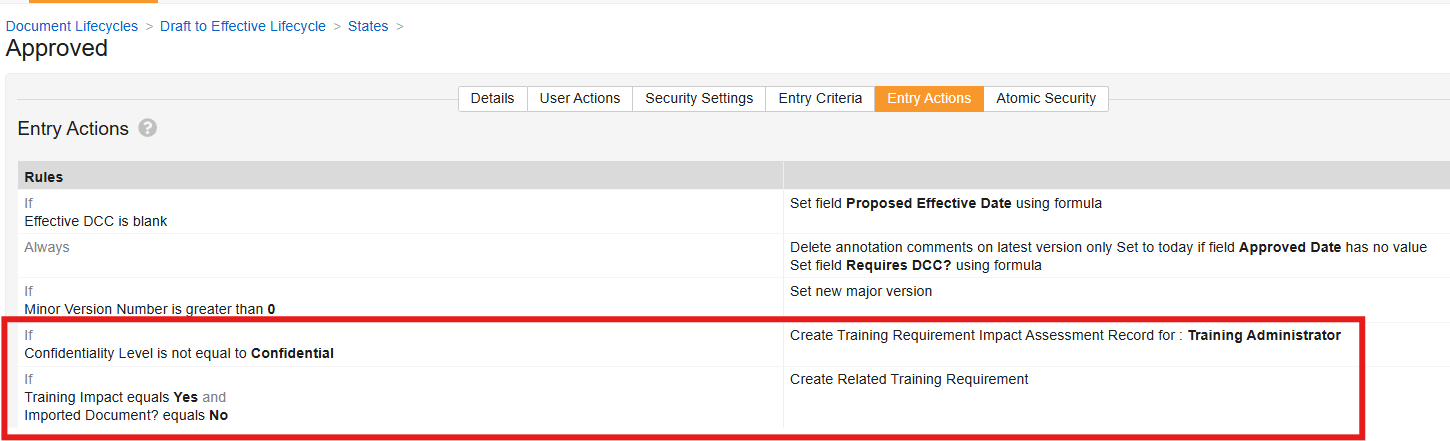
During testing of new configuration, the Vault Admin observes that Vault does not operate as expected for the first major version (v1.0) of “Non-Confidential” documents: Vault does not create a TRIA record because the Create Related Training Requirement action is configured to occur after the Create Training Requirement Impact Assessment Record action, and Vault cannot create TRIA records for Training Requirements that do not yet exist. To resolve this, the Vault Admin swaps the order of the entry actions, such that Vault first creates the related Training Requirement, then creates the TRIA record based on the Confidentiality Level conditions.
Application Roles
We recommend using the Training Administrator Application Role for document lifecycle and Training Requirement Impact Assessment lifecycle and workflow configurations.
When a Training Material enters its configured lifecycle state (but prior to executing any TRIA-specific actions), Vault confirms that an Application Role:
- Is configured for both the document lifecycle entry action and the Training Requirement Impact Assessment object lifecycle.
- The role includes at least one assigned user, but no more than 50 users.
When these criteria are not met, users are prevented from transitioning a document to its TRIA-triggering state.
Training Requirement Impact Assessment Lifecycle & Workflows
Generally, the TRIA process uses a workflow such as the “Assess Impact” workflow to:
- Collect the Training Admin’s impact decision.
- Populate corresponding fields on the Training Requirement Impact Assessment record.
- Transition the TRIA record to a lifecycle state which corresponds to the TRIA verdict.
We also recommend including an “In Review” workflow and related user action to allow Training Admins to manually restart TRIA in certain cases.
Note: The workflows described here include optional Vault configuration and may or may not resemble TRIA workflows already configured in your Vault. Always consult your organization’s requirements before creating or updating any workflow.
Workflow: Assess Impact
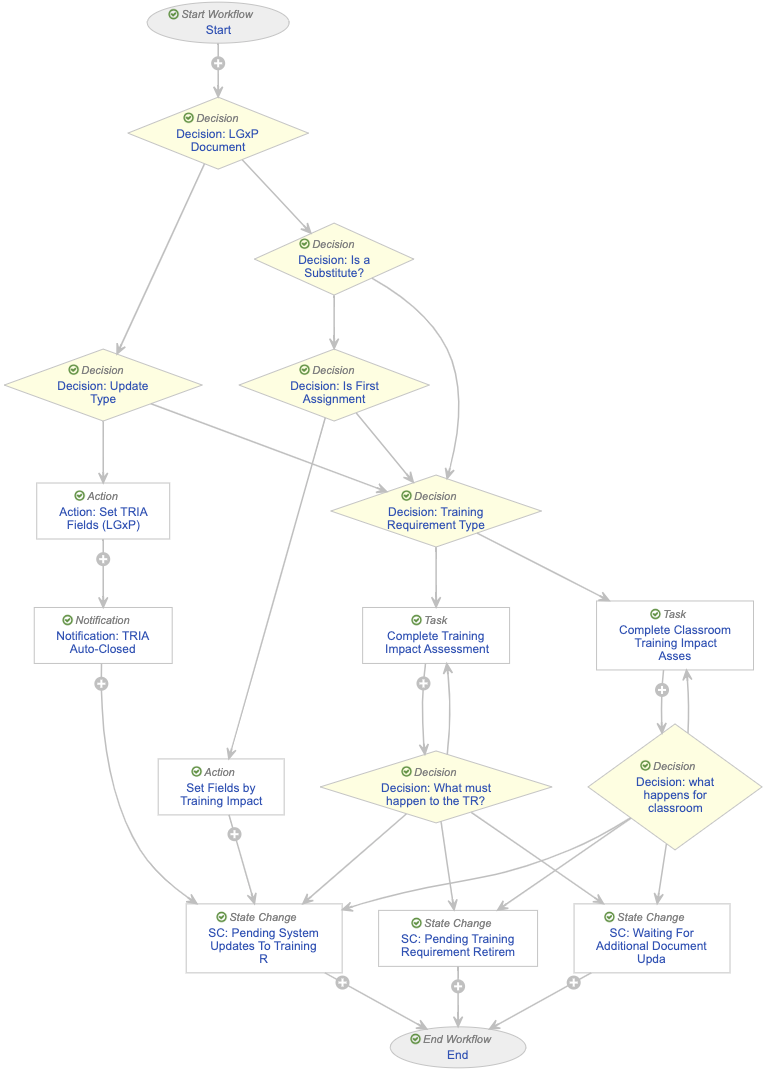
When a document enters its TRIA-triggering state and Vault executes the Create Training Requirement Impact Assessment Record or Retire or Assess Impact on Training Requirements entry actions, Vault initiates the below “Assess Impact” workflow from the TRIA lifecycle’s In Review state (initiate_tria_state__v).
The workflow operates such that:
- The Start step references the “Training Administrator” Application Role as workflow participants. This aligns with the Create Training Requirement Impact Assessment Record document lifecycle entry action configuration.
- The Decision: Training Requirement Type step determines whether the requirement is a Classroom Training Requirement. When this is the case, the workflow branches to the Complete Classroom Training Impact Assessment task.
- This parallel task is necessary to differentiate classroom requirements from other requirements: Generally, Vault does not support managing standard quizzes via the TRIA process, however it does support this step for pre-quizzes.
- As a result of the above, the “Update Training Requirement” verdict includes prompts for pre-quiz fields (Require Updated Pre-Quiz?, Exclude Pre-Quiz for Revision Training) but does not include their standard quiz counterparts (Require Updated Quiz?, Exclude Quiz for Doc Revision Training).
- Some steps allow for a TRIA record to be automatically closed, based on various criteria. See additional details about configuring Vault to automatically close TRIA records.
- The Decision: LGxP Document step determines whether the TRIA-triggering document is a LearnGxP document (e-learning course). When this is the case, the workflow sets LearnGxP-specific TRIA record fields, then Vault notifies the Training Admin and transitions the record to Pending System Updates To Training Req. state. Vault transitions the TRIA record to Completed via the Update Training Assignments job.
- The Decision: Is a Substitute? step determines whether a requirement is a substitute, based on the Is A Substitute Training Requirement field: When this field is “Yes”, the workflow proceeds to the typical TRIA flow, via the Decision: Training Requirement Type step. Here, Vault is confirming the requirement is not a substitute: TRIA records for substitutes cannot be automatically closed via Auto-Close TRIA when Vault is additionally required to set record fields, as in the Set Fields by Training Impact step. When the requirement is not a substitute, the workflow proceeds to the Decision: Is First Assignment step for an additional check on whether the TRIA record can be automatically closed.
- The Decision: Is First Assignment step is specific to Auto-Close TRIA. The step assesses the requirement’s Training Assignments Assigned? field to determine whether any assignments have ever been issued against the requirement. When this field is “No Training Matrix Assignments assigned”, this workflow allows Vault to set training impact fields (Set Fields by Training Impact), then close the TRIA record on the merit that the related document is new and does not require TRIA.
Workflow: In Review
When the selected TRIA verdict is to Wait for additional Docs to be updated, Vault transitions the TRIA record to its Waiting For Updates to Addtl Documents state (pending_changes_state__v).
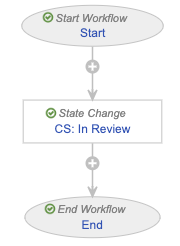
When a simple “TRIA: In Review” workflow such as the below is configured as a user action from this state, Training Admins can manually transition the record back to the In Review state and re-start the “Assess Impact” workflow, without having to wait for the impacted documents to reach their TRIA-triggering state.
A similar user action on the Pending System Updates to Training Req. state can be used to adjust fields impacted by the “Update Training Requirement” verdict: When executed, Vault re-starts the workflow and a Training Admin can make the proper field selections. While impact alerts for these fields may eliminate the need to re-start the TRIA process, you may consider adding this workflow if your Vault’s security configuration is such that Training Admins cannot edit a Training Requirement Impact Assessment record’s relevant fields in this state.
About Auto-Close TRIA
Automatically closing TRIA records can be useful for expediting the TRIA process when, for example, Vault produces superfluous TRIA tasks for new documents for which training has never been issued. This can also be useful for handling similar cases of unnecessary TRIA tasks as the result of TRIA for All.
With a TRIA workflow decision step referencing the Training Assignments Assigned? field, the TRIA workflow can skip the review task, such that:
- When the field value is “No Training Matrix Assignments assigned”, there are no system-created assignments for that requirement, or all system-created assignments for that requirement are in the Cancelled state. From a training matrix perspective, this likely means that the Training Requirement is new and assignments have never been issued against it, and thus the TRIA process is not required in this case.
- When the field value is “Training Matrix Assignments assigned”, there is at least one System-created assignment (according to its Creation Source) for that requirement, and that assignment is in any lifecycle state except Cancelled. In this case, TRIA is still required.
Using this and other fields, a Vault Admin can configure the TRIA workflow to proceed past the TRIA task and In Review state and end at the TRIA lifecycle state appropriate for your use case.
Important: Configuring your Vault for Auto-Close TRIA is a complex process which requires significant requirements analysis. We recommend working with your Veeva Services representative to implement this feature in your Vault. You can additionally visit Veeva Connect for a configuration guide.
Limitations
Training Requirement Impact Assessment is subject to the following limitations:
- The Document Revision Training Due Date impact alert only appears in Vaults configured for TRIA for Document Change Control. This is because the alert is controlled by this feature’s Use Document Field as Due Date Application Setting.
- Updates to Supplemental Materials do not trigger the TRIA process and are not subject to the same rules and automation updates as Training Materials. Training Admins should review a requirement’s Supplemental Materials when assessing training impact for the related Training Materials.
- TRIA is not intended to replace organizational discussions or decisions regarding overall training matrix needs. TRIA is intended only to notify Training Admins that a document update may impact training. This process supplements training automation by collecting the Training Admin’s decisions on how the Update Training Assignments job should proceed with assigning and/or canceling assignments once the related documents reach a trainable state.