# Configuring Training Change Request

Many training programs rely upon external resources such as ticketing systems or electronic forms to solicit Training Matrix updates, such as adjusting an existing *Curriculum*'s associated *Training Requirements*. Then, a Training Admin must manually apply these updates within Vault, along with ensuring the changes themselves are timed correctly. 

With Training Change Request, users can instead create *Training Change Request* (TCR) records directly in Vault, then Vault automatically processes them at the appropriate time following Training Admin review and update, as required.


<div class="note-border alert-info">
  <div class="alert alert-info" role="alert">
    <div><i class="far fa-info-circle"></i></div>
    <div class="alert-text">
      <p><strong>Note</strong>: <a href="/en/gr/868522/">Training Change Request</a> is available in Veeva Training Vaults only. The <em>Training Change Request</em> object is highly configurable to meet your organization’s requirements. This article outlines Veeva’s best-practice recommendations for managing TCRs.</p>

    </div>
  </div>
</div>


## Feature Dependencies

Training Change Request does not depend on any other Training features beyond the baseline application <a href="/en/gr/50960/">configuration</a>.

However, Training Change Request can be optionally configured to:
* [Integrate][2] with your Vault's <a href="/en/gr/572291/">Training Requirement Impact Assessment</a> (TRIA) configuration.
* Allow Managers to view and compare their direct reports' _Learner Role_ assignments, then submit a Training Change Request to update the Training Matrix accordingly. When both the My Team page and Training Change Request are already configured within your Vault, this capability is automatically available, however your organization may consider updating this feature's standard workflow.


## Use Cases {#use-cases}

Training Change Request replaces external or incomplete methods of soliciting Training Matrix updates: Where an organization once tracked these updates in external ticketing systems, electronic forms, or custom Vault objects (for example, *Training Needs Assessment*), Training Change Request allows any Vault user to request Training Matrix updates.

For example:

* A Learner's Manager is training them on new duties and requests to assign the Learner to all applicable *Learner Roles*.
* The Finance department's biennial training audit yields several recommendations to retire some *Training Requirements* and remove and replace others within the applicable *Curricula*.
* A Document Owner revises an SOP which expands the training audience, and thus the related *Training Requirement* should be added to additional *Curricula*. The owner can submit a change request at any time during SOP revision, or add change items directly to the requirement's resulting *Training Requirement Impact Assessment* record.

Additionally, Training Change Request facilitates the matrix updates themselves: For a Learner training on new duties, their Manager selects all applicable *Learner Roles*, then indicates the exact *Training Change Implementation Date* upon which they should receive the related *Training Assignments*. When the related *VT: Process Training Change Requests* job runs on this date, Vault adds their *Person* record to their new *Learner Role*, and the *Update Training Assignments* job assigns the applicable training tasks without any additional Training Admin effort.

See <a href="/en/gr/868522/#how-tcr-works">additional details</a> on how Training Change Request works, and how Managers can use the My Team page to <a href="/en/gr/868522/#tcr-my-team">submit certain requests</a>.


## Configuration Overview

To configure Training Change Request:

1. <a href="/en/gr/23516/">Create</a> a new tab for the *Training Change Request* object and arrange it within the appropriate menu tab and/or Tab Collection.
2. <a href="/en/gr/15057/#customizestandardobjects">Update</a> the *Matrix Change Item* object with the **Display in Business Admin** configuration option.
    * While Vault automatically manages these records alongside their *Training Change Requests*, Training Admins may want to view all *Matrix Change Items* together.
    * You can optionally create a new *Matrix Change Item* object tab and/or report for these same purposes.
3. <a href="/en/gr/26387/#add-edit-move-sections">Update</a> the *Training Change Request* object page layout to include a new "Matrix Change Items" section, using the section type (control) of the same name. 
    * Recommended: Arrange this object's most relevant fields under the layout's Details section, including *Name*, *Status*, *Training Change Request Type*, *Description*, *Request Owner*, *Creation Source*, and *Training Change Implementation Date*.
4. Create a new workflow for your organization's Training Change Request process, then update the *Training Change Request* lifecycle accordingly.
    * The [sample configuration][4] described below meets this feature's minimum requirements. When following Veeva recommendations, requestors send a review task to Training Admins from the TCR's *Initiated* state via the "Send to Training Admin" user action and related workflow.
    * See [additional details][3] on updating these components to fit simpler or more complex Training Change Request processes.
5. Review your Vault's security configuration to ensure requestors and Training Admins are assigned the appropriate [permissions][6]. 
6. <a href="/en/gr/22897/#how-to-edit-job-definitions">Activate</a> the *VT: Process Training Change Requests* job. We additionally recommend updating the **Job Owner** to a user or group who should be notified in the event of job failures. You can optionally update the **Hourly Interval** according to your organization's requirements.
7. Optional: [Configure][2] Training Change Request for TRIA.
8. Optional: [Review][9] the default behavior of Training Change Request for the My Team page. While this capability is automatically available in Vaults using the My Team page, your organization may consider updating this feature's lifecycle and standard _VT: Manager Homepage Initiate TCR_ workflow to support your Manager-submitted TCR process.


### Configuring Training Change Request for TRIA {#configuring-tcr-tria}

Once you've configured Training Change Request, you can optionally update your Vault's Training Requirement Impact Assessment (TRIA) configuration to additionally support creating *Training Change Request* and *Matrix Change Item* directly within a TRIA record.

To do this:

1. <a href="/en/gr/26387/#add-edit-move-sections">Update</a> the *Training Requirement Impact Assessment* object page layout to include a new "Training Requirement Matrix Changes" section, using the section type (control) of the same name.
2. Review your Vault's security configuration to ensure requestors and Training Admins are assigned the appropriate [permissions][7].
3. Within the *Training Requirement Impact Assessment* object lifecycle's *Completed* state, add two new entry actions such that Vault always updates the related *Child Training Change Request* record's *Training Change Implementation Date* to the current date (`today()`), then transitions it to the *Pending System Implementation* state:
   * <a href="https://platform.veevavault.help/assets/images/tcr-tria-entry-action.png" data-lightbox="tcr-tria-entry-action.png" data-title="" data-alt="tria lifecycle entry action details">
  <img class="docimage" src="https://platform.veevavault.help/assets/images/tcr-tria-entry-action.png" alt="tria lifecycle entry action details" style="width: 500px;"  />
</a>


## About the Training Change Request Lifecycle & Workflow {#tcr-lifecycle-workflow}

The *Training Change Request* object lifecycle is delivered to all Training Vaults with standard lifecycle states, and the Veeva-recommended workflow configuration is a basic use case for moving TCRs and their related change items to completion.

Your organization may require that this process is simpler or more complex than what is described here. As such, when updating the *Training Change Request* object lifecycle and any related workflows, Vault Admins should minimally ensure that:

* *Training Change Request* records enter the *Pending System Implementation* state. The *VT: Process Training Change Requests* job searches for relevant TCR records in this state to locate proposed matrix updates, then it updates the matrix and transitions the TCR to *Complete* upon the TCR's indicated *Training Change Implementation Date*.
* When a TCR is in the *Pending System Implementation* state, its related *Matrix Change Items* have an *Implementation Status* of "Ready to Implement".

Training Change Request additionally includes a standard _VT: Manager Homepage Initiate TCR_ [workflow][9] for routing requests originating from the My Team page.


### Sample Configuration {#sample-config}

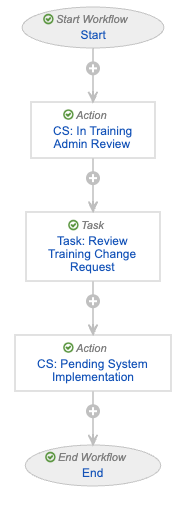
The Veeva-recommended lifecycle and workflow configuration follows a basic Training Change Request use case in which:

* In the TCR's *Initiated* state, requestors initiate a workflow via the "Send to Training Admin" user action. This sends the TCR to a Training Admin for review. Once initiated, the TCR transitions to the *In Training Admin Review* state.
* While *In Training Admin Review*, Training Admins review the request. In the event updates are required, they can remove or update *Matrix Change Items* directly.
* Once all change items are ready, Training Admins render a single "Ready for Implementation" verdict, and the record transitions to the *Pending System Implementation* state. Vault references this state to apply the proposed matrix changes and transition the TCR to the *Complete* state.

The workflow and lifecycle is additionally configured such that:
* The custom workflow is labeled "TCR: Send to Training Administrator".
* The **Start** step includes a participant control to use the Training Administrator role as a participant. To support this:
    * The *Training Change Request* lifecycle includes the Training Administrator role.
    * The *Training Change Request* object is configured with a custom sharing rule, where the Training Administrator role is mapped to a Training Administrators group.
* The **Task** step's settings assign the task to the Training Administrator role. The task is available to all users in this participant group.
<a href="https://platform.veevavault.help/assets/images/tcr-sample-configuration.png" data-lightbox="tcr-sample-configuration.png" data-title="" data-alt="screenshot of the described workflow configuration">
  <img class="docimage" src="https://platform.veevavault.help/assets/images/tcr-sample-configuration.png" alt="screenshot of the described workflow configuration" style=""  />
</a>

### TCR Workflow for the My Team Page {#tcr-my-team-wf}

Training Change Request functionality within the My Team page is delivered with a standard *VT: Manager Homepage Initiate TCR* placeholder workflow that your organization can update with custom configurations. 

When this workflow does not include any custom configurations:

* Vault creates a *Training Change Request* in the *Initiated* state, and related *Matrix Change Items* with a "Ready to Implement" *Implementation Status*.
* The change request record remains in the *Initiated* state until the Manager or other user starts a workflow. When your organization follows the recommended configuration, this is the "TCR: Send to Training Administrator" workflow used for the TCR feature generally.


## Limitations {#limitations}

Training Change Request is an evolving feature which supports many, but not all, requests to update your organization's Training Matrix.

See <a href="/en/gr/868522/#limitations">additional details</a> on the types of matrix changes users can currently request with this feature, including via the <a href="/en/gr/627003/#tcr-limitations">My Team page</a>.

Additionally, this feature can function differently for users requesting new matrix records. See [additional details][8] on how your Vault's security configuration can impact <a href="/en/gr/868522/#how-tcr-works">user experience</a>.


## Related Permissions {#related-permissions}

To work with Training Change Requests generally, users must be assigned a <a href="/en/gr/23647/#how_to_edit_permission_sets">permission set</a> with the below permissions to submit a change request of any kind.

These basic permissions can be expanded such that:
* Users are granted [additional capability][8] when requesting to create a new matrix record.
* Users can <a href="/en/gr/868522/#tcr-tria">create</a> _Matrix Change Items_ directly [from a TRIA record][7].

| Permission Label | Permission |
|---|---|
| Objects: Training Change Request | Read, Create, Edit |
| Objects: Training Change Request:<br> Object Control Permissions: Matrix Change Items | View |
| Objects: Matrix Change Item | Read, Create, Edit, Delete |
| Tabs: Training Change Request | View |

### About Expanded Permissions {#expanded-permissions}

In contrast to this feature's basic permissions for creating new matrix records, you can configure expanded permissions such that requestors can additionally:

* Populate a new record's fields
* Associate Training Materials
* Associate existing matrix records

See <a href="/en/gr/868522/#expanded-permissions">additional details</a> on how this can work in your Vault.

| Permission Label | Permission | Controls |
|---|---|---|
| Objects: Curriculum: Object Permissions: Base Curriculum, Curriculum | Read, Create, Edit | Ability to populate fields during creation. |
| Objects: Curriculum-Learner Role | Read, Create, Edit | Ability to associate an existing Curriculum or Learner Role to the matrix record being created. |
| Objects: Learner Role: Object Permissions: Base Learner Role, Learner Role | Read, Create, Edit | Ability to populate fields during creation. |
| Objects: Training Requirement: Object Permissions: [All applicable object types] | Read, Create, Edit | Ability to populate fields during creation. |
| Objects: Training Requirement-Curriculum | Read, Create, Edit | Ability to associate an existing Training Requirement or Curriculum to the matrix record being created. |


### Related TRIA Permissions {#tria-permissions}

If your Training Change Request implementation includes the ability to <a href="/en/gr/868522/#tcr-tria">create</a> _Matrix Change Items_ directly from a TRIA record, relevant users must be assigned a permission set with the below permissions, in addition to this feature's basic permissions.

| Permission Label | Permission |
|---|---|
| Objects: Training Requirement Impact Assessment | Read, Edit |
| Objects: Training Requirement Impact Assessment:<br> Object Control Permissions: Training Requirement Matrix Changes | View |

[1]: #use-cases
[2]: #configuring-tcr-tria
[3]: #tcr-lifecycle-workflow
[4]: #sample-config
[5]: #limitations
[6]: #related-permissions
[7]: #tria-permissions
[8]: #expanded-permissions
[9]: #tcr-my-team-wf
