Note: This feature must be configured by a Vault Admin in Veeva Training and Study Training Vaults.
## How Curriculum Outcomes Work
Generally, Curriculum Outcomes enable organizations to dynamically manage an aspect of their capabilities within Vault, based on their completion of a given *Curriculum* that covers that capability. In this context, a Vault user's "capabilities" refers to how they interact with Vault according to various security configurations (via *Application Roles* or user-managed Groups), or their *Learner Role* assignments.
Supported [outcome types][1] can be defined by Training Admins for:
* All instances of a *Curriculum* in the matrix, or
* A specific *Learner Role* and *Curriculum* pairing.
Once a Learner completes the last *Training Assignment* to fulfill the curriculum, Vault processes the outcome by granting or revoking access according to the configured outcome via the *Curriculum Outcome Fulfillment* hourly job. The job additionally manages the underlying [rule records][6] as a Training Admin adds or removes outcomes.
For example, in the case of adding a Learner to a *Learner Role*, Vault associates the Learner's *Person* record to the intended *Learner Role* via the *Curriculum Outcome Fulfillment* job. Then, as the Learner has not yet trained on this role's requirements, Vault assigns new *Training Assignments* via the next *Update Training Assignments* job run.
### Supported Outcome Types {#supported-outcome-types}
Curriculum Outcomes includes the below outcome types, each of which is subject to [limitations][7]. Each type corresponds to _Outcome Type_ picklist values within the _Outcome Type_ [record][6].
See [Vault Security Overview][2] for additional details.
| Outcome Type | Purpose | Example |
|---|---|---|
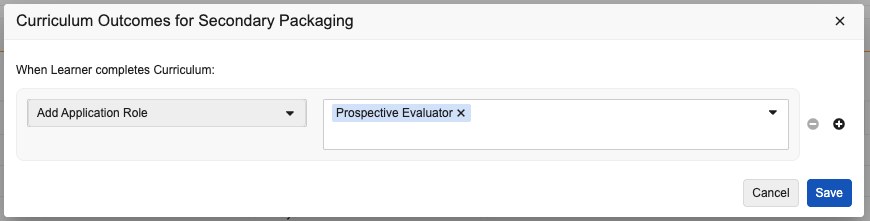
| Add Application Role | Creates a _User Role_ for Learners (_Users_) via _Application Roles_ | Grant the "DCC Change Authorization Approver" _Application Role_ to Learners upon completing the "Change Control Authorization" _Curriculum_. |
| Add Group | Assigns Learners (_Users_) to a user-managed Group | -Add Learners to an "Instructors" Group upon completing the "Classroom Training" _Curriculum_.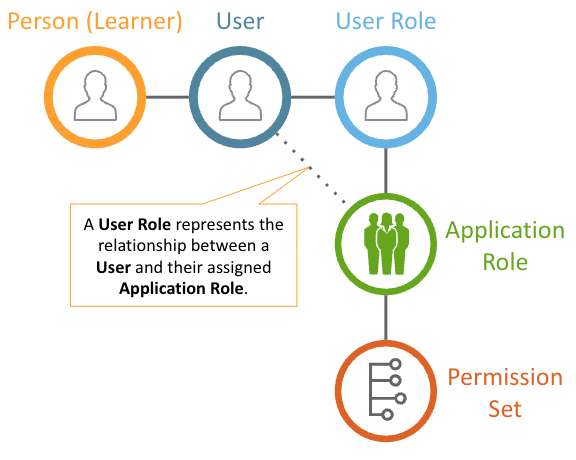 ## Configuring Curriculum Outcomes {#configuring-curriculum-outcomes}
To configure Curriculum Outcomes:
1. Activate the _Outcome_ object types within the _Curriculum Training Rule_ and _Curriculum Training Rule Set_ objects.
2. Enable the _Display in Business Admin_ configuration option or create custom tabs for the _Curriculum Training Rule_ and _Curriculum Training Rule Set_ objects. We recommend naming custom tabs "Curriculum Outcome Rule" and "Curriculum Outcome Rule Set", respectively.
3. Within the _Curriculum_ object, add the _Create Curriculum Outcome_ action and select the **Available in All Lifecycle States** configuration option. In the **Atomic Action Security Defaults** dialog, select **Execute** for all lifecycle states.
4. Assign the _Create Curriculum Outcome_ action to the desired _Curriculum_ object's _Curriculum_ object type, as well as any desired custom object types.
5. Ensure Training Admins are assigned the appropriate [permissions][4] to work with this feature.
6. [Activate](/en/lr/22897/#how-to-edit-job-definitions) the _Curriculum Outcome Fulfillment_ job. We recommend additionally updating the job's owner to a user or group who should be notified in the event the job fails. Optionally, you can update the job's default hourly interval (1).
## Defining Curriculum Outcomes {#defining-curriculum-outcomes}
Generally, Vault can process [supported outcomes][1] for either all instances of a *Curriculum* in the matrix, or a specific *Learner Role* and *Curriculum* pairing (ideally when [Curriculum Sequencing & Prerequisites](/en/lr/589032/) are configured).
To define a new outcome for all instances of a *Curriculum* in the matrix:
1. Locate the relevant *Curriculum* record and click the **Create Curriculum Outcome** button, or select the related user action.
2. In the **Curriculum Outcomes** dialog, select an outcome type from the **Select action** dropdown, for example, **Add Learner Role**.
3. Select up to ten applicable records. The records you can select may be [limited][7] based on the selected action.
4. Optional: Use the and to add or remove outcomes.
5. Click **Save**.
To define a new outcome for a specific *Learner Role* and *Curriculum* pairing:
1. Locate the relevant *Learner Role* and click the **Manage Curriculum Rules** button, or select the related action.
2. Vault loads the **Curriculum Sequencing Rule Builder** page. Hover over the desired *Curriculum* and select **Create Rule**.
3. Select the **Outcomes** tab and follow Steps 2-5 above.
When your Vault does not have this configuration, you can instead create an outcome for the *Curriculum*, then update the related *Curriculum Training Rule Set* record's *Learner Role* field with the applicable record.
To update and/or remove these outcome configurations, locate them per the above steps and apply your updates.
### Curriculum Outcome Objects {#outcome-objects}
As Training Admins add and remove outcomes, Vault automatically creates or deletes the underlying rule records via the *Curriculum Outcome Fulfillment* job:
* A *Curriculum Training Rule Set* defining the target *Curriculum*, and, when applicable, the specific *Learner Role* associated with the target *Curriculum*.
* A *Curriculum Training Rule* defining the [_Outcome Type_][1] or types for the target *Curriculum Training Rule Set*.
* *Outcome Type* picklist values represent each supported type.
* *Curriculum Training Rule Type* values differentiate outcome rule records from rules related to [prerequisites](/en/lr/589032/).
Vault additionally deletes these records when a Vault Admin saves an outcome-related *Application Role* with a selected *Permission Set*, as Curriculum Outcomes [does not support][7] this scenario.
Secondary to these are the system-managed records Vault uses to track a given outcome:
* Upon Learner assignment, *Curriculum Completion Status* records are automatically created for each combination of Learner (*Person*), *Learner Role*, and *Curriculum*. This record's [*Completion Percentage*](/en/lr/24483/) and *Latest Automation Update* field can provide useful completion statistics as a Learner works through their assignments.
* Upon Learner completion, Vault marks the completion status record as *Complete* (via the *Current Completion Status*), then creates an accompanying *Curriculum Outcome Status* record.
## Limitations {#limitations}
Curriculum Outcomes are not supported for:
* Adding Learners to *Application Roles* with an associated permission set.
* When a Training Admin defines an outcome, Vault filters out these roles.
* When a role is already defined within an outcome and a Vault Admin attempts to populate the **Permission Set** field, Vault displays an impact alert. If the Vault Admin proceeds with selecting a permission set, Vault deletes the rule (*Curriculum Training Rule*).
* Adding Learners to Groups with an associated security profile.
* When a Training Admin defines an outcome, Vault filters out any non-[user managed group](/en/lr/3200/#user-managed-groups). Only user managed groups are supported for this feature.
* When a group is already defined within an outcome, Vault Admins can still populate the **Included Security Profiles** field. When this occurs:
* The *Curriculum Outcome Fulfillment* job logs the event.
* The next time a Training Admin updates the outcomes defined for impacted curricula, Vault displays an impact alert with the impacted rule and group details.
See [additional details][1] on supported outcome types.
### Record Limits
Training Admins can define one outcome (*Curriculum Training Rule Set*) per *Curriculum* or *Learner Role*-*Curriculum* pairing. This means a given curriculum can have defined outcomes for all instances in the matrix, or just within the context of its relationship with a *Learner Role*, but not both.
Each *Curriculum* can include one outcome per [outcome type][1] (*Curriculum Training Rule*, according to its *Outcome Type*).
When defining an outcome, Training Admins can select up to ten records for each type (*Application Role*, *Learner Role*, and Group).
## Related Permissions {#permissions}
Training Admins working with Curriculum Outcomes must be assigned a permission set with the below permissions. If your Vault is configured for [Curriculum Sequencing & Prerequisites](/en/lr/589032/), some of these permissions may already be in place.
| Permission Label | Permission |
|---|---|
| Admin: Users | Assign Group |
| Admin: Groups | Read, Assign Users |
| Objects: Curriculum | Read |
| Objects: _Curriculum Training Rule_ and _Outcome_ object type | Read, Create, Edit, Delete |
| Objects: _Curriculum Training Rule Set_ and _Outcome_ object type | Read, Create, Edit, Delete |
| Objects: Learner Role | Read |
| Objects: Learner Role-Curriculum Order | Read, Edit |
## Configuring Curriculum Outcomes {#configuring-curriculum-outcomes}
To configure Curriculum Outcomes:
1. Activate the _Outcome_ object types within the _Curriculum Training Rule_ and _Curriculum Training Rule Set_ objects.
2. Enable the _Display in Business Admin_ configuration option or create custom tabs for the _Curriculum Training Rule_ and _Curriculum Training Rule Set_ objects. We recommend naming custom tabs "Curriculum Outcome Rule" and "Curriculum Outcome Rule Set", respectively.
3. Within the _Curriculum_ object, add the _Create Curriculum Outcome_ action and select the **Available in All Lifecycle States** configuration option. In the **Atomic Action Security Defaults** dialog, select **Execute** for all lifecycle states.
4. Assign the _Create Curriculum Outcome_ action to the desired _Curriculum_ object's _Curriculum_ object type, as well as any desired custom object types.
5. Ensure Training Admins are assigned the appropriate [permissions][4] to work with this feature.
6. [Activate](/en/lr/22897/#how-to-edit-job-definitions) the _Curriculum Outcome Fulfillment_ job. We recommend additionally updating the job's owner to a user or group who should be notified in the event the job fails. Optionally, you can update the job's default hourly interval (1).
## Defining Curriculum Outcomes {#defining-curriculum-outcomes}
Generally, Vault can process [supported outcomes][1] for either all instances of a *Curriculum* in the matrix, or a specific *Learner Role* and *Curriculum* pairing (ideally when [Curriculum Sequencing & Prerequisites](/en/lr/589032/) are configured).
To define a new outcome for all instances of a *Curriculum* in the matrix:
1. Locate the relevant *Curriculum* record and click the **Create Curriculum Outcome** button, or select the related user action.
2. In the **Curriculum Outcomes** dialog, select an outcome type from the **Select action** dropdown, for example, **Add Learner Role**.
3. Select up to ten applicable records. The records you can select may be [limited][7] based on the selected action.
4. Optional: Use the and to add or remove outcomes.
5. Click **Save**.
To define a new outcome for a specific *Learner Role* and *Curriculum* pairing:
1. Locate the relevant *Learner Role* and click the **Manage Curriculum Rules** button, or select the related action.
2. Vault loads the **Curriculum Sequencing Rule Builder** page. Hover over the desired *Curriculum* and select **Create Rule**.
3. Select the **Outcomes** tab and follow Steps 2-5 above.
When your Vault does not have this configuration, you can instead create an outcome for the *Curriculum*, then update the related *Curriculum Training Rule Set* record's *Learner Role* field with the applicable record.
To update and/or remove these outcome configurations, locate them per the above steps and apply your updates.
### Curriculum Outcome Objects {#outcome-objects}
As Training Admins add and remove outcomes, Vault automatically creates or deletes the underlying rule records via the *Curriculum Outcome Fulfillment* job:
* A *Curriculum Training Rule Set* defining the target *Curriculum*, and, when applicable, the specific *Learner Role* associated with the target *Curriculum*.
* A *Curriculum Training Rule* defining the [_Outcome Type_][1] or types for the target *Curriculum Training Rule Set*.
* *Outcome Type* picklist values represent each supported type.
* *Curriculum Training Rule Type* values differentiate outcome rule records from rules related to [prerequisites](/en/lr/589032/).
Vault additionally deletes these records when a Vault Admin saves an outcome-related *Application Role* with a selected *Permission Set*, as Curriculum Outcomes [does not support][7] this scenario.
Secondary to these are the system-managed records Vault uses to track a given outcome:
* Upon Learner assignment, *Curriculum Completion Status* records are automatically created for each combination of Learner (*Person*), *Learner Role*, and *Curriculum*. This record's [*Completion Percentage*](/en/lr/24483/) and *Latest Automation Update* field can provide useful completion statistics as a Learner works through their assignments.
* Upon Learner completion, Vault marks the completion status record as *Complete* (via the *Current Completion Status*), then creates an accompanying *Curriculum Outcome Status* record.
## Limitations {#limitations}
Curriculum Outcomes are not supported for:
* Adding Learners to *Application Roles* with an associated permission set.
* When a Training Admin defines an outcome, Vault filters out these roles.
* When a role is already defined within an outcome and a Vault Admin attempts to populate the **Permission Set** field, Vault displays an impact alert. If the Vault Admin proceeds with selecting a permission set, Vault deletes the rule (*Curriculum Training Rule*).
* Adding Learners to Groups with an associated security profile.
* When a Training Admin defines an outcome, Vault filters out any non-[user managed group](/en/lr/3200/#user-managed-groups). Only user managed groups are supported for this feature.
* When a group is already defined within an outcome, Vault Admins can still populate the **Included Security Profiles** field. When this occurs:
* The *Curriculum Outcome Fulfillment* job logs the event.
* The next time a Training Admin updates the outcomes defined for impacted curricula, Vault displays an impact alert with the impacted rule and group details.
See [additional details][1] on supported outcome types.
### Record Limits
Training Admins can define one outcome (*Curriculum Training Rule Set*) per *Curriculum* or *Learner Role*-*Curriculum* pairing. This means a given curriculum can have defined outcomes for all instances in the matrix, or just within the context of its relationship with a *Learner Role*, but not both.
Each *Curriculum* can include one outcome per [outcome type][1] (*Curriculum Training Rule*, according to its *Outcome Type*).
When defining an outcome, Training Admins can select up to ten records for each type (*Application Role*, *Learner Role*, and Group).
## Related Permissions {#permissions}
Training Admins working with Curriculum Outcomes must be assigned a permission set with the below permissions. If your Vault is configured for [Curriculum Sequencing & Prerequisites](/en/lr/589032/), some of these permissions may already be in place.
| Permission Label | Permission |
|---|---|
| Admin: Users | Assign Group |
| Admin: Groups | Read, Assign Users |
| Objects: Curriculum | Read |
| Objects: _Curriculum Training Rule_ and _Outcome_ object type | Read, Create, Edit, Delete |
| Objects: _Curriculum Training Rule Set_ and _Outcome_ object type | Read, Create, Edit, Delete |
| Objects: Learner Role | Read |
| Objects: Learner Role-Curriculum Order | Read, Edit |
Note: When defining outcomes, Training Admins can select any Application Role. This includes roles they cannot normally see when manually assigning User Roles via a User record.