# QMS Overview
Veeva QMS is an application that manages global quality processes across an organization and its external partners.
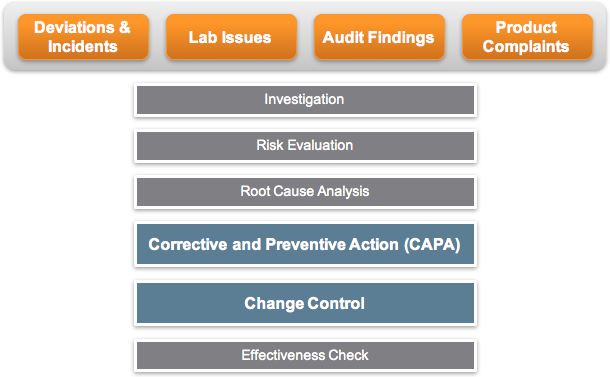 ## Veeva QMS Features
Veeva QMS is built on the Veeva Vault platform and therefore has the features that are described in the platform help topics. In addition, it includes these capabilities specific to the management of global quality processes:
* **Quality Lifecycles, Workflows, and Object Model**: Veeva QMS supports deployment of _Deviation_, _Internal_ and _External Audit_, _Complaint_, _Lab Investigation_, _Change Control_, and _CAPA_ processes via delivered lifecycles, workflows, and data model that reflect latest industry practices. Admins can also enable specific quality event data models to suit their business needs.
* **Audit Trails**: Veeva QMS demonstrates compliance with detailed audit trails capturing important events including execution of a signature, process state changes, task creation and assignment, and more.
* **Reasons for Change**: Veeva QMS provides the option for Admins to require users to provide a reason for change upon editing a specific object field to meet regulatory requirements.
* **Supplier access and visibility**: Veeva QMS provides access to suppliers and contract manufacturers, giving them visibility into key quality processes.
* **Quality reporting and dashboards**: Veeva QMS tracks and visualizes quality management operations by combining related metadata across objects, such as _Deviations_, _Investigations_, _Root Causes_, _CAPAs_, _Change Controls_, and more.
* **Entry Criteria for Related Documents**: This feature allows you to require documents related to a specific object record to be in specific state types (Ready for DCC Approval, Effective, Obsolete, etc.) before the object record can move into the destination state.
* **Effectiveness Check Automation**: This feature automates the creation and processing of _Effectiveness Check_ records. The _Create Effectiveness Check_ record entry action is available for the _Quality Event_, _CAPA Action_, _Change Control_, _Change Plan_, _Deviation_, _Finding_, and _Continuous Improvement_ object lifecycles. To take full advantage of this feature, you can model configurations to automate the business process around completing changes or actions within QMS.
* **Quality Teams**: With this feature, you can manage structured teams of individual users that are responsible for completing specific processes within your Vault.
* **Quality Risk Management (QRM)**: Manage the risk associated with enterprise and operational processes in your Vault using risk matrices and risk registers. Create _Assessments_ and _Risks_ using the Risk Builder tool and generate heat map visualizations. Conduct periodic review of assessments and risks.
* **Audit Program Planning**: Using the _Audit Program_ object, you can initiate, plan, and approve audit programs for execution for a determined time period. Once the _Audit Program_ record enters a specified state, Vault automatically creates _Audit_ object records based on _Proposed Audit_ record data within the _Audit Program_. Using the configurable _Create Proposed Audits_ user action, Vault can automatically create associated _Proposed Audit_ records based on the _Planned Start Date_ and _Planned End Date_ of the _Audit Program_.
* **External Response Collaboration**: Automates temporary External User account provisioning for partners to respond to applicable events, _CAPAs_, or _SCARs_. Vault users identify _Persons_ to assign external findings or requests to, and Vault can invite or uninvite these persons to or from your Vault automatically at specific lifecycle states within a record's lifecycle.
* **External Collaboration Checklists**: Provides temporary access to your Vault for external contacts to complete checklist questionnaires in order to gather information about a partner organization's business, capabilities, compliance, and risk profile.
* **Relationship Automation for Quality Objects**: Creates two-way relationships between records of _Quality Events_, _Audits_, _CAPAs_, _Change Controls_, _Change Plans_, _Deviations_, _Findings_, or _Continuous Improvements_. With optionally defined relationship natures, users can easily see the origin of the relationship.
* **Quality Document Generation**: Allows Admins to configure user actions, entry actions, and workflow steps which create a document based on data in an object record. These documents are created from Adobe or Word formatted output templates, document templates, reports, or from the object layout itself, allowing complex configurations and data from multiple related records to be brought into the generated document. Documents created by this function inherit Vault Document metadata from the starting record, are added to the Library, and are linked to the record from which they were generated.
* **Record Checks**: An intelligent and streamlined interface for users to determine whether an event or _Complaint_ is a recurrence, duplicate, or follow-up of another such record. With this feature configured, Vault can simplify a complex manual process with a simple user action where text search terms are automatically suggested by Vault.
* **Cycle Time Metrics**: Capture reportable data on cycle times and closure deltas from due dates on supported object types.
* **Related Record Automation**: Uses _Related Record Configurations_ to automate the creation of full records or placeholder records based on the lifecycle progress of another record.
* **APQR/QMR**: Supports management of APQR and QMR processes. The Annual Product Quality Review (APQR) process is an annual evaluation of the quality standard of a drug product to determine the need for adjustments in drug product specifications, manufacturing, and control procedures. The Quality Management Review (QMR) process is an evaluation of the effectiveness and suitability of a quality system.
* **Supplier Change Notification Automation**: Automatically creates _Supplier Change Notification_ object records using a standard Vault email processor. Stores follow-up emails and attachments in a single record repository.
* **5 Whys Analysis**: Allows users to perform and document a 5 Whys Analysis, as a tool to assist in determining the root cause of an event or _Complaint_.
* **Quality Incidents**: The _Quality Incident_ object and lifecycle allows your organization to triage an incident to determine if it is necessary to initiate a quality event. This avoids skewing quality event metrics, and unnecessarily complicating audits.
* **Auditor Profiles & Qualifications**: Veeva QMS can capture key demographic information about auditors, and manage the variety of qualifications that may be required for an auditor to perform any given role on various types of audits. With this solution, auditors can even be automatically given security rights or access across the Vault as they complete their qualifications. This addresses scenarios where it can be difficult to know which personnel are authorized to perform a role on an audit.
* **Field Corrective Action Automation**: Veeva QMS supports the creation, management, and automation of _Field Corrective Actions_ (FCAs) to support the recall of medical devices with potential safety issues.
* **Supplier Risk Assessments**: Veeva QMS supports performing Supplier Risk Assessments to identify and rank complex risk factors, such as quality or compliance, associated with engaging or continuing to use a supplier. With this feature, Vault calculates an assessment score and suggests a risk level using criteria defined by your organization.
* **Quality Automated Language Translations**: Veeva QMS supports the instant translation of data on supported object records via a user or entry action during complaint intake and processing in order to ensure that complaints are triaged quickly.
* **Continuous Improvements and Standalone CAPAs**: Veeva QMS provides the _Continuous Improvement_ object to allow your organization to manage proactive continuous improvements and event-driven standalone CAPAs.
* **Record History**: Veeva QMS provides functionality to capture a record and its data at the time of approval or closure, and to preserve and display captured versions of the record on its detail page.
* **Organization Management**: Veeva QMS provides a robust shared data model and functionality to manage information and processes involving the external partners your organization works with.
## Standard Connections
### Quality-RIM Connection
This connection between a Quality QMS Vault and a RIM Registrations Vault automates data sharing between the two applications, supporting change control initiation, regulatory assessment, and close out. See details about the Quality-RIM Connection.
### Quality-Clinical Operations Connection
Organizations using both a Clinical Operations Vault and a Quality Vault can utilize a connection between the two Vaults to automatically transfer Study data from Clinical Operations to Quality. This connection transfers _Study_, _Study Country_, and _Study Site_ information across Vaults.
## Veeva QMS Features
Veeva QMS is built on the Veeva Vault platform and therefore has the features that are described in the platform help topics. In addition, it includes these capabilities specific to the management of global quality processes:
* **Quality Lifecycles, Workflows, and Object Model**: Veeva QMS supports deployment of _Deviation_, _Internal_ and _External Audit_, _Complaint_, _Lab Investigation_, _Change Control_, and _CAPA_ processes via delivered lifecycles, workflows, and data model that reflect latest industry practices. Admins can also enable specific quality event data models to suit their business needs.
* **Audit Trails**: Veeva QMS demonstrates compliance with detailed audit trails capturing important events including execution of a signature, process state changes, task creation and assignment, and more.
* **Reasons for Change**: Veeva QMS provides the option for Admins to require users to provide a reason for change upon editing a specific object field to meet regulatory requirements.
* **Supplier access and visibility**: Veeva QMS provides access to suppliers and contract manufacturers, giving them visibility into key quality processes.
* **Quality reporting and dashboards**: Veeva QMS tracks and visualizes quality management operations by combining related metadata across objects, such as _Deviations_, _Investigations_, _Root Causes_, _CAPAs_, _Change Controls_, and more.
* **Entry Criteria for Related Documents**: This feature allows you to require documents related to a specific object record to be in specific state types (Ready for DCC Approval, Effective, Obsolete, etc.) before the object record can move into the destination state.
* **Effectiveness Check Automation**: This feature automates the creation and processing of _Effectiveness Check_ records. The _Create Effectiveness Check_ record entry action is available for the _Quality Event_, _CAPA Action_, _Change Control_, _Change Plan_, _Deviation_, _Finding_, and _Continuous Improvement_ object lifecycles. To take full advantage of this feature, you can model configurations to automate the business process around completing changes or actions within QMS.
* **Quality Teams**: With this feature, you can manage structured teams of individual users that are responsible for completing specific processes within your Vault.
* **Quality Risk Management (QRM)**: Manage the risk associated with enterprise and operational processes in your Vault using risk matrices and risk registers. Create _Assessments_ and _Risks_ using the Risk Builder tool and generate heat map visualizations. Conduct periodic review of assessments and risks.
* **Audit Program Planning**: Using the _Audit Program_ object, you can initiate, plan, and approve audit programs for execution for a determined time period. Once the _Audit Program_ record enters a specified state, Vault automatically creates _Audit_ object records based on _Proposed Audit_ record data within the _Audit Program_. Using the configurable _Create Proposed Audits_ user action, Vault can automatically create associated _Proposed Audit_ records based on the _Planned Start Date_ and _Planned End Date_ of the _Audit Program_.
* **External Response Collaboration**: Automates temporary External User account provisioning for partners to respond to applicable events, _CAPAs_, or _SCARs_. Vault users identify _Persons_ to assign external findings or requests to, and Vault can invite or uninvite these persons to or from your Vault automatically at specific lifecycle states within a record's lifecycle.
* **External Collaboration Checklists**: Provides temporary access to your Vault for external contacts to complete checklist questionnaires in order to gather information about a partner organization's business, capabilities, compliance, and risk profile.
* **Relationship Automation for Quality Objects**: Creates two-way relationships between records of _Quality Events_, _Audits_, _CAPAs_, _Change Controls_, _Change Plans_, _Deviations_, _Findings_, or _Continuous Improvements_. With optionally defined relationship natures, users can easily see the origin of the relationship.
* **Quality Document Generation**: Allows Admins to configure user actions, entry actions, and workflow steps which create a document based on data in an object record. These documents are created from Adobe or Word formatted output templates, document templates, reports, or from the object layout itself, allowing complex configurations and data from multiple related records to be brought into the generated document. Documents created by this function inherit Vault Document metadata from the starting record, are added to the Library, and are linked to the record from which they were generated.
* **Record Checks**: An intelligent and streamlined interface for users to determine whether an event or _Complaint_ is a recurrence, duplicate, or follow-up of another such record. With this feature configured, Vault can simplify a complex manual process with a simple user action where text search terms are automatically suggested by Vault.
* **Cycle Time Metrics**: Capture reportable data on cycle times and closure deltas from due dates on supported object types.
* **Related Record Automation**: Uses _Related Record Configurations_ to automate the creation of full records or placeholder records based on the lifecycle progress of another record.
* **APQR/QMR**: Supports management of APQR and QMR processes. The Annual Product Quality Review (APQR) process is an annual evaluation of the quality standard of a drug product to determine the need for adjustments in drug product specifications, manufacturing, and control procedures. The Quality Management Review (QMR) process is an evaluation of the effectiveness and suitability of a quality system.
* **Supplier Change Notification Automation**: Automatically creates _Supplier Change Notification_ object records using a standard Vault email processor. Stores follow-up emails and attachments in a single record repository.
* **5 Whys Analysis**: Allows users to perform and document a 5 Whys Analysis, as a tool to assist in determining the root cause of an event or _Complaint_.
* **Quality Incidents**: The _Quality Incident_ object and lifecycle allows your organization to triage an incident to determine if it is necessary to initiate a quality event. This avoids skewing quality event metrics, and unnecessarily complicating audits.
* **Auditor Profiles & Qualifications**: Veeva QMS can capture key demographic information about auditors, and manage the variety of qualifications that may be required for an auditor to perform any given role on various types of audits. With this solution, auditors can even be automatically given security rights or access across the Vault as they complete their qualifications. This addresses scenarios where it can be difficult to know which personnel are authorized to perform a role on an audit.
* **Field Corrective Action Automation**: Veeva QMS supports the creation, management, and automation of _Field Corrective Actions_ (FCAs) to support the recall of medical devices with potential safety issues.
* **Supplier Risk Assessments**: Veeva QMS supports performing Supplier Risk Assessments to identify and rank complex risk factors, such as quality or compliance, associated with engaging or continuing to use a supplier. With this feature, Vault calculates an assessment score and suggests a risk level using criteria defined by your organization.
* **Quality Automated Language Translations**: Veeva QMS supports the instant translation of data on supported object records via a user or entry action during complaint intake and processing in order to ensure that complaints are triaged quickly.
* **Continuous Improvements and Standalone CAPAs**: Veeva QMS provides the _Continuous Improvement_ object to allow your organization to manage proactive continuous improvements and event-driven standalone CAPAs.
* **Record History**: Veeva QMS provides functionality to capture a record and its data at the time of approval or closure, and to preserve and display captured versions of the record on its detail page.
* **Organization Management**: Veeva QMS provides a robust shared data model and functionality to manage information and processes involving the external partners your organization works with.
## Standard Connections
### Quality-RIM Connection
This connection between a Quality QMS Vault and a RIM Registrations Vault automates data sharing between the two applications, supporting change control initiation, regulatory assessment, and close out. See details about the Quality-RIM Connection.
### Quality-Clinical Operations Connection
Organizations using both a Clinical Operations Vault and a Quality Vault can utilize a connection between the two Vaults to automatically transfer Study data from Clinical Operations to Quality. This connection transfers _Study_, _Study Country_, and _Study Site_ information across Vaults.