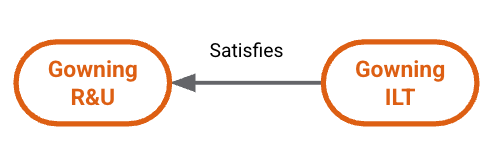
Note: This feature must be configured by a Vault Admin in Veeva Training and Veeva Study Training Vaults.
Note: The job processing described above is supported by a concept called live calculation, which dynamically handles primary and substitute assignments in specific scenarios. This means that these types of assignments may not be visible within the Vault UI until live calculation creates them. See additional details about live calculation. See additional details about live calculation.
 #### Bi-Directional Equivalent {#bi-directional-equivalent}
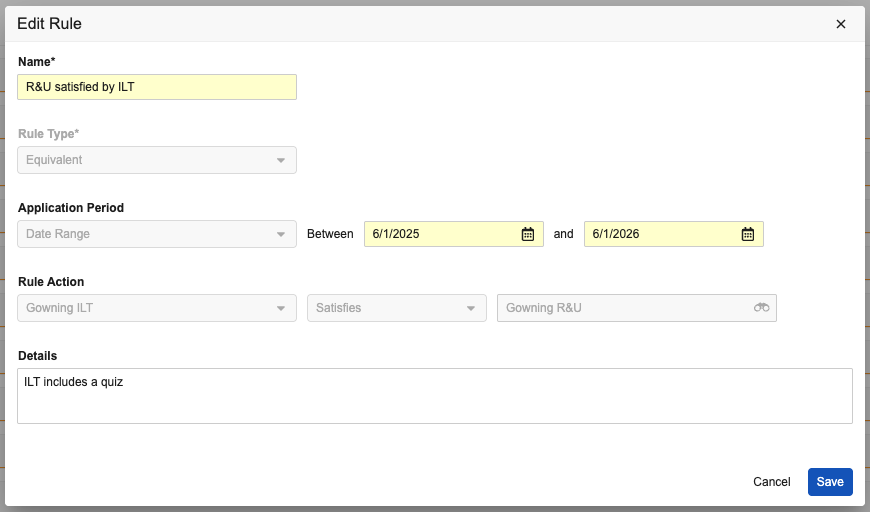
The "Gowning R&U" requirement and related Training Materials are up for biennial review. During the review, a "Gowning ILT" instructor notifies the Training Admin that the "Gowning R&U" requirement's updated materials now match the depth of content covered in the ILT session with the addition of a quiz, and that these requirements are now equivalent to each other.
#### Bi-Directional Equivalent {#bi-directional-equivalent}
The "Gowning R&U" requirement and related Training Materials are up for biennial review. During the review, a "Gowning ILT" instructor notifies the Training Admin that the "Gowning R&U" requirement's updated materials now match the depth of content covered in the ILT session with the addition of a quiz, and that these requirements are now equivalent to each other.
 To accommodate this within the Training Matrix, the Training Admin configures a second training rule such that the "Gowning R&U" is considered to be the equivalent of "Gowning ILT". This new rule can be configured on either requirement, as Vault ensures any configured training rules are visible within all impacted requirements.
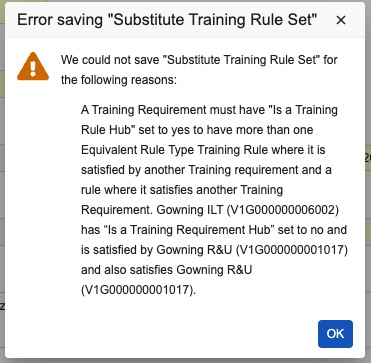
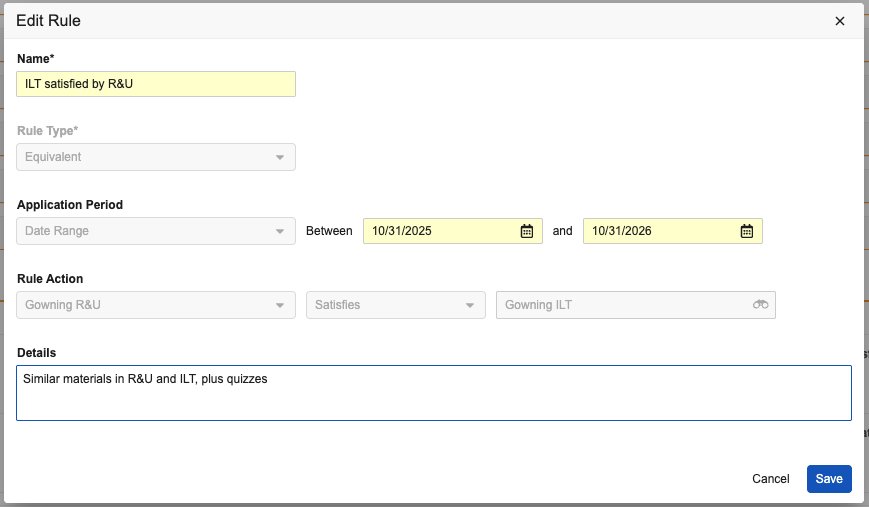 Together, these rules make the equivalency relationship bi-directional: Learners can now complete either the "Gowning R&U" or the "Gowning ILT" assignment and satisfy the one they did not complete. To do this, the Training Admin also marks one of these requirements as a [hub][9].
 #### Bi-Directional Equivalent Rules with a Full Substitute
As part of the "Gowning R&U" requirement's biennial review described above, the requirement's new English-language Training Materials were translated into Spanish, and those materials are now part of a new "Gowning R&U - Spanish" requirement. The Training Admin marks this requirement as a full substitute (where _Is A Substitute Training Requirement_ is selected), and thus does not include it within the "Gowning" _Curriculum_.
#### Bi-Directional Equivalent Rules with a Full Substitute
As part of the "Gowning R&U" requirement's biennial review described above, the requirement's new English-language Training Materials were translated into Spanish, and those materials are now part of a new "Gowning R&U - Spanish" requirement. The Training Admin marks this requirement as a full substitute (where _Is A Substitute Training Requirement_ is selected), and thus does not include it within the "Gowning" _Curriculum_.
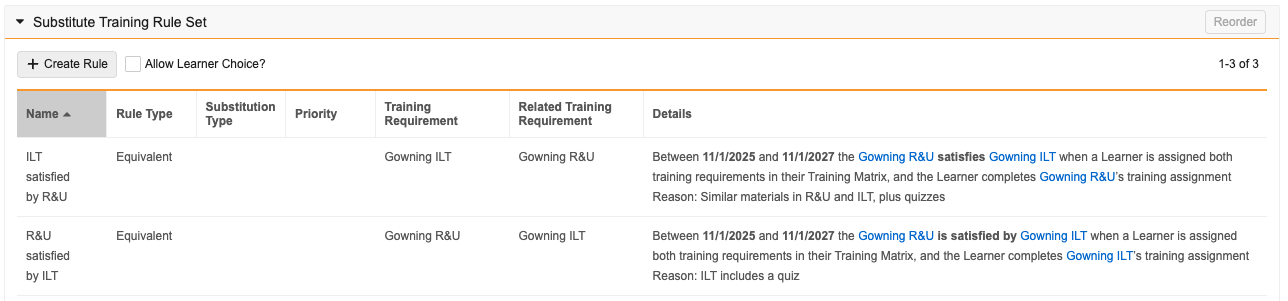
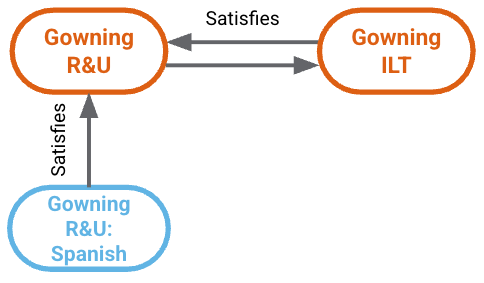 With a third training rule for this group of requirements, Learners opting to complete the "Gowning R&U" are automatically assigned "Gowning R&U Spanish" when their _Person_ record's Language is "Spanish". This English-Spanish "swap" is considered to be a full substitution. See [additional details][5] on other substitution types.
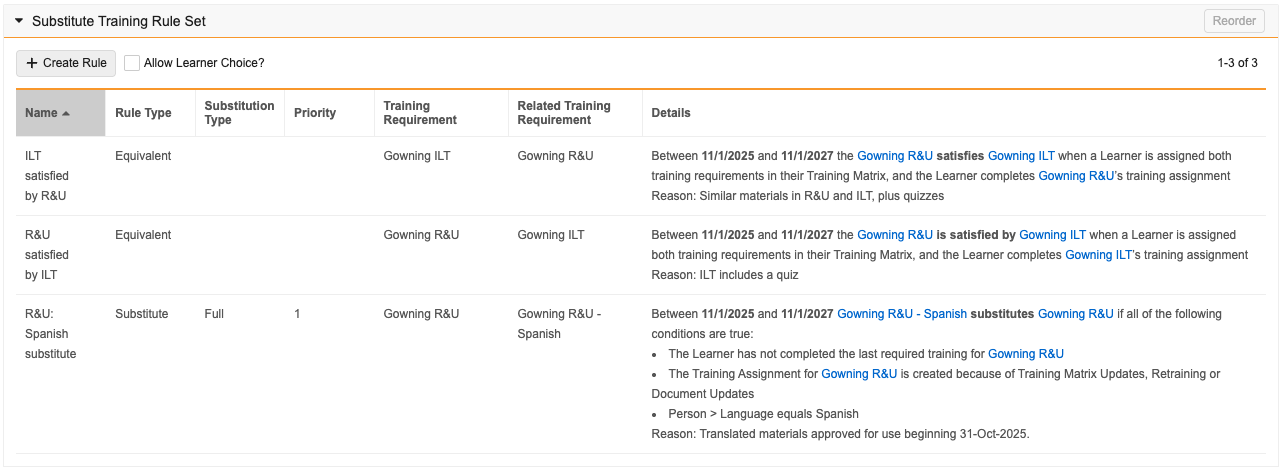
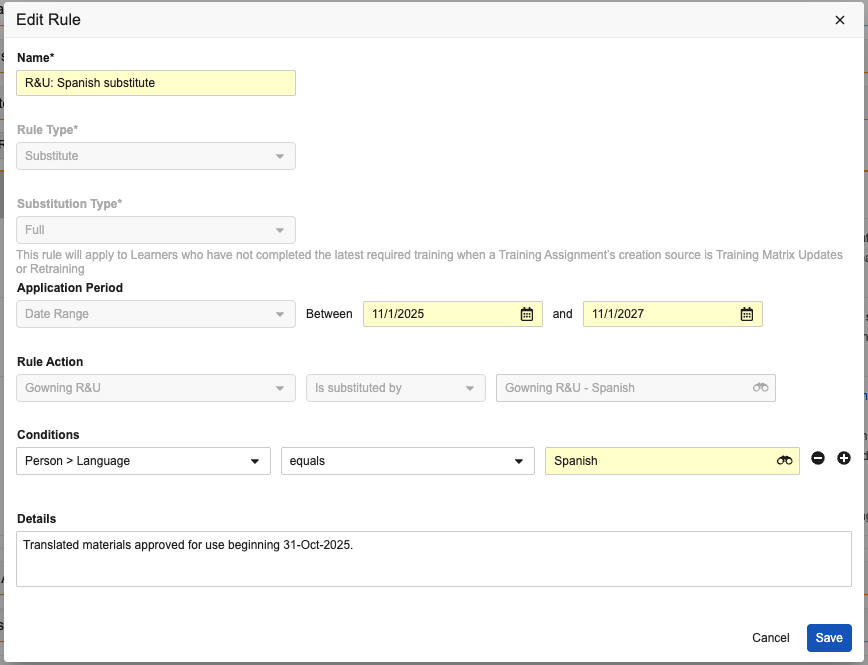 This collection of rules includes full substitute behavior along with the more complex bi-directional equivalency rules:
 ### Full Substitutes
A full substitution is one in which the substitute requirement's Training Materials are fully "swapped" for the primary requirement. This reflects Substitute Training feature functionality prior to the 25R2 release.
#### Locale-Specific Training Materials {#example-locale-specific-training-materials}
You can use Substitute Training to provide training with specialized materials for specific locales or facilities. For example, suppose you are a Training Admin for an international organization who has created a _Training Requirement_ for "Code of Conduct" training and the associated training materials are in English. However, this organization has a facility (Kangawa-A) with employees who only read Japanese.
With Substitute Training feature, you can:
* Create one additional "Code of Conduct" _Training Requirement_, one for the Japanese materials, checking the _Is A Substitute Training Requirement_ checkbox.
* Create a full _Substitute Training Rule_ to substitute this new requirement based on the rule's conditions.
Once created, Vault summarizes the new rule's details in the Substitute Training Rule Set section of both requirements:
`Between 01/01/2025 and 31/12/2025, Code of Conduct - Japanese substitutes Code of Conduct - English
if all of the conditions are true:`
* `The Learner has not completed the last required training for Code of Conduct - English`
* `The Training Assignment for Code of Conduct - English is created because of Training Matrix Updates, Retraining or Document Updates`
* `Learner Role > Facility equals Kanagawa-A, AND;`
* `Person > Language equals Japanese`
With this configuration, when the nightly _Update Training Assignments_ job runs, a Learner whose _Learner Role_ and _Curricula_ include the primary _Training Requirement_, but whose _Person_ record has a "Kanagawa-A" _Facility_ value, would receive a _Training Assignment_ with the appropriate Japanese version of the training materials. When the Learner completes the substitute _Training Assignment_, the Learner automatically gets completion credit for the primary _Training Requirement_. If none of the substitution rules are triggered, the Learner receives the primary _Training Requirement_.
After Vault issues those _Training Assignments_, you may add additional substitution rules to this configuration, such as a rule to issue specialized "Code of Conduct - Contractor - Japanese" assignments to Learners with a _Learner Role_ value of "Contract Employee". In such a case, Vault re-checks the substitution rules each time the Learner opens a _Training Assignment_, and, if the new substitution rule applies to them, Vault issues a new assignment that complies with the updated substitution rules.
#### Aggregated Requirements {#example-aggregated-requirements}
Using Substitute Training, you can give credit for multiple primary _Training Requirements_ with a single substitute _Training Requirement_. Suppose a training system includes an e-learning course which contains all the requisite SOP training material to fill ten _Vault Document Training Requirements_.
You can create one substitute _Training Requirement_ which includes the e-learning course as training material, and define a group substitution rule, pointing to all ten of the existing primary SOP requirements. When the _Update Training Assignments_ job runs, the applicable Learners will receive a single _Training Assignment_ for the e-learning, rather than many separate _Training Assignments_, one for each SOP.
#### External Course Substitution {#example-external-course-substitution}
Substitute Training enables Training Admins to provide alternate methods of receiving required training. Suppose your organization requires CPR certifications for certain types of employees and holds annual CPR courses on-site with an employee instructor managed via a "CPR Certification" _Classroom Training Requirement_. This training is held in March, and is attended by all applicable employees hired in January, February, or March of that year.
In the event that an applicable employee is hired outside of the normal cycle, you may want to allow that employee to acquire the CPR certification using a third-party off-site training course, managed via an _External Training Requirement_ "CPR Certification – Off-Site". In such a case, you can mark the _External Training Requirement_ as a substitute, and define a substitution rule tied to the date of assignment, substituting any "CPR Certification" _Classroom Training Assignment_ assigned outside of January, February, or March, with the _External Training Assignment_ "CPR Certification – Off-Site".
### Delta & Refresher Substitutes
Delta and refresher substitutes are for re-training scenarios, where the substitute requirement includes a specialized set of Training Materials related to the primary requirement's updates. Delta and Refresher Rules are a newer way to manage substitutes as of the 25R2 release.
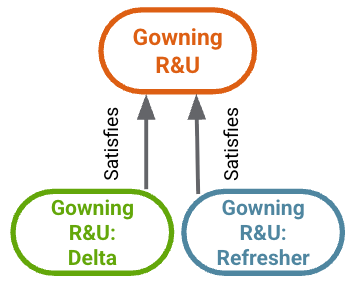
For example, a gowning process owner creates both delta and refresher Training Materials to cover the "Gowning R&U" requirement's SOP latest updates during biennial review. To support this, the Training Admin creates a new substitute _Training Requirement_ for each set of materials, then creates the corresponding delta and refresher rules.
In this scenario, Vault assigns Learners the appropriate substitute for the re-training situation:
* When the "Gowning R&U" requirement is updated as a result of document update such as the recent biennial review, Learners who have previously trained on this requirement are assigned "Gowning R&U: Delta".
* When the "Gowning R&U" requirement recurs in the future, Learners who have previously trained on this requirement are assigned "Gowning R&U: Refresher".
### Full Substitutes
A full substitution is one in which the substitute requirement's Training Materials are fully "swapped" for the primary requirement. This reflects Substitute Training feature functionality prior to the 25R2 release.
#### Locale-Specific Training Materials {#example-locale-specific-training-materials}
You can use Substitute Training to provide training with specialized materials for specific locales or facilities. For example, suppose you are a Training Admin for an international organization who has created a _Training Requirement_ for "Code of Conduct" training and the associated training materials are in English. However, this organization has a facility (Kangawa-A) with employees who only read Japanese.
With Substitute Training feature, you can:
* Create one additional "Code of Conduct" _Training Requirement_, one for the Japanese materials, checking the _Is A Substitute Training Requirement_ checkbox.
* Create a full _Substitute Training Rule_ to substitute this new requirement based on the rule's conditions.
Once created, Vault summarizes the new rule's details in the Substitute Training Rule Set section of both requirements:
`Between 01/01/2025 and 31/12/2025, Code of Conduct - Japanese substitutes Code of Conduct - English
if all of the conditions are true:`
* `The Learner has not completed the last required training for Code of Conduct - English`
* `The Training Assignment for Code of Conduct - English is created because of Training Matrix Updates, Retraining or Document Updates`
* `Learner Role > Facility equals Kanagawa-A, AND;`
* `Person > Language equals Japanese`
With this configuration, when the nightly _Update Training Assignments_ job runs, a Learner whose _Learner Role_ and _Curricula_ include the primary _Training Requirement_, but whose _Person_ record has a "Kanagawa-A" _Facility_ value, would receive a _Training Assignment_ with the appropriate Japanese version of the training materials. When the Learner completes the substitute _Training Assignment_, the Learner automatically gets completion credit for the primary _Training Requirement_. If none of the substitution rules are triggered, the Learner receives the primary _Training Requirement_.
After Vault issues those _Training Assignments_, you may add additional substitution rules to this configuration, such as a rule to issue specialized "Code of Conduct - Contractor - Japanese" assignments to Learners with a _Learner Role_ value of "Contract Employee". In such a case, Vault re-checks the substitution rules each time the Learner opens a _Training Assignment_, and, if the new substitution rule applies to them, Vault issues a new assignment that complies with the updated substitution rules.
#### Aggregated Requirements {#example-aggregated-requirements}
Using Substitute Training, you can give credit for multiple primary _Training Requirements_ with a single substitute _Training Requirement_. Suppose a training system includes an e-learning course which contains all the requisite SOP training material to fill ten _Vault Document Training Requirements_.
You can create one substitute _Training Requirement_ which includes the e-learning course as training material, and define a group substitution rule, pointing to all ten of the existing primary SOP requirements. When the _Update Training Assignments_ job runs, the applicable Learners will receive a single _Training Assignment_ for the e-learning, rather than many separate _Training Assignments_, one for each SOP.
#### External Course Substitution {#example-external-course-substitution}
Substitute Training enables Training Admins to provide alternate methods of receiving required training. Suppose your organization requires CPR certifications for certain types of employees and holds annual CPR courses on-site with an employee instructor managed via a "CPR Certification" _Classroom Training Requirement_. This training is held in March, and is attended by all applicable employees hired in January, February, or March of that year.
In the event that an applicable employee is hired outside of the normal cycle, you may want to allow that employee to acquire the CPR certification using a third-party off-site training course, managed via an _External Training Requirement_ "CPR Certification – Off-Site". In such a case, you can mark the _External Training Requirement_ as a substitute, and define a substitution rule tied to the date of assignment, substituting any "CPR Certification" _Classroom Training Assignment_ assigned outside of January, February, or March, with the _External Training Assignment_ "CPR Certification – Off-Site".
### Delta & Refresher Substitutes
Delta and refresher substitutes are for re-training scenarios, where the substitute requirement includes a specialized set of Training Materials related to the primary requirement's updates. Delta and Refresher Rules are a newer way to manage substitutes as of the 25R2 release.
For example, a gowning process owner creates both delta and refresher Training Materials to cover the "Gowning R&U" requirement's SOP latest updates during biennial review. To support this, the Training Admin creates a new substitute _Training Requirement_ for each set of materials, then creates the corresponding delta and refresher rules.
In this scenario, Vault assigns Learners the appropriate substitute for the re-training situation:
* When the "Gowning R&U" requirement is updated as a result of document update such as the recent biennial review, Learners who have previously trained on this requirement are assigned "Gowning R&U: Delta".
* When the "Gowning R&U" requirement recurs in the future, Learners who have previously trained on this requirement are assigned "Gowning R&U: Refresher".
 ## Creating Substitute Training Requirements {#creating-substitute-tr}
You can create substitute _Training Requirements_ using the same process as other _Training Requirements_ with the addition of having the _Is A Substitute Training Requirement_ checkbox selected.
A substitute _Training Requirement_ is a lightweight _Training Requirement_ used only for substitute purposes. Substitute requirements differ from primary requirements in the following ways:
* Substitute _Training Requirements_ cannot be part of a _Curriculum_. Only primary requirements can be included in the Training Matrix.
* Substitute requirements cannot have _Assign Additional Training Assignment?_ enabled.
* While recurrence is respected for primary _Training Requirements_ with substitution rules, substitute _Training Requirements_ cannot have values in recurrence-related fields.
* The Direct Assignment feature bypasses substitution rules. You can use Direct Assignment for either primary or substitute _Training Requirements_.
* Substitute _Training Assignments_ do not have related _Assignment Details_ records.
### Due Dates for Substitute Training Requirements {#substitute-due-dates}
If you want to have fine control over the due dates of substitute training requirements, you can select from the following options, and your choices can differ for each substitute:
* **Substitute Due Date based on**: This field determines how Vault calculates the _Due Date_ value for the substitute training assignment. Select from the following:
* **Primary Training Assignment Due Date (Earliest if multiple)**: Vault uses the primary training assignment's _Due Date_ value as the due date for the substitute training assignment.
* **Substitute Training Requirement Duration**: Vault calculates a due date for the substitute training assignment based on the substitute training requirement's duration. This is the default behavior, even if the _Substitute Due Date based on_ field is blank.
* **Substitute Due Date Override**: This field determines which _Due Date_ value Vault applies when a Learner receives a substitute training assignment which fulfills multiple primary training requirements. Select from the following:
* **Keep Existing Due Date**: Vault uses the existing training assignment's _Due Date_ value. This is the default behavior, even if the _Substitute Due Date Override_ field is blank.
* **Use Earliest Due Date**: Vault compares the new assignment's _Due Date_ value, based on your _Substitute Due Date based on_ value, against the existing training assignment and uses the earliest _Due Date_ value.
* **Use Last Due Date**: Vault compares the new assignment's _Due Date_ value, based on your _Substitute Due Date based on_ value, against existing training assignment and uses the latest _Due Date_ value.
## Creating Substitute Training Requirements {#creating-substitute-tr}
You can create substitute _Training Requirements_ using the same process as other _Training Requirements_ with the addition of having the _Is A Substitute Training Requirement_ checkbox selected.
A substitute _Training Requirement_ is a lightweight _Training Requirement_ used only for substitute purposes. Substitute requirements differ from primary requirements in the following ways:
* Substitute _Training Requirements_ cannot be part of a _Curriculum_. Only primary requirements can be included in the Training Matrix.
* Substitute requirements cannot have _Assign Additional Training Assignment?_ enabled.
* While recurrence is respected for primary _Training Requirements_ with substitution rules, substitute _Training Requirements_ cannot have values in recurrence-related fields.
* The Direct Assignment feature bypasses substitution rules. You can use Direct Assignment for either primary or substitute _Training Requirements_.
* Substitute _Training Assignments_ do not have related _Assignment Details_ records.
### Due Dates for Substitute Training Requirements {#substitute-due-dates}
If you want to have fine control over the due dates of substitute training requirements, you can select from the following options, and your choices can differ for each substitute:
* **Substitute Due Date based on**: This field determines how Vault calculates the _Due Date_ value for the substitute training assignment. Select from the following:
* **Primary Training Assignment Due Date (Earliest if multiple)**: Vault uses the primary training assignment's _Due Date_ value as the due date for the substitute training assignment.
* **Substitute Training Requirement Duration**: Vault calculates a due date for the substitute training assignment based on the substitute training requirement's duration. This is the default behavior, even if the _Substitute Due Date based on_ field is blank.
* **Substitute Due Date Override**: This field determines which _Due Date_ value Vault applies when a Learner receives a substitute training assignment which fulfills multiple primary training requirements. Select from the following:
* **Keep Existing Due Date**: Vault uses the existing training assignment's _Due Date_ value. This is the default behavior, even if the _Substitute Due Date Override_ field is blank.
* **Use Earliest Due Date**: Vault compares the new assignment's _Due Date_ value, based on your _Substitute Due Date based on_ value, against the existing training assignment and uses the earliest _Due Date_ value.
* **Use Last Due Date**: Vault compares the new assignment's _Due Date_ value, based on your _Substitute Due Date based on_ value, against existing training assignment and uses the latest _Due Date_ value.
Note: In some cases, it is possible for a substitute assignment’s Due Date to be in the future, and not the primary assignment’s Due Date. When the Substitute Due Date based on value is Primary Training Assignment Due Date (Earliest if multiple), Vault may set the substitute assignment’s due date according to the related requirement’s duration values (Duration, Duration Unit). This can occur when either a Learner chooses a substitute or a substitute rule is created on the same day as the primary assignment’s Due Date: Training automation logic requires that an assignment’s Due Date must be a date in the future, as opposed to the current date or a past date.
 ## About Training Requirement Impact Assessment (TRIA)
A primary or substitute _Training Requirement_ with substitution rules is subject to the Training Requirement Impact Assessment (TRIA) process. In Vaults using Substitute Training, a Vault Admin should add the _In Use Training Rule Sets_ section to the _Training Requirement Impact Assessment_ object page layout.
When Vault creates a TRIA record, impact assessors can view the substitute rules defined on the affected _Training Requirements_. When the affected _Training Requirement_ is a substitute, the _Issue Training Assignments?_ and _Require Updated Quiz?_ fields cannot be updated within the TRIA, as these fields are not applicable to substitutes.
## About Training Assignments {#about-training-assignments}
When Vault creates a substitute _Training Assignment_, it also creates a primary assignment in the _Pending Substitute Completion_ lifecycle state, as well as a _Related Training Assignment_ record to link the two records. Vault does not create _Assignment Detail_ records for substitute assignments.
Vault uses the _Update Training Assignments_ job to evaluate substitution rules for each primary _Training Requirement_ it processes. A rule's _Priority_ allows Vault to assess requirements with multiple rules: When multiple rules are valid, Vault uses the rule with the lowest _Priority_ number to create assignments.
### Completed Substitute Training Assignments
When a Learner completes a substitute _Training Assignment_, Vault moves the related primary _Training Assignment_ to the _Completed_ state and sets the _Completion Source_ field to _Substitute_. Any open quizzes or _Training Content Status_ records for the primary assignment are moved to the _Cancelled_ state.
### About Classroom Training Assignments
When a primary assignment is a _Classroom Training Assignment_ with a substitute, Vault prevents the associated _Class Roster_ record from referencing that primary _Classroom Training Assignment,_ since it will be completed by the substitute _Training Assignment_.
In cases where a primary _Classroom Training Assignment_ has a _Part of Class_ value of _Yes_, but a substitute rule changes and causes the primary _Training Assignment_ to no longer be applicable, Vault evaluates the substitution rules and changes the primary _Training Assignment_ to the _Assigned_ lifecycle state or creates and assigns a new substitute _Training Assignment_. In such a case, the Learner may have two classroom _Training Assignments_ assigned as the initial _Training Assignment_ is not automatically modified. See the Classroom Training best practices documentation for more information on this type of scenario.
### Substitute Rule Rechecking
Once an assignment is issued, Vault rechecks substitute rules each time the Learner opens the _Training Assignment_, ensuring that all substitute rules are still applicable.
When a rule is no longer applicable, Vault creates a new _Training Assignment_, following the currently-applicable substitution rules. Depending on the applicable rules, Vault either issues a new substitute _Training Assignment_ or defaults to the primary _Training Assignment_.
## Best Practices for Substitute Training
Follow the guidelines in this section to ensure that Substitute Training functions as expected.
### Training Requirement Availability
Substitute _Training Requirements_ must be in an available lifecycle state (`available_state__v`) before Vault can apply them. When a rule applies to a Learner, but the substitute _Training Requirement_ is not in the available state, Vault does not evaluate and apply rules for that Learner.
If, after assignment, the substitute _Training Requirement_ state later changes to a _Retired_ state or _Inactive_ state, Vault cancels the substitute _Training Assignment_ when the Learner accesses it. While Vault updates the primary assignment's state to _Assigned_ and assigns the training task, Learners see a task-canceled page.
### Training Document Availability
If a substitute requirement is a _Vault Document Training Requirement_, the associated documents must be training-eligible, in either the _Issued_ or _Effective_ lifecycle state. When documents are not in an eligible state, Vault does not evaluate and apply rules.
When the substitute requirement's document goes from _Issued_ or _Effective_ to _Superseded_ or _Obsolete_, Vault cancels the substitute Training Assignment when the Learner opens it, and changes the state of the primary _Training Assignment_ to _Assigned,_ with the appropriate training workflow task available.
### Training Requirement Impact Assessment (TRIA)
When Vault initiates the Training Requirement Impact Assessment process for a substitute requirement, Training Admins should select "Yes" for both the _Re-Issue Training?_ and _Cancel Open Training Assignments_ TRIA verdict options. This allows Vault to cancel any related substitute Training Assignments, then assign a new substitute assignment and link it to the original primary assignment.
## Limitations {#limitations}
The below limitations apply to Training Admins working with substitute and equivalent rules. See Configuring Substitute Training for configuration and other Vault Admin-specific limitations.
* Training Admins can add up to five conditions per rule.
* Vault does not enforce delta training rules when:
* The requirement has a related _Training Requirement Impact Assessment_ record that does not have an _Execution Date_ value, and its _Re-Issue Training?_ field (`reissue_training_on_update__v`) is "Yes".
* A related assignment's _Completion Date_ is before the TRIA record's _Execution Date_.
* We highly recommend working with rules directly within their impacted requirements. The streamlined rule UI ensures Training Admins clearly understand the impacts of the rules they're creating, while Vault maintains the related object fields. As a result, Vault manages _Substitute Training Rule_ object fields as follows when Training Admins attempt to update them directly:
* Editable fields include those most likely to be updated, such as `label__v`, `start_date__v`, `end_date__v`, `priority__v`, and `reason_details__v`. Updates appear within the rule UI.
* The `rule_conditions__v` and `training_rule_duration__v `fields are editable, however Vault does not display any edits within the rule UI, and edits do not impact the rule itself.
* Vault prevents the following fields from being edited:
* `related_training_requirement__v`
* `rule_conditions_internal__v`
* `training_rule_substitution_type__v`
* Some requirement fields must remain blank or otherwise have certain characteristics when _Is A Substitute Training Requirement_ is checked. These fields include:
* _Assign Additional Training Assignment?_ checkbox cannot be selected.
* _Do Not Re-Train_ must be blank or "No".
* Navigating away from a page while editing an unsaved substitution rule does not result in a warning. Ensure that you have saved your rule before navigating away from the page.
* _Training Requirements_ with existing _Training Assignments_ cannot be converted to a substitute or primary requirement.
* For Training Requirement Impact Assessments, rules cannot be edited directly within a _Training Requirement Impact Assessment_ record, only on the _Training Requirement_ records.
* It is possible for expected substitute assignments to be generated later than expected. This is due to a concept called live calculation, which dynamically handles primary and substitute assignments in specific scenarios. This means that these types of assignments may not be visible within the Vault UI until live calculation creates them. See additional details about live calculation.
## Related Permissions
See Configuring Substitute Training for the permissions required to use this feature.
[1]: #example-locale-specific-training-materials
[2]: #example-aggregated-requirements
[3]: #example-external-course-substitution
[4]: #substitute-training-objects
[5]: #about-full-delta-and-refresher-substitute-rules
[6]: #about-equivalent-rules
[7]: #about-training-assignments
[8]: #bi-directional-equivalent
[9]: #about-equivalent-rule-hubs
[10]: #limitations
[11]: #substitute-rule-fields
[12]: #about-substitution-rules
[13]: #substitution-rule-conditions
[15]: #how-substitute-training-works
[20]: #substitution-rules
## About Training Requirement Impact Assessment (TRIA)
A primary or substitute _Training Requirement_ with substitution rules is subject to the Training Requirement Impact Assessment (TRIA) process. In Vaults using Substitute Training, a Vault Admin should add the _In Use Training Rule Sets_ section to the _Training Requirement Impact Assessment_ object page layout.
When Vault creates a TRIA record, impact assessors can view the substitute rules defined on the affected _Training Requirements_. When the affected _Training Requirement_ is a substitute, the _Issue Training Assignments?_ and _Require Updated Quiz?_ fields cannot be updated within the TRIA, as these fields are not applicable to substitutes.
## About Training Assignments {#about-training-assignments}
When Vault creates a substitute _Training Assignment_, it also creates a primary assignment in the _Pending Substitute Completion_ lifecycle state, as well as a _Related Training Assignment_ record to link the two records. Vault does not create _Assignment Detail_ records for substitute assignments.
Vault uses the _Update Training Assignments_ job to evaluate substitution rules for each primary _Training Requirement_ it processes. A rule's _Priority_ allows Vault to assess requirements with multiple rules: When multiple rules are valid, Vault uses the rule with the lowest _Priority_ number to create assignments.
### Completed Substitute Training Assignments
When a Learner completes a substitute _Training Assignment_, Vault moves the related primary _Training Assignment_ to the _Completed_ state and sets the _Completion Source_ field to _Substitute_. Any open quizzes or _Training Content Status_ records for the primary assignment are moved to the _Cancelled_ state.
### About Classroom Training Assignments
When a primary assignment is a _Classroom Training Assignment_ with a substitute, Vault prevents the associated _Class Roster_ record from referencing that primary _Classroom Training Assignment,_ since it will be completed by the substitute _Training Assignment_.
In cases where a primary _Classroom Training Assignment_ has a _Part of Class_ value of _Yes_, but a substitute rule changes and causes the primary _Training Assignment_ to no longer be applicable, Vault evaluates the substitution rules and changes the primary _Training Assignment_ to the _Assigned_ lifecycle state or creates and assigns a new substitute _Training Assignment_. In such a case, the Learner may have two classroom _Training Assignments_ assigned as the initial _Training Assignment_ is not automatically modified. See the Classroom Training best practices documentation for more information on this type of scenario.
### Substitute Rule Rechecking
Once an assignment is issued, Vault rechecks substitute rules each time the Learner opens the _Training Assignment_, ensuring that all substitute rules are still applicable.
When a rule is no longer applicable, Vault creates a new _Training Assignment_, following the currently-applicable substitution rules. Depending on the applicable rules, Vault either issues a new substitute _Training Assignment_ or defaults to the primary _Training Assignment_.
## Best Practices for Substitute Training
Follow the guidelines in this section to ensure that Substitute Training functions as expected.
### Training Requirement Availability
Substitute _Training Requirements_ must be in an available lifecycle state (`available_state__v`) before Vault can apply them. When a rule applies to a Learner, but the substitute _Training Requirement_ is not in the available state, Vault does not evaluate and apply rules for that Learner.
If, after assignment, the substitute _Training Requirement_ state later changes to a _Retired_ state or _Inactive_ state, Vault cancels the substitute _Training Assignment_ when the Learner accesses it. While Vault updates the primary assignment's state to _Assigned_ and assigns the training task, Learners see a task-canceled page.
### Training Document Availability
If a substitute requirement is a _Vault Document Training Requirement_, the associated documents must be training-eligible, in either the _Issued_ or _Effective_ lifecycle state. When documents are not in an eligible state, Vault does not evaluate and apply rules.
When the substitute requirement's document goes from _Issued_ or _Effective_ to _Superseded_ or _Obsolete_, Vault cancels the substitute Training Assignment when the Learner opens it, and changes the state of the primary _Training Assignment_ to _Assigned,_ with the appropriate training workflow task available.
### Training Requirement Impact Assessment (TRIA)
When Vault initiates the Training Requirement Impact Assessment process for a substitute requirement, Training Admins should select "Yes" for both the _Re-Issue Training?_ and _Cancel Open Training Assignments_ TRIA verdict options. This allows Vault to cancel any related substitute Training Assignments, then assign a new substitute assignment and link it to the original primary assignment.
## Limitations {#limitations}
The below limitations apply to Training Admins working with substitute and equivalent rules. See Configuring Substitute Training for configuration and other Vault Admin-specific limitations.
* Training Admins can add up to five conditions per rule.
* Vault does not enforce delta training rules when:
* The requirement has a related _Training Requirement Impact Assessment_ record that does not have an _Execution Date_ value, and its _Re-Issue Training?_ field (`reissue_training_on_update__v`) is "Yes".
* A related assignment's _Completion Date_ is before the TRIA record's _Execution Date_.
* We highly recommend working with rules directly within their impacted requirements. The streamlined rule UI ensures Training Admins clearly understand the impacts of the rules they're creating, while Vault maintains the related object fields. As a result, Vault manages _Substitute Training Rule_ object fields as follows when Training Admins attempt to update them directly:
* Editable fields include those most likely to be updated, such as `label__v`, `start_date__v`, `end_date__v`, `priority__v`, and `reason_details__v`. Updates appear within the rule UI.
* The `rule_conditions__v` and `training_rule_duration__v `fields are editable, however Vault does not display any edits within the rule UI, and edits do not impact the rule itself.
* Vault prevents the following fields from being edited:
* `related_training_requirement__v`
* `rule_conditions_internal__v`
* `training_rule_substitution_type__v`
* Some requirement fields must remain blank or otherwise have certain characteristics when _Is A Substitute Training Requirement_ is checked. These fields include:
* _Assign Additional Training Assignment?_ checkbox cannot be selected.
* _Do Not Re-Train_ must be blank or "No".
* Navigating away from a page while editing an unsaved substitution rule does not result in a warning. Ensure that you have saved your rule before navigating away from the page.
* _Training Requirements_ with existing _Training Assignments_ cannot be converted to a substitute or primary requirement.
* For Training Requirement Impact Assessments, rules cannot be edited directly within a _Training Requirement Impact Assessment_ record, only on the _Training Requirement_ records.
* It is possible for expected substitute assignments to be generated later than expected. This is due to a concept called live calculation, which dynamically handles primary and substitute assignments in specific scenarios. This means that these types of assignments may not be visible within the Vault UI until live calculation creates them. See additional details about live calculation.
## Related Permissions
See Configuring Substitute Training for the permissions required to use this feature.
[1]: #example-locale-specific-training-materials
[2]: #example-aggregated-requirements
[3]: #example-external-course-substitution
[4]: #substitute-training-objects
[5]: #about-full-delta-and-refresher-substitute-rules
[6]: #about-equivalent-rules
[7]: #about-training-assignments
[8]: #bi-directional-equivalent
[9]: #about-equivalent-rule-hubs
[10]: #limitations
[11]: #substitute-rule-fields
[12]: #about-substitution-rules
[13]: #substitution-rule-conditions
[15]: #how-substitute-training-works
[20]: #substitution-rules