You can configure your Vault to help you manage the risk associated with suppliers. QMS supports performing Supplier Risk Assessments, also known as Risk Ranking & Filtering (RRF) assessments, to identify and rank complex risk factors associated with engaging or continuing to work with a supplier. Supplier Risk Assessments can also be performed for a product, material, process, or site. This feature helps your organization remain compliant with the most up-to-date requirements for risk-based decision making.
Configuration Overview
We recommend the following steps to configure your Vault to perform Supplier Risk Assessments:
Configuring Objects
Configure the Assessment Object
For Vaults created prior to 25R3, the Supplier Risk Assessment feature does not include a standard layout for the Assessment object. Configure a layout for the Risk Factor object type on the Assessment object according to your business requirements. A configured layout might look something like the following:
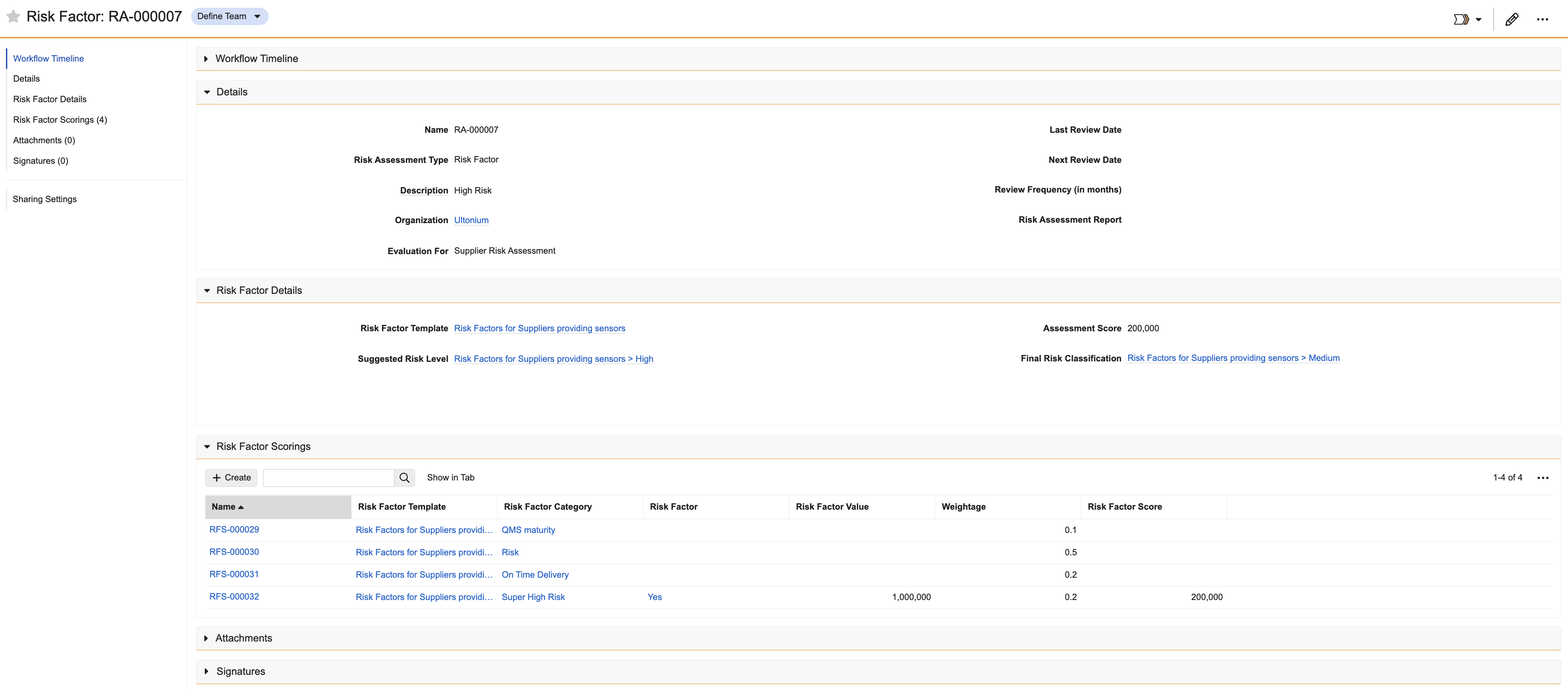
To configure the Assessment object:
- Activate the Risk Factor object type.
- Activate the following fields and add them to the relevant layout:
- Assessment Score
- Evaluation For
- Final Risk Classification
- Risk Factor Template
- Suggested Risk Level
- Add a Risk Factor Scoring related object section to the object layout.
Configure the Risk Factor Category Object
To configure the Risk Factor Category object, add a related object section for the Risk Factor object.
Configure the Risk Matrix Object
For Vaults created prior to 25R3, the Supplier Risk Assessment feature does not include a standard layout for the Risk Factor Template object type on the Risk Matrix object.
To configure the Risk Matrix object:
- Activate the Risk Factor Template object type.
- Activate the Scoring Method field.
- Make the Dimensions field optional and remove it from the layout your organization uses for Supplier Risk Assessments, which do not use dimensions.
- Add a related object section for the Risk Factor Category and Risk Level objects.
Configuring the Scoring Method Picklist
The Scoring Method picklist on the Risk Matrix object determines the options users can select on a Risk Factor Template. Their selection determines how Vault calculates the Assessment Score for a Risk Factor Assessment using that Risk Factor Template. Depending on your organization’s process, you can activate or inactivate the following values on the Scoring Method picklist:
- Average: Vault calculates the average of all Risk Factor Scores for the assessment.
- Multiply: Vault multiplies all Risk Factor Scores for the assessment.
- Sum: Vault calculates the sum of all Risk Factor Scores for the assessment.
Configuring User Permissions
Users must have the following permissions to perform Supplier Risk Assessments:
- Read permission on the following objects:
- Risk Factor
- Risk Factor Category
- Risk Level
- Risk Factor Template object type on the Risk Matrix object
- Edit permission on the Risk Factor Scoring object
- Create and Edit permissions on the Risk Factor object type on the Assessment object
Business Admins must have the following permissions to create and maintain Risk Factor Templates:
- Create and Edit permissions on the following objects:
- Risk Factor
- Risk Factor Category
- Risk Level
- Risk Factor Template object type on the Risk Matrix object