Veeva QMS automates and streamlines the high-volume, manual complaint process for known, recurring complaints. Leveraging a set of predefined Known Complaint records, Vault automatically links risks, investigations, codes, CAPAs, and root causes to Complaint records, significantly reducing cycle times for recurring complaints.
Known Complaint Profiles are supported for Medtech Complaints and Pharma Complaints, or for Quality Event Complaints and Quality Event Medtech Complaints. In this article, these are collectively referred to as Complaints.
Depending on your Admin’s configuration, object, field, and section labels may appear differently than the labels mentioned in this article.
This article uses the following terms:
- Known Complaint Profile: A MedTech Known Complaint or Pharma Known Complaint record which serves as the source for pre-approved data for other similar processing Complaints. You can create Known Complaint records by promoting a Complaint to a Known Complaint.
- Source Complaint: A Complaint that is promoted to a Known Complaint Profile. The source Complaint record remains unchanged after promotion, and Vault creates a new Pharma or MedTech Known Complaint record with data from the source Complaint.
- Processing Complaint: An incoming Medtech or Pharma Complaint identified as a recurrence of an existing Known Complaint Profile. You can associate processing Complaints with a Known Complaint in order to populate key data and related records, and update the lifecycle state of the complaint based on the state of the associated Known Complaint.
- Related Records: Depending on your Admin’s configuration, Vault may copy Assessment Risks, CAPAs, Codes, Investigations, and Root Causes from a source Complaint to a Known Complaint, and from a Known Complaint to associated processing Complaints.
Known Complaint Profiles Process
The process for working with Known Complaint Profiles may look like the following:
- An incoming Complaint is processed, closed, then promoted to a Known Complaint Profile and approved.
- Similar incoming processing Complaints are associated with the Known Complaint. Upon association, each processing Complaint is updated with information from the Known Complaint record and automatically transitioned to a downstream lifecycle state.
If you promote a Complaint to a Known Complaint Profile before it’s finished processing, the process may look like the following:
- An incoming Complaint is promoted to a Known Complaint Profile based on its similarity to other incoming Complaints.
- Similar incoming processing Complaints are associated with the Known Complaint while the source Complaint is still processing.
- The source Complaint finishes processing and the Known Complaint updates with the latest information from the source Complaint and is approved.
- The processing Complaints associated with the Known Complaint Profile are updated with information from the closed Known Complaint record and automatically transitioned to a downstream lifecycle state.
The following diagram outlines the flow of information between source Complaints, Known Complaints, and processing Complaints:
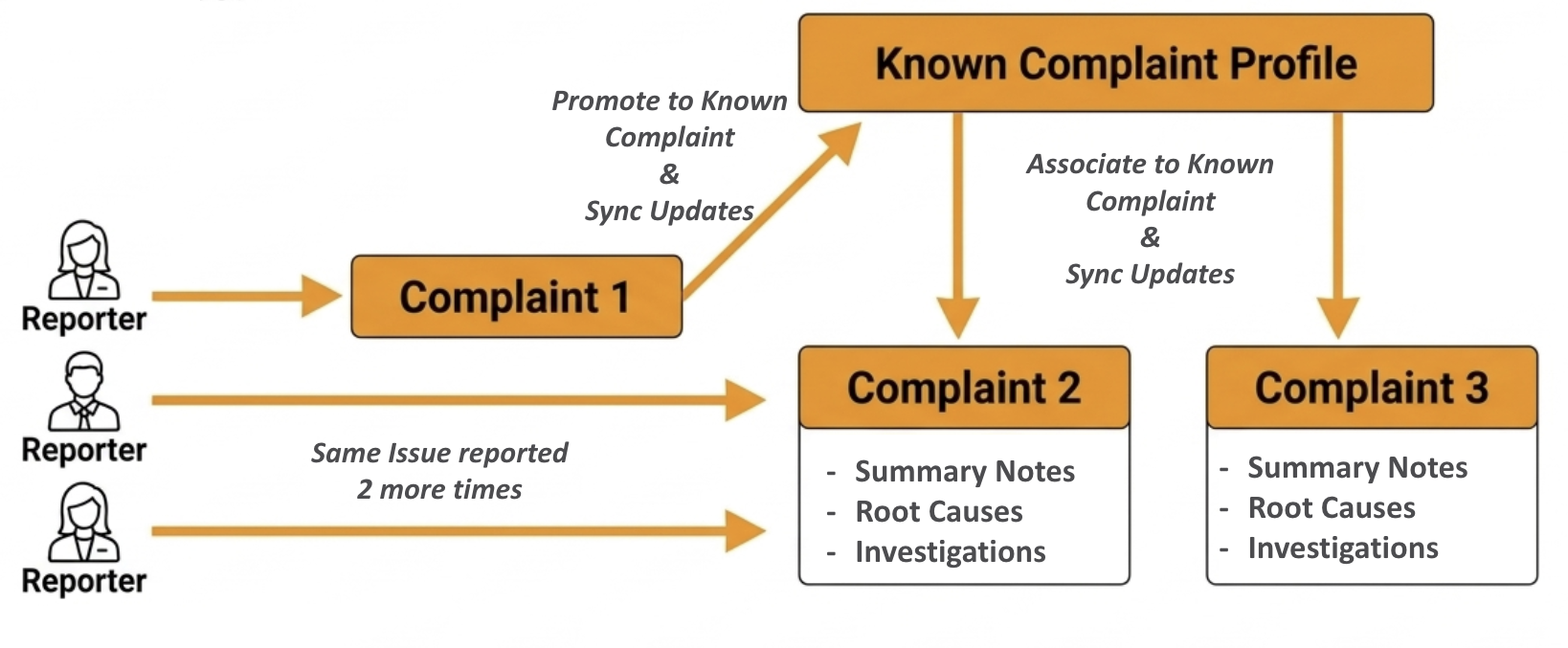
Promoting a Complaint to a Known Complaint Profile
You can promote a Medtech or Pharma Complaint to a Known Complaint Profile by selecting the Promote to Known Complaint Profile action from the All Actions menu of a Complaint. This action creates a MedTech or Pharma Known Complaint from the source Complaint and copies field data and related records from the source Complaint to the created Known Complaint. The new record serves as a Known Complaint Profile.
Typically, your Admin would configure this action for processed Complaints in a closed state, but you may want to run this action earlier in the process if a number of similar incoming complaints exist. If you promote a complaint early in the triaging process, after you have processed the source Complaint, you can run the Update Known Complaint Profile action to update the known complaint with details from the source Complaint.
After promotion, the Known Complaint can then be associated with additional similar processing Complaints.
Updating a Known Complaint Profile
In some cases, you may wish to promote a Complaint to a Known Complaint record early in the complaint handling process and later update the Known Complaint after the source Complaint’s data is complete. This may occur automatically when the source Complaint enters a final approval or terminal lifecycle state. Alternatively, you may be able to select the Update Known Complaint Profile action from the All Actions menu on the source Complaint to populate the latest field data and related records from the source Complaint when all investigations have been executed and the source Complaint enters a final approval or terminal state.
Associating a Complaint with a Known Complaint Profile
If you determine that an incoming processing Complaint is similar to an existing Known Complaint, you can associate the processing Complaint with the Known Complaint to populate field data and related records from the Known Complaint and fast-track the processing Complaint to a downstream lifecycle state. You can do this either by populating the Associated Known Complaint field on a Complaint Intake and promoting the intake to a Complaint, or by selecting the Associate Known Complaint action from a processing Complaint’s All Actions menu. When you select the action, a dialog appears with the following filters:
- Material
- Product
- Product Variant
The values for these filters match the corresponding field values on the Complaint record. These filters do not display if the corresponding fields are empty. You can adjust these values if needed and add additional filters. You cannot adjust the filters for Status and Object Type. You can select one Known Complaint from the filtered list.
If you run this action on a Complaint that is already associated with a Known Complaint, Vault displays a dialog allowing you to disassociate the currently associated Known Complaint, or associate the Complaint with a different Known Complaint.
Updating Associated Records from a Complaint Profile
When a Known Complaint reaches an approved or terminal state, Vault automatically updates related processing Complaints in certain lifecycle states with field data and related records from the Known Complaint, then fast-tracks the Complaints to a downstream lifecycle state. This is useful in situations where a source Complaint is promoted to a Known Complaint before being processed. After the update is complete, Vault sends a notification letting you know if the update was successful or encountered failures.
Limitation
The following limitation applies to Known Complaint Profiles: The Known Complaint Profiles actions can copy up to 100 related records per Complaint.
Related Permissions
See Configuring Known Complaint Profiles for the permissions required to use the Known Complaint Profiles feature.