Study Training customers can use the Study Training-Clinical Operations Connection to automatically manage user access to study-specific records in the Clinical Operations Vault based on their Study Training completions. This provides sponsors and CROs, particularly those with externalized clinical operations, with an automated way to ensure that only qualified, trained personnel gain access to clinical study records.
Note: This functionality is managed via the Study Training-Clinical Operations Connection and must be configured by a Vault Admin.
How Vault Manages Study Training Completion
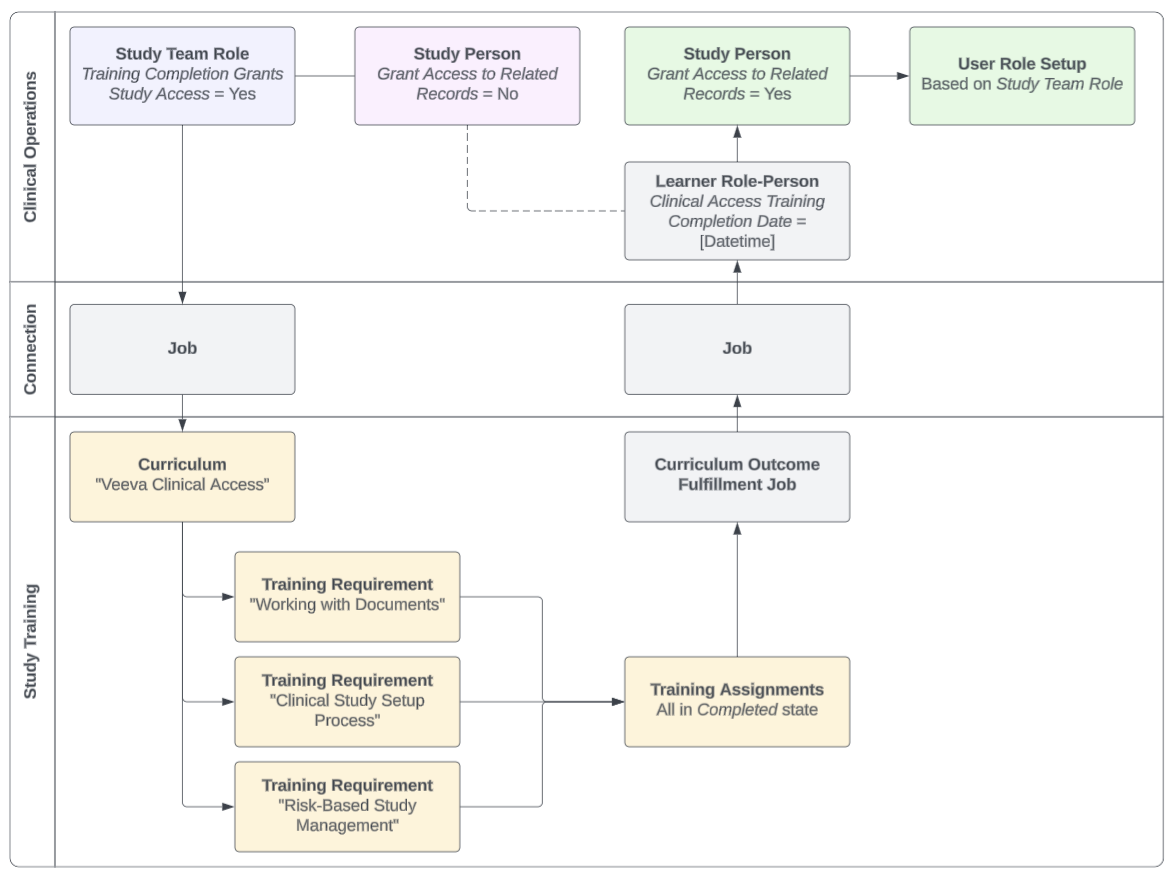
Vault grants Clinical Operations users access to study-specific records based on several components across Clinical Operations and Study Training.
In Clinical Operations, these are:
- A Study Team Role with its Training Completion Grants Study Access field set to “Yes”.
- Study Person records for each Learner, configured with the Grant Access to Related Records field. At the beginning of this process, this field is set to “No”.
In Study Training, Training Admins use the Study Training Matrix Builder to define Curricula with one or more topic-specific Training Requirements that ensure Learners are properly trained for handling study-specific records, for example “Veeva Clinical Access”.
Once a Learner completes these assignments, Study Training’s Curriculum Outcome Fulfillment hourly job processes the outcome, then the Study Training-Clinical Operations Connection sends the completion details to Clinical Operations via the Study Persons Integration. In Clinical Operations, Vault:
- Updates the related Learner Role-Person record with the appropriate Clinical Access Training Completion Date.
- Updates the Learner’s Study Person record with the Grant Access to Related Records field set to “Yes”.
- Creates User Role Setup records for that Learner based on the Study Team Role, providing access to any Clinical Operations records associated with that role.
In the event the connection cannot locate the appropriate Clinical Operations Learner Role-Person record, Vault creates a User Exception Message with the details.
About Curriculum Outcomes & Outcome Types
This feature shares various components with Veeva Training’s Curriculum Outcomes feature, including:
- The Outcome Type picklist, where Vault references the picklist’s Study Training Clinical Access value to grant access. All other values in this picklist are specific to Curriculum Outcomes and cannot be made active in Study Training. Similarly, Study Training Clinical Access cannot be made active in Veeva Training Vaults.
- The Curriculum Training Rule Set, Curriculum Training Rule, and Curriculum Completion Status Curriculum Outcomes. Vault uses these objects to aggregate completion data and automatically manages these object records; in Study Training, this primarily occurs when a Training Admin publishes a matrix with the required components. Admins can use these records to locate Curricula with defined rules for reporting or troubleshooting purposes.
- The Curriculum Outcome Fulfillment hourly job processes the outcomes captured within the above system-managed records.
Defining Completion Criteria
To define the completion criteria for granting Clinical Operations access via Study Training:
- In Clinical Operations, create or update Study Team Role records with the Training Completion Grants Study Access field set to “Yes”.
- In Study Training:
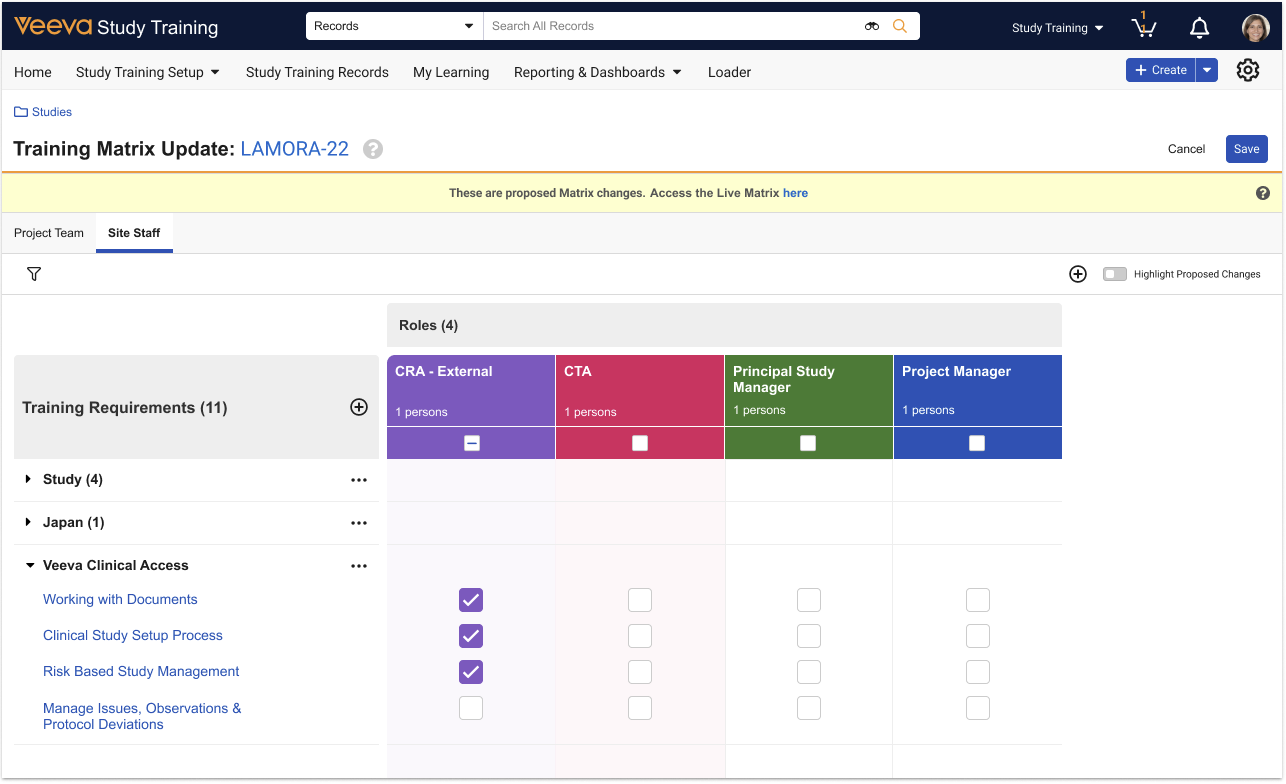
- Access the Study Training Matrix Builder
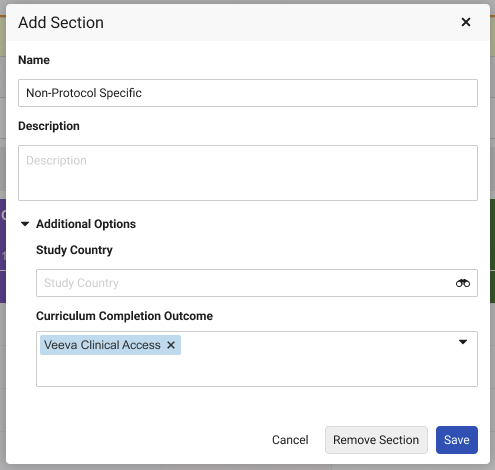
- Update or create a section with the appropriate Curriculum selected as the Curriculum Completion Outcome.
- Ensure the selected section includes all relevant Training Requirements, and that the role(s) you worked with in Step 1 are assigned to at least one requirement.
Configuration Overview
This functionality is managed via the Study Training-Clinical Operations Connection, and as a result a Vault Admin with access to both Study Training and Clinical Operations must complete the below configuration.
Clinical Operations Configuration
- Within the Study Team Role object, activate the Training Completion Grants Study Access field, then:
- Update the field configuration with the Display in default lists and hovercards option.
- Add the field to the object page layout.
- Within the Study Person object, activate the Clinical Access Training Completion Date field, then add it to the object page layout. We recommend adding it to the layout’s Details section.
- Navigate to Admin > Connections and locate Study Training to Clinical Operations Connection. Within the Study Persons Integration, activate the Learner Role Person Inbound Integration Point.
- Review your Vault’s permission sets and ensure users are assigned the appropriate permissions.
Study Training Configuration
- Within the Curriculum Training Rule and Curriculum Training Rule Set objects, activate the Outcome object type.
- Review your Vault’s permission sets and ensure users are assigned the appropriate permissions.
- Activate the Curriculum Outcome Fulfillment job.
Limitations
This feature does not provision users, nor is it intended for generic Clinical application training or any other non-study-focused training. This feature is specifically designed to automate internal Clinical Operations training with the Study Person activation process.
Related Permissions
Clinical Operations Permissions
Clinical Operations users working with Study Training must be permitted to Edit the Study Team Role object’s Training Completion Grants Study Access field.
Study Training Permissions
Study Training Admins must be assigned a permission set with the below permissions.
| Permission Label | Permission |
|---|---|
| Objects: Training Matrix Section: [All object types] | Read, Edit |
| Objects: Training Matrix Section: Object Field Permissions: Training Matrix Section Type | Read, Edit |