Training Focus Time tracks how long a Learner spends on a given Vault Document Training Assignment. While it is not an indicator of how long it takes to complete a training (as indicated by a requirement’s Estimated Time to Complete (Minutes) field), Training Focus Time indicates how long the Learner was focused on the assignment page. Each time the Learner is focused, Vault adds the number of seconds to the assignment’s Task Page Focus Seconds field.
With Training Focus Time, Training Admins and other stakeholders can build reports including the Task Page Focus Seconds field, allowing them to draw their own conclusions related to a training’s effectiveness or efficiency.
Note: This feature can be enabled by a Vault Admin in Veeva Training and Veeva Study Training Vaults.
Feature Dependencies
Training Focus Time does not depend on any other Training features beyond the baseline application configuration.
How Vault Tracks Training Focus Time
Vault starts a “timer” to track training focus each time a Learner views the assignment’s Learner task page. The task page is the first page Learners see when they click Begin Training from their Learner Homepage:
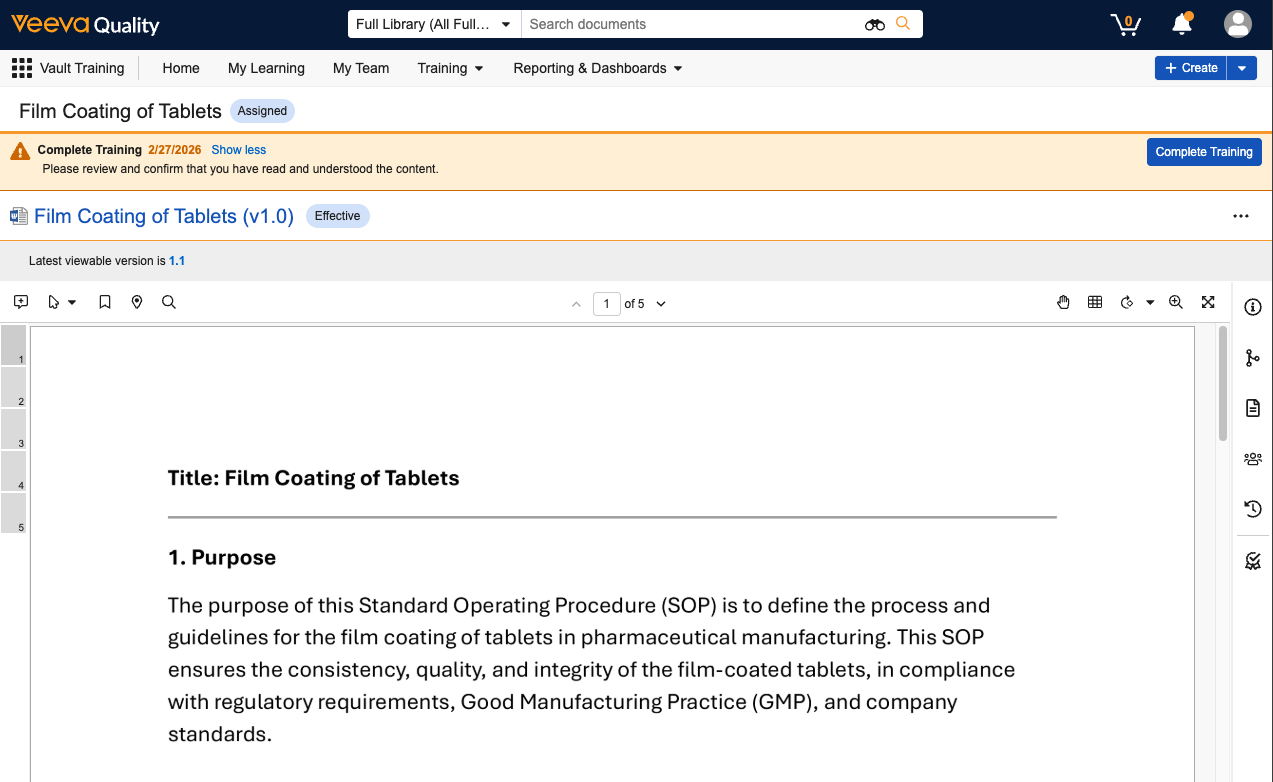
Vault uses feedback from the Learner’s browser to continually stop and start the timer until the assignment is Completed. Generally, with each browser event, the timer stops and then resumes where it left off once the Learner returns focus to the page. To do this, Vault adds more seconds to the Task Page Focus Seconds field each time the Learner accesses the assignment.
Browser events which start and stop the timer include when the Learner:
- Opens the assignment in a new tab. Vault maintains a timer for each browser tab.
- Clicks away from a page or tab.
- Closes the browser without completing the assignment.
With Task Page Focus Seconds and other assignment metadata, Training Admins can build reports to analyze Learner behavior across courses.
Enabling Training Focus Time
To enable Training Focus Time, navigate to Admin > Settings > Application Settings and enable the Track Learner Focus Time for Vault Document Training Assignments setting.
Once enabled, Training Admins and other stakeholders can include the Task Page Focus Seconds field within any reports which include the Vault Document Training Assignment object.
You can optionally configure the Task Page Focus Seconds field to appear within the Vault Document Training Assignment object page layout for visibility within specific assignments, however this is not required for Vault to track focus time.
Limitations
Vault tracks training focus time for Vault Document Training Assignments only. This feature is not supported for other training methods (Training Assignment object types).